
How to Use PL-2303XA: Examples, Pinouts, and Specs
 Design with PL-2303XA in Cirkit Designer
Introduction
The PL-2303XA, manufactured by Prolific Technology Inc., is a USB to serial bridge controller designed to facilitate communication between USB-enabled devices and serial peripherals. This component is widely used in applications where legacy serial devices, such as modems, GPS receivers, and industrial equipment, need to interface with modern USB ports. Its ease of use and compatibility with various operating systems make it a popular choice for developers and hobbyists alike.
Explore Projects Built with PL-2303XA
 Open Project in Cirkit Designer
 Open Project in Cirkit Designer
 Open Project in Cirkit Designer
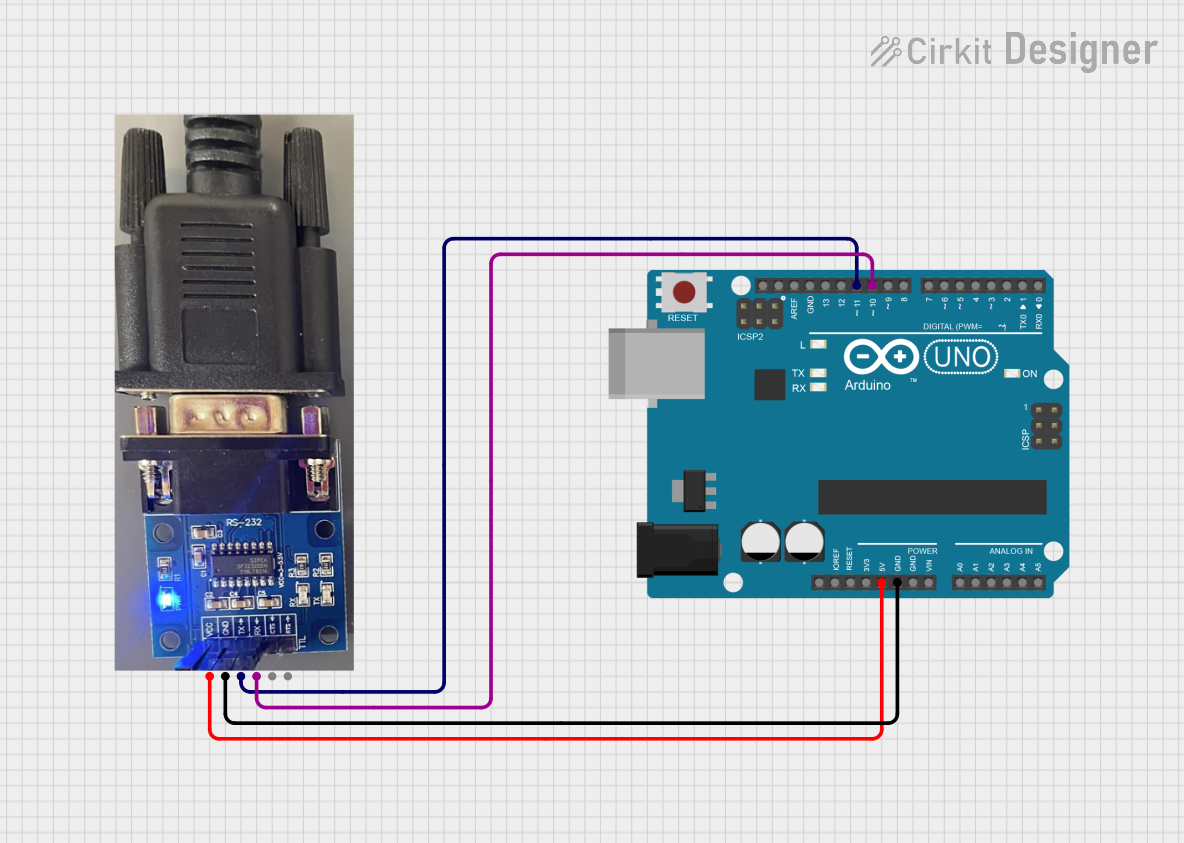 Open Project in Cirkit Designer
Explore Projects Built with PL-2303XA
Open Project in Cirkit DesignerOpen Project in Cirkit DesignerOpen Project in Cirkit DesignerOpen Project in Cirkit DesignerCommon Applications
- Connecting serial devices (e.g., modems, GPS receivers, barcode scanners) to USB ports.
- Debugging and programming microcontrollers via serial communication.
- Industrial automation and control systems.
- Data logging and monitoring applications.
Technical Specifications
Key Technical Details
| Parameter | Specification |
|---|---|
| Manufacturer | Prolific Technology Inc. |
| Part Number | PL-2303XA |
| USB Interface | USB 1.1/2.0 compliant |
| Serial Interface | RS-232 standard |
| Baud Rate | Up to 1 Mbps |
| Operating Voltage | 3.3V or 5V (USB-powered) |
| Operating Temperature | -40°C to +85°C |
| Driver Support | Windows, macOS, Linux |
| Package Type | 28-pin SSOP |
Pin Configuration and Descriptions
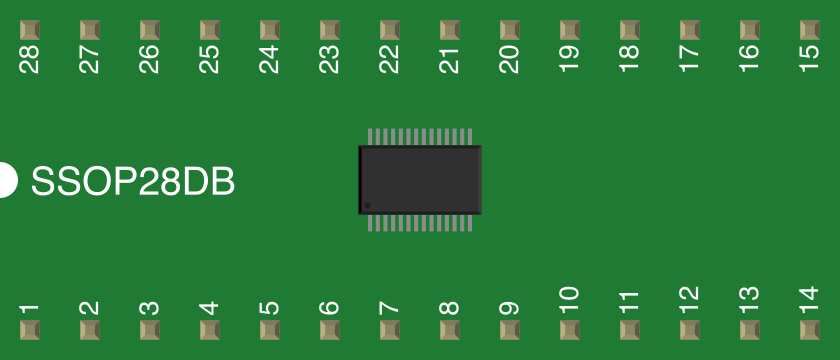
The PL-2303XA is typically available in a 28-pin SSOP package. Below is the pin configuration and description:
| Pin Number | Pin Name | Description |
|---|---|---|
| 1 | VDD_3V3 | 3.3V power supply input |
| 2 | GND | Ground |
| 3 | TXD | Transmit data (RS-232 output) |
| 4 | RXD | Receive data (RS-232 input) |
| 5 | RTS | Request to send (RS-232 output) |
| 6 | CTS | Clear to send (RS-232 input) |
| 7 | DTR | Data terminal ready (RS-232 output) |
| 8 | DSR | Data set ready (RS-232 input) |
| 9 | DCD | Data carrier detect (RS-232 input) |
| 10 | RI | Ring indicator (RS-232 input) |
| 11 | RESET_N | Active-low reset input |
| 12 | XTAL1 | Crystal oscillator input |
| 13 | XTAL2 | Crystal oscillator output |
| 14 | USB_DM | USB data minus |
| 15 | USB_DP | USB data plus |
| 16-28 | NC | No connection |
Usage Instructions
How to Use the PL-2303XA in a Circuit
- Power Supply: Connect the VDD_3V3 pin to a 3.3V power source and the GND pin to ground. The PL-2303XA is USB-powered, so no external power supply is required when connected to a USB port.
- USB Connection: Connect the USB_DM and USB_DP pins to the USB data lines of a USB connector. Ensure proper differential pair routing for signal integrity.
- Serial Connection: Connect the TXD and RXD pins to the corresponding RX and TX pins of the serial device. Optionally, connect RTS, CTS, DTR, and other control pins if required by the application.
- Crystal Oscillator: Attach a 12 MHz crystal oscillator to the XTAL1 and XTAL2 pins, along with the appropriate load capacitors.
- Driver Installation: Install the appropriate drivers for your operating system. Drivers are available on the Prolific Technology Inc. website.
Important Considerations
- Voltage Levels: Ensure that the serial device operates at RS-232 voltage levels. Use level shifters if necessary.
- Driver Compatibility: Verify that the installed driver version is compatible with your operating system to avoid communication issues.
- USB Cable Quality: Use a high-quality USB cable to minimize signal degradation and ensure reliable communication.
Example: Connecting to an Arduino UNO
The PL-2303XA can be used to establish serial communication between a computer and an Arduino UNO. Below is an example Arduino sketch and Python script for testing communication.
Arduino Code
// Arduino sketch to echo received data back to the sender
void setup() {
  Serial.begin(9600); // Initialize serial communication at 9600 baud
}

void loop() {
  if (Serial.available() > 0) { // Check if data is available
    char received = Serial.read(); // Read the incoming byte
    Serial.print("Echo: "); // Send back an echo message
    Serial.println(received); // Print the received character
  }
}
Python Code (PC Side)
Python script to send data to Arduino and receive the echo
import serial import time
Configure the serial port
ser = serial.Serial('COM3', 9600, timeout=1) # Replace 'COM3' with your port time.sleep(2) # Wait for the connection to initialize
try: while True: # Send data to Arduino ser.write(b'Hello Arduino!\n') # Send a test message time.sleep(1) # Wait for a response
    # Read the response
    response = ser.readline().decode('utf-8').strip()
    if response:
        print(f"Received: {response}")  # Print the received message
except KeyboardInterrupt: print("Exiting...") finally: ser.close() # Close the serial port
Troubleshooting and FAQs
Common Issues
Driver Installation Failure:
- Cause: Incorrect or outdated driver.
- Solution: Download the latest driver from the Prolific Technology Inc. website and ensure compatibility with your operating system.
No Serial Communication:
- Cause: Incorrect wiring or baud rate mismatch.
- Solution: Double-check the connections and ensure the baud rate matches on both ends.
Device Not Recognized:
- Cause: Faulty USB cable or port.
- Solution: Try a different USB cable or port. Ensure the USB cable supports data transfer.
Data Corruption:
- Cause: Poor signal integrity or noise.
- Solution: Use shielded cables and ensure proper grounding.
FAQs
Can the PL-2303XA be used with 5V serial devices?
- Yes, the PL-2303XA supports both 3.3V and 5V logic levels.
Is the PL-2303XA compatible with macOS?
- Yes, drivers are available for macOS. Ensure you download the correct version for your macOS version.
What is the maximum baud rate supported?
- The PL-2303XA supports baud rates up to 1 Mbps.
Do I need external components for USB communication?
- No, the PL-2303XA integrates the necessary USB transceiver. However, a crystal oscillator is required for proper operation.
By following this documentation, users can effectively integrate the PL-2303XA into their projects and troubleshoot common issues.