
How to Use dspic30f4012: Examples, Pinouts, and Specs
 Design with dspic30f4012 in Cirkit Designer
Introduction
The dsPIC30F4012 is a 16-bit Digital Signal Controller (DSC) manufactured by Microchip Technology. It combines the performance of a Digital Signal Processor (DSP) with the simplicity of a microcontroller, making it ideal for high-performance embedded applications. With a processing speed of up to 30 MIPS (Million Instructions Per Second), integrated analog peripherals, and versatile communication interfaces, the dsPIC30F4012 is well-suited for applications such as motor control, digital signal processing, power conversion, and general-purpose embedded control.
Explore Projects Built with dspic30f4012
 Open Project in Cirkit Designer
 Open Project in Cirkit Designer
 Open Project in Cirkit Designer
 Open Project in Cirkit Designer
Explore Projects Built with dspic30f4012
Open Project in Cirkit DesignerOpen Project in Cirkit DesignerOpen Project in Cirkit DesignerOpen Project in Cirkit DesignerCommon Applications
- Motor control (e.g., BLDC, PMSM, and ACIM motors)
- Power inverters and converters
- Audio signal processing
- Industrial automation and control
- Embedded systems requiring real-time performance
Technical Specifications
Key Technical Details
| Parameter | Value |
|---|---|
| Core Architecture | 16-bit Digital Signal Controller (DSC) |
| Maximum Clock Speed | 30 MIPS |
| Program Memory (Flash) | 24 KB |
| Data Memory (RAM) | 2 KB |
| Operating Voltage Range | 2.5V to 5.5V |
| I/O Pins | 21 |
| Communication Interfaces | UART, SPI, I2C, CAN |
| Analog Peripherals | 2x 10-bit ADC modules (up to 12 inputs) |
| PWM Channels | 6 |
| Timers | 5 (16-bit) |
| Package Options | 28-pin SPDIP, SOIC, SSOP, QFN |
Pin Configuration and Descriptions
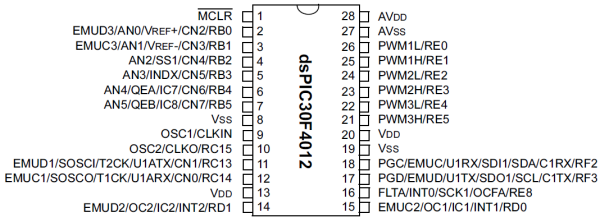
The dsPIC30F4012 is available in a 28-pin package. Below is the pin configuration and description:
| Pin No. | Pin Name | Type | Description |
|---|---|---|---|
| 1 | VDD | Power | Positive supply voltage |
| 2 | VSS | Power | Ground |
| 3 | OSC1/CLKI | Input | Oscillator input or external clock input |
| 4 | OSC2/CLKO | Output | Oscillator output or clock output |
| 5 | MCLR | Input | Master Clear (Reset) input |
| 6 | AN0 | Analog | Analog input channel 0 |
| 7 | AN1 | Analog | Analog input channel 1 |
| 8 | PGD | Digital I/O | Programming data line |
| 9 | PGC | Digital I/O | Programming clock line |
| 10 | RB0 | Digital I/O | General-purpose I/O or external interrupt |
| 11 | RB1 | Digital I/O | General-purpose I/O or external interrupt |
| 12 | RB2 | Digital I/O | General-purpose I/O or external interrupt |
| 13 | RB3 | Digital I/O | General-purpose I/O or external interrupt |
| 14 | VSS | Power | Ground |
| 15 | VDD | Power | Positive supply voltage |
| 16 | RC0 | Digital I/O | General-purpose I/O |
| 17 | RC1 | Digital I/O | General-purpose I/O |
| 18 | RC2 | Digital I/O | General-purpose I/O |
| 19 | RC3 | Digital I/O | General-purpose I/O |
| 20 | RC4 | Digital I/O | General-purpose I/O |
| 21 | RC5 | Digital I/O | General-purpose I/O |
| 22 | RC6 | Digital I/O | General-purpose I/O |
| 23 | RC7 | Digital I/O | General-purpose I/O |
| 24 | RD0 | Digital I/O | General-purpose I/O |
| 25 | RD1 | Digital I/O | General-purpose I/O |
| 26 | RD2 | Digital I/O | General-purpose I/O |
| 27 | RD3 | Digital I/O | General-purpose I/O |
| 28 | RD4 | Digital I/O | General-purpose I/O |
Usage Instructions
How to Use the dsPIC30F4012 in a Circuit
- Power Supply: Ensure the operating voltage is within the range of 2.5V to 5.5V. Connect VDD to the positive supply and VSS to ground.
- Clock Configuration: Use an external crystal oscillator or clock source connected to the OSC1 and OSC2 pins. Alternatively, configure the internal oscillator if available.
- Reset Pin: Connect the MCLR pin to a pull-up resistor (typically 10kΩ) to VDD for proper reset functionality.
- Programming: Use the PGD and PGC pins for in-circuit programming with a compatible programmer (e.g., Microchip's ICD3 or PICkit).
- Analog Inputs: Connect analog signals to the ANx pins for ADC functionality. Configure the ADC module in software.
- PWM Outputs: Use the PWM channels for motor control or other applications requiring pulse-width modulation.
- Communication Interfaces: Utilize UART, SPI, I2C, or CAN for communication with other devices.
Important Considerations and Best Practices
- Decoupling Capacitors: Place 0.1µF decoupling capacitors close to the VDD and VSS pins to reduce noise.
- Unused Pins: Configure unused pins as outputs or connect them to ground through pull-down resistors to avoid floating states.
- Programming Voltage: Ensure the programming voltage is within the specified range to avoid damaging the device.
- Thermal Management: If operating at high speeds or in demanding environments, ensure proper heat dissipation.
Example: Interfacing dsPIC30F4012 with Arduino UNO
The dsPIC30F4012 can communicate with an Arduino UNO via UART. Below is an example Arduino code to send data to the dsPIC30F4012:
// Arduino UNO UART Communication with dsPIC30F4012
// Sends a message to the dsPIC30F4012 via Serial

void setup() {
  Serial.begin(9600); // Initialize UART at 9600 baud rate
}

void loop() {
  Serial.println("Hello, dsPIC30F4012!"); // Send data to dsPIC
  delay(1000); // Wait for 1 second
}
On the dsPIC30F4012 side, configure the UART module in software to receive the data.
Troubleshooting and FAQs
Common Issues and Solutions
Device Not Responding
- Cause: Incorrect power supply or clock configuration.
- Solution: Verify the power supply voltage and ensure the oscillator is correctly configured.
Programming Failure
- Cause: Improper connection to the PGD and PGC pins or incompatible programmer.
- Solution: Check the connections and use a supported programmer (e.g., PICkit or ICD3).
Analog Inputs Not Working
- Cause: ADC module not initialized or incorrect pin configuration.
- Solution: Ensure the ADC module is properly configured in software and the analog pins are correctly connected.
Communication Issues
- Cause: Mismatched baud rates or incorrect wiring.
- Solution: Verify the baud rate settings and check the connections for UART, SPI, I2C, or CAN.
FAQs
Q: Can the dsPIC30F4012 operate without an external oscillator?
- A: Yes, it can use the internal oscillator, but an external oscillator is recommended for precise timing.
Q: What is the maximum ADC sampling rate?
- A: The maximum ADC sampling rate is approximately 500 ksps (kilo-samples per second).
Q: Can I use the dsPIC30F4012 for motor control?
- A: Yes, it is specifically designed for motor control applications with integrated PWM and ADC modules.
Q: How do I protect the MCLR pin?
- A: Use a pull-up resistor (10kΩ) and optionally a diode to VDD for additional protection.
This concludes the documentation for the dsPIC30F4012. For further details, refer to the official datasheet provided by Microchip Technology.