
How to Use esp32 type c: Examples, Pinouts, and Specs
 Design with esp32 type c in Cirkit Designer
Introduction
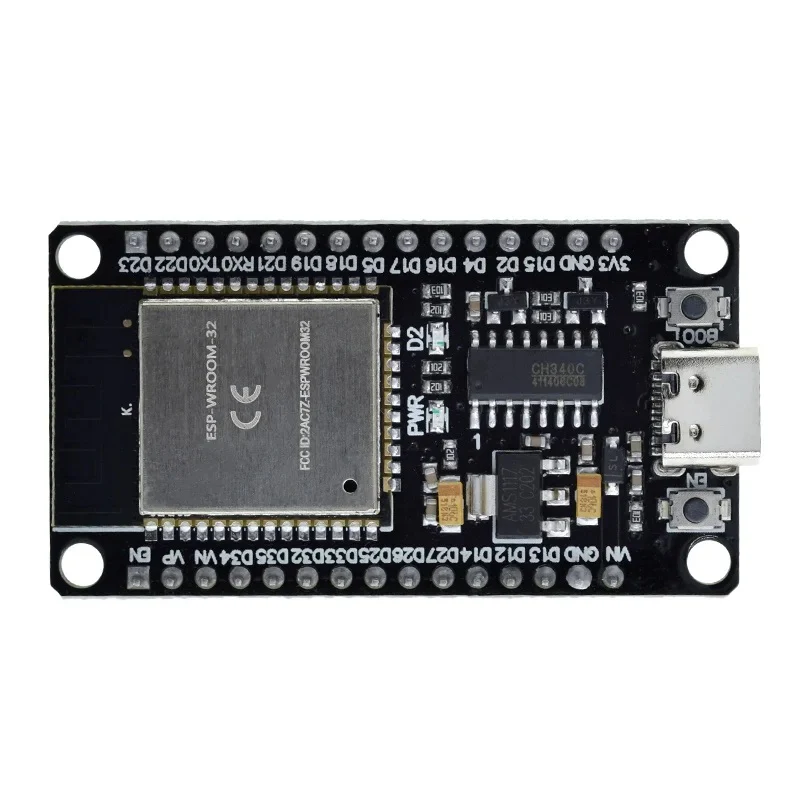
The ESP32 Type-C, manufactured by IRPANGTG, is a powerful and versatile microcontroller module designed for IoT (Internet of Things) applications. It features dual-core processing, integrated Wi-Fi and Bluetooth capabilities, and a USB Type-C interface for power and programming. This module is ideal for projects requiring wireless communication, low power consumption, and high processing power.
Explore Projects Built with esp32 type c
 Open Project in Cirkit Designer
 Open Project in Cirkit Designer
 Open Project in Cirkit Designer
 Open Project in Cirkit Designer
Explore Projects Built with esp32 type c
Open Project in Cirkit DesignerOpen Project in Cirkit DesignerOpen Project in Cirkit DesignerOpen Project in Cirkit DesignerCommon Applications and Use Cases
- Smart home devices (e.g., smart lights, thermostats)
- Wearable technology
- Industrial IoT systems
- Wireless sensor networks
- Robotics and automation
- Prototyping and development of IoT solutions
Technical Specifications
The ESP32 Type-C is built to deliver high performance while maintaining energy efficiency. Below are its key technical details:
| Parameter | Specification |
|---|---|
| Microcontroller | Dual-core Xtensa® 32-bit LX6 CPU |
| Clock Speed | Up to 240 MHz |
| Flash Memory | 4 MB (expandable) |
| SRAM | 520 KB |
| Wireless Connectivity | Wi-Fi 802.11 b/g/n, Bluetooth 4.2 (BLE) |
| USB Interface | USB Type-C for power and programming |
| Operating Voltage | 3.3V |
| Input Voltage (via USB) | 5V |
| GPIO Pins | 34 (including ADC, DAC, PWM, I2C, SPI) |
| ADC Resolution | 12-bit |
| DAC Resolution | 8-bit |
| Power Consumption | Ultra-low power modes available |
| Dimensions | 25.5 mm x 50.0 mm |
Pin Configuration and Descriptions
The ESP32 Type-C module has a total of 34 GPIO pins, which can be configured for various functions. Below is a summary of the pinout:
| Pin | Name | Function |
|---|---|---|
| 1 | GND | Ground |
| 2 | 3V3 | 3.3V Power Output |
| 3 | EN | Enable Pin (Active High) |
| 4 | GPIO0 | General Purpose I/O, Boot Mode Selection |
| 5 | GPIO1 (TX0) | UART0 Transmit |
| 6 | GPIO3 (RX0) | UART0 Receive |
| 7 | GPIO4 | General Purpose I/O, PWM, ADC |
| 8 | GPIO5 | General Purpose I/O, PWM, ADC |
| ... | ... | ... (Refer to the full datasheet) |
| 34 | GPIO34 | General Purpose I/O, ADC |
For a complete pinout diagram, refer to the official IRPANGTG datasheet.
Usage Instructions
How to Use the ESP32 Type-C in a Circuit
Powering the Module:
- Connect the ESP32 Type-C to a 5V USB power source via the Type-C port.
- Alternatively, supply 3.3V directly to the 3V3 pin.
Programming the Module:
- Use the USB Type-C interface to connect the ESP32 to your computer.
- Install the necessary drivers (if required) and use the Arduino IDE or ESP-IDF for programming.
Connecting Peripherals:
- Use the GPIO pins to interface with sensors, actuators, and other devices.
- Ensure that the voltage levels of connected peripherals are compatible with the 3.3V logic of the ESP32.
Important Considerations and Best Practices
- Voltage Levels: Avoid applying voltages higher than 3.3V to the GPIO pins to prevent damage.
- Boot Mode: To enter bootloader mode, hold down the BOOT button while pressing the EN (reset) button.
- Power Consumption: Use deep sleep modes to minimize power usage in battery-powered applications.
- Heat Management: Ensure proper ventilation or heat dissipation for high-performance applications.
Example Code for Arduino UNO Integration
Below is an example of how to use the ESP32 Type-C to read data from a DHT11 temperature and humidity sensor:
#include <WiFi.h>
#include "DHT.h"

// Define the DHT sensor type and pin
#define DHTPIN 4       // GPIO4 is connected to the DHT11 data pin
#define DHTTYPE DHT11  // DHT11 sensor type

DHT dht(DHTPIN, DHTTYPE);

void setup() {
  Serial.begin(115200);  // Initialize serial communication
  dht.begin();           // Initialize the DHT sensor
  Serial.println("DHT11 Sensor Test");
}

void loop() {
  // Read temperature and humidity values
  float humidity = dht.readHumidity();
  float temperature = dht.readTemperature();

  // Check if the readings are valid
  if (isnan(humidity) || isnan(temperature)) {
    Serial.println("Failed to read from DHT sensor!");
    return;
  }

  // Print the readings to the Serial Monitor
  Serial.print("Humidity: ");
  Serial.print(humidity);
  Serial.print("%  Temperature: ");
  Serial.print(temperature);
  Serial.println("°C");

  delay(2000);  // Wait 2 seconds before the next reading
}
Troubleshooting and FAQs
Common Issues and Solutions
ESP32 Not Detected by Computer:
- Ensure the USB Type-C cable supports data transfer (not just charging).
- Install the correct USB-to-serial drivers for your operating system.
Program Upload Fails:
- Check the COM port settings in the Arduino IDE or ESP-IDF.
- Hold the BOOT button while uploading the program to force bootloader mode.
Wi-Fi Connection Issues:
- Verify the SSID and password in your code.
- Ensure the router is within range and supports 2.4 GHz Wi-Fi.
Overheating:
- Reduce the clock speed or optimize the code to lower CPU usage.
- Use a heat sink if necessary.
FAQs
Q: Can the ESP32 Type-C operate on 5V logic?
A: No, the GPIO pins operate at 3.3V logic. Use level shifters for 5V peripherals.Q: What is the maximum Wi-Fi range?
A: The range depends on environmental factors but typically extends up to 50 meters indoors.Q: Can I use the ESP32 Type-C with batteries?
A: Yes, you can power the module using a 3.7V LiPo battery with a suitable voltage regulator.
For additional support, refer to the official IRPANGTG documentation or community forums.