
How to Use float sensor: Examples, Pinouts, and Specs
 Design with float sensor in Cirkit Designer
Introduction
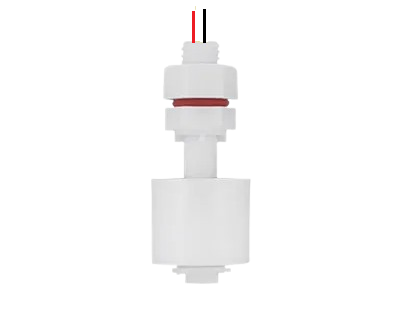
A float sensor, manufactured by R.M ENTERPRISE with part ID SENSOR, is a device designed to detect the level of liquid within a tank or container. It operates using a buoyant float that moves with the liquid level, triggering a switch or sending a signal when a specific level is reached. This simple yet effective mechanism makes float sensors highly reliable for liquid level monitoring.
Explore Projects Built with float sensor
 Open Project in Cirkit Designer
 Open Project in Cirkit Designer
 Open Project in Cirkit Designer
 Open Project in Cirkit Designer
Explore Projects Built with float sensor
Open Project in Cirkit DesignerOpen Project in Cirkit DesignerOpen Project in Cirkit DesignerOpen Project in Cirkit DesignerCommon Applications and Use Cases
- Water level monitoring in tanks and reservoirs
- Industrial liquid level control systems
- Automotive fuel tank level detection
- Home appliances such as washing machines and dishwashers
- Agricultural irrigation systems
Technical Specifications
The following table outlines the key technical details of the R.M ENTERPRISE float sensor:
| Parameter | Specification |
|---|---|
| Operating Voltage | 5V to 24V DC |
| Maximum Current Rating | 500mA |
| Contact Type | Normally Open (NO) or Normally Closed (NC) |
| Material | Polypropylene (PP) |
| Operating Temperature | -10°C to 85°C |
| Float Movement Range | 10mm to 50mm |
| Cable Length | 1 meter |
| Mounting Type | Vertical or Horizontal |
Pin Configuration and Descriptions
The float sensor typically has two wires for connection. The table below describes the wiring:
| Wire Color | Description |
|---|---|
| Red | Positive terminal (VCC) |
| Black | Signal output or ground (GND) |
Usage Instructions
How to Use the Float Sensor in a Circuit
Wiring the Sensor:
- Connect the red wire to the positive terminal of the power supply (5V to 24V DC).
- Connect the black wire to the input pin of a microcontroller or to ground, depending on the circuit design.
- If using with a microcontroller, ensure a pull-up resistor is used if required.
Circuit Design:
- The float sensor acts as a switch. When the float rises or falls to the set level, the internal contact changes state (NO to NC or vice versa).
- Use the sensor output to trigger an action, such as turning on a pump or sending a signal to a monitoring system.
Example Circuit:
- Connect the sensor to an Arduino UNO as follows:
- Red wire to 5V pin on the Arduino.
- Black wire to a digital input pin (e.g., D2) on the Arduino.
- Connect the sensor to an Arduino UNO as follows:
Arduino Code Example
Below is an example code to read the float sensor's state using an Arduino UNO:
// Float Sensor Example Code
// This code reads the state of the float sensor and prints it to the Serial Monitor.

const int floatSensorPin = 2; // Connect the black wire to digital pin 2
int sensorState = 0;         // Variable to store the sensor state

void setup() {
  pinMode(floatSensorPin, INPUT); // Set the float sensor pin as input
  Serial.begin(9600);            // Initialize serial communication
}

void loop() {
  sensorState = digitalRead(floatSensorPin); // Read the sensor state

  if (sensorState == HIGH) {
    // If the sensor is HIGH, the float is at the trigger level
    Serial.println("Liquid level reached!");
  } else {
    // If the sensor is LOW, the float is below the trigger level
    Serial.println("Liquid level below threshold.");
  }

  delay(500); // Wait for 500ms before reading again
}
Important Considerations and Best Practices
- Ensure the sensor is mounted securely in the correct orientation (vertical or horizontal) as per the application.
- Avoid exposing the sensor to temperatures or chemicals beyond its specified limits.
- Use proper waterproofing techniques for wiring connections in wet environments.
- Test the sensor's functionality before integrating it into critical systems.
Troubleshooting and FAQs
Common Issues and Solutions
Sensor Not Responding:
- Cause: Loose or incorrect wiring.
- Solution: Double-check all connections and ensure proper polarity.
False Triggering:
- Cause: Electrical noise or unstable power supply.
- Solution: Use a capacitor across the power supply terminals to filter noise.
Sensor Stuck in One State:
- Cause: Float mechanism obstructed by debris or dirt.
- Solution: Clean the sensor and ensure the float moves freely.
No Output Signal:
- Cause: Damaged sensor or incorrect voltage.
- Solution: Verify the operating voltage and replace the sensor if necessary.
FAQs
Q1: Can the float sensor be used with liquids other than water?
A1: Yes, the float sensor can be used with various non-corrosive liquids. However, ensure the liquid is compatible with the sensor's material (polypropylene).
Q2: How do I switch between Normally Open (NO) and Normally Closed (NC) modes?
A2: Some float sensors allow switching between NO and NC by inverting the mounting orientation. Refer to the manufacturer's instructions for details.
Q3: Can the sensor be used in high-pressure environments?
A3: The float sensor is not designed for high-pressure applications. Use a sensor rated for high pressure if required.
Q4: Is the sensor suitable for outdoor use?
A4: The sensor can be used outdoors if proper waterproofing and protection from extreme conditions are ensured.