
How to Use Siemens Schütz: Examples, Pinouts, and Specs
 Design with Siemens Schütz in Cirkit Designer
Introduction
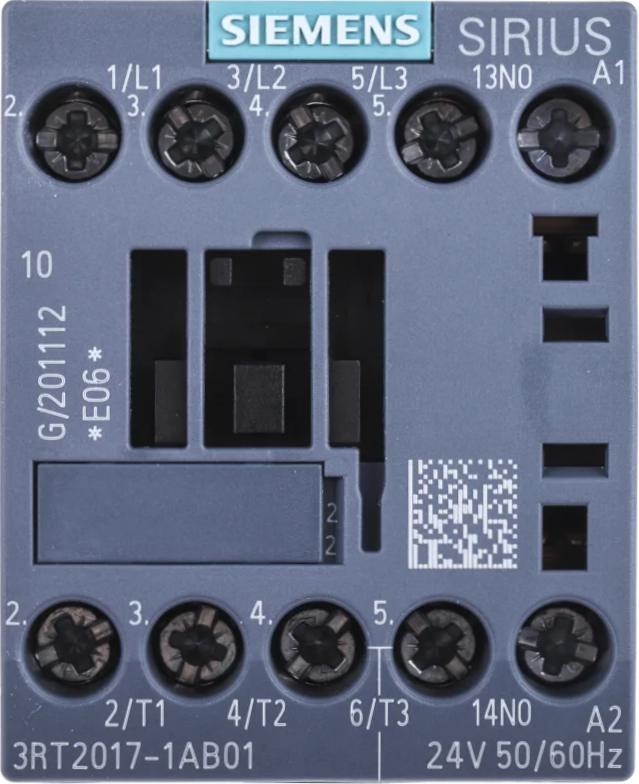
The Siemens Schütz (part number: 3RT2017-1AB01) is a high-quality contactor designed for controlling and switching high-power electrical devices. Manufactured by Siemens, this component is widely used in industrial automation, motor control, and power distribution systems. It operates as an electrically controlled switch, allowing a low-power control signal to manage high-power loads safely and efficiently.
Explore Projects Built with Siemens Schütz
 Open Project in Cirkit Designer
 Open Project in Cirkit Designer
 Open Project in Cirkit Designer
 Open Project in Cirkit Designer
Explore Projects Built with Siemens Schütz
Open Project in Cirkit DesignerOpen Project in Cirkit DesignerOpen Project in Cirkit DesignerOpen Project in Cirkit DesignerCommon Applications and Use Cases
- Motor control in industrial machinery
- Power distribution in electrical panels
- Automation systems for switching high-current devices
- HVAC systems for controlling compressors and fans
- Lighting control in commercial and industrial environments
Technical Specifications
The Siemens Schütz (3RT2017-1AB01) is engineered to meet demanding industrial requirements. Below are its key technical details:
General Specifications
| Parameter | Value |
|---|---|
| Manufacturer | Siemens |
| Part Number | 3RT2017-1AB01 |
| Type | Contactor (Schütz) |
| Rated Operational Voltage | 690 V AC |
| Rated Operational Current | 9 A (AC-3) |
| Coil Voltage | 24 V DC |
| Frequency | 50/60 Hz |
| Number of Poles | 3 (Three-phase) |
| Auxiliary Contacts | 1 NO (Normally Open) |
| Mechanical Durability | 10 million operations |
| Electrical Durability | 1 million operations (AC-3) |
| Mounting Type | DIN Rail or Screw Mount |
| Operating Temperature Range | -25°C to +60°C |
| Dimensions (H x W x D) | 77 mm x 45 mm x 86 mm |
| Weight | Approx. 0.4 kg |
Pin Configuration and Descriptions
The Siemens Schütz has terminals for both the main power circuit and the control circuit. Below is the pin configuration:
Main Power Circuit Terminals
| Terminal Label | Description |
|---|---|
| L1, L2, L3 | Input terminals for three-phase power supply |
| T1, T2, T3 | Output terminals to the load |
Control Circuit Terminals
| Terminal Label | Description |
|---|---|
| A1 | Positive terminal for the control coil (24 V DC) |
| A2 | Negative terminal for the control coil (0 V) |
Auxiliary Contact Terminals
| Terminal Label | Description |
|---|---|
| 13, 14 | Normally Open (NO) auxiliary contact for signaling or interlocking |
Usage Instructions
How to Use the Siemens Schütz in a Circuit
Power Connections:
- Connect the three-phase power supply to the input terminals (L1, L2, L3).
- Connect the load (e.g., motor, heater) to the output terminals (T1, T2, T3).
Control Circuit:
- Supply 24 V DC to the control coil terminals (A1 and A2). Ensure proper polarity.
- Use a low-power control signal (e.g., from a PLC or switch) to energize the coil.
Auxiliary Contacts:
- Use the auxiliary contact terminals (13 and 14) for signaling or interlocking purposes.
Mounting:
- Mount the Schütz on a DIN rail or secure it using screws, depending on your application.
Important Considerations and Best Practices
- Ensure the coil voltage matches the specified 24 V DC to avoid damage.
- Verify that the load current does not exceed the rated operational current (9 A for AC-3).
- Use proper wire gauges and tighten connections securely to prevent overheating.
- Install the Schütz in a well-ventilated enclosure to maintain the operating temperature range.
- For motor applications, consider using overload relays in conjunction with the Schütz for added protection.
Example: Connecting to an Arduino UNO
The Siemens Schütz can be controlled using an Arduino UNO by interfacing the control coil with a relay module or transistor circuit. Below is an example Arduino code to control the Schütz:
// Arduino code to control Siemens Schütz (3RT2017-1AB01)
// Ensure a relay module or transistor circuit is used to drive the 24 V DC coil.

const int controlPin = 7; // Pin connected to the relay module or transistor base

void setup() {
  pinMode(controlPin, OUTPUT); // Set the control pin as an output
  digitalWrite(controlPin, LOW); // Initialize the pin to LOW (Schütz OFF)
}

void loop() {
  digitalWrite(controlPin, HIGH); // Turn ON the Schütz
  delay(5000); // Keep it ON for 5 seconds
  digitalWrite(controlPin, LOW); // Turn OFF the Schütz
  delay(5000); // Keep it OFF for 5 seconds
}
Note: Use a relay module or transistor circuit to interface the Arduino with the Schütz, as the Arduino cannot directly supply the required 24 V DC for the control coil.
Troubleshooting and FAQs
Common Issues and Solutions
Schütz Does Not Activate:
- Cause: Insufficient or incorrect coil voltage.
- Solution: Verify that the control circuit is supplying 24 V DC to the coil terminals (A1 and A2).
Overheating of Terminals:
- Cause: Loose connections or undersized wires.
- Solution: Tighten all connections and use wires of appropriate gauge.
Load Does Not Operate:
- Cause: Faulty load or incorrect wiring.
- Solution: Check the load and ensure proper wiring between the Schütz and the load.
Auxiliary Contact Not Functioning:
- Cause: Miswiring or damaged auxiliary contact.
- Solution: Verify wiring and test the auxiliary contact for continuity.
FAQs
Q: Can the Schütz be used with a single-phase load?
- A: Yes, connect the single-phase load to one of the poles (e.g., L1 and T1) and leave the other poles unused.
Q: Is the Schütz suitable for DC loads?
- A: The 3RT2017-1AB01 is primarily designed for AC loads. For DC loads, consult Siemens for a suitable model.
Q: Can I use the Schütz in outdoor environments?
- A: The Schütz should be installed in a weatherproof enclosure if used outdoors.
Q: How do I test the Schütz?
- A: Apply 24 V DC to the coil terminals (A1 and A2) and check for continuity between the input and output terminals (e.g., L1 and T1).
This documentation provides a comprehensive guide to understanding, using, and troubleshooting the Siemens Schütz (3RT2017-1AB01). For further assistance, refer to the Siemens technical support team or product datasheet.