
How to Use TXS0108E High Speed Full Duplex Shifter 8 Way 8 Channel Logic Level Conversion Module 8-Bit 8 CH: Examples, Pinouts, and Specs
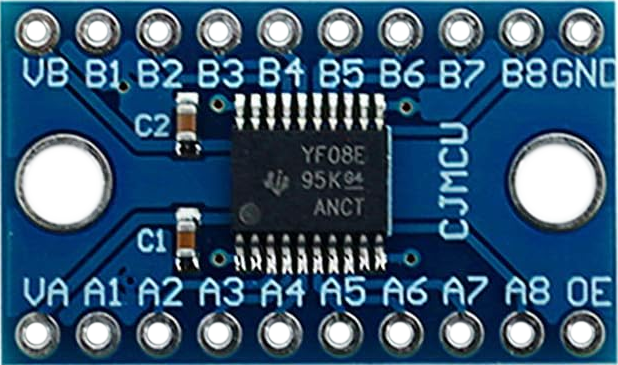
 Design with TXS0108E High Speed Full Duplex Shifter 8 Way 8 Channel Logic Level Conversion Module 8-Bit 8 CH in Cirkit Designer
Introduction
The TXS0108E by DEVMO is an 8-channel bidirectional logic level converter designed to facilitate communication between devices operating at different voltage levels. It supports high-speed data transfer and is particularly useful for interfacing 3.3V and 5V systems. This module is ideal for applications involving microcontrollers, sensors, and other peripherals that require voltage level translation.
Explore Projects Built with TXS0108E High Speed Full Duplex Shifter 8 Way 8 Channel Logic Level Conversion Module 8-Bit 8 CH
 Open Project in Cirkit Designer
 Open Project in Cirkit Designer
 Open Project in Cirkit Designer
 Open Project in Cirkit Designer
Explore Projects Built with TXS0108E High Speed Full Duplex Shifter 8 Way 8 Channel Logic Level Conversion Module 8-Bit 8 CH
Open Project in Cirkit DesignerOpen Project in Cirkit DesignerOpen Project in Cirkit DesignerOpen Project in Cirkit DesignerCommon Applications
- Interfacing 3.3V microcontrollers (e.g., Arduino, ESP32, Raspberry Pi) with 5V peripherals.
- Communication between sensors and devices operating at different voltage levels.
- Bidirectional data transfer in I2C, SPI, UART, and GPIO applications.
- Voltage level shifting in mixed-voltage systems.
Technical Specifications
Key Technical Details
| Parameter | Specification |
|---|---|
| Manufacturer | DEVMO |
| Part Number | TXS0108E |
| Voltage Range (VCCA) | 1.2V to 3.6V |
| Voltage Range (VCCB) | 1.65V to 5.5V |
| Maximum Data Rate | 110 Mbps (Push-Pull), 1.2 Mbps (Open-Drain) |
| Channels | 8 Bidirectional Channels |
| Operating Temperature | -40°C to +85°C |
| Package Type | Module (with TXS0108E IC) |
| Communication Protocols | Supports I2C, SPI, UART, GPIO |
Pin Configuration and Descriptions
The TXS0108E module has 10 pins, as described in the table below:
| Pin Name | Direction | Description |
|---|---|---|
| VCCA | Input | Voltage supply for the low-voltage side (1.2V to 3.6V). |
| VCCB | Input | Voltage supply for the high-voltage side (1.65V to 5.5V). |
| GND | Input | Ground connection (common for both voltage domains). |
| OE | Input | Output Enable pin. Active HIGH. Pull HIGH to enable the module. |
| A1–A8 | I/O | Low-voltage side data pins (1.2V to 3.6V). |
| B1–B8 | I/O | High-voltage side data pins (1.65V to 5.5V). |
Usage Instructions
How to Use the TXS0108E in a Circuit
Power Connections:
- Connect the low-voltage supply (e.g., 3.3V) to the VCCA pin.
- Connect the high-voltage supply (e.g., 5V) to the VCCB pin.
- Connect the GND pin to the ground of your circuit.
Enable the Module:
- Pull the OE (Output Enable) pin HIGH to activate the module. If left LOW, the module will be disabled.
Connect Data Lines:
- Connect the low-voltage device's data lines to the A1–A8 pins.
- Connect the high-voltage device's data lines to the corresponding B1–B8 pins.
- Ensure that each channel is connected to the correct corresponding pin (e.g., A1 ↔ B1, A2 ↔ B2).
Verify Voltage Levels:
- Ensure that the voltage levels of the connected devices match the voltage ranges specified for VCCA and VCCB.
Important Considerations and Best Practices
- Pull-Up Resistors: For open-drain communication protocols like I2C, external pull-up resistors may be required on both sides of the module.
- Output Enable: Always ensure the OE pin is HIGH during operation. If not used, connect it to VCCA.
- Power Supply Sequencing: Power up VCCA before VCCB to avoid potential damage to the module.
- Data Rate: For high-speed communication, ensure the connected devices support the required data rates.
Example: Connecting TXS0108E to an Arduino UNO
Below is an example of using the TXS0108E to interface a 3.3V sensor with a 5V Arduino UNO.
Circuit Connections
- VCCA: Connect to the 3.3V pin of the Arduino.
- VCCB: Connect to the 5V pin of the Arduino.
- GND: Connect to the Arduino's GND.
- OE: Connect to the 3.3V pin of the Arduino.
- A1: Connect to the sensor's data pin.
- B1: Connect to the Arduino's digital pin (e.g., D2).
Arduino Code Example
// Example code for reading data from a 3.3V sensor using TXS0108E
// connected to a 5V Arduino UNO.

const int sensorPin = 2; // Arduino pin connected to B1 of TXS0108E
int sensorValue = 0;

void setup() {
  pinMode(sensorPin, INPUT); // Set sensor pin as input
  Serial.begin(9600);        // Initialize serial communication
}

void loop() {
  sensorValue = digitalRead(sensorPin); // Read sensor value
  Serial.println(sensorValue);          // Print the value to Serial Monitor
  delay(500);                           // Wait for 500ms
}
Troubleshooting and FAQs
Common Issues and Solutions
Module Not Working:
- Ensure the OE pin is pulled HIGH. Without this, the module will remain disabled.
- Verify that VCCA and VCCB are powered correctly and within the specified voltage ranges.
Data Not Transmitting:
- Check the connections between the A and B pins. Ensure they are correctly paired (e.g., A1 ↔ B1).
- For I2C communication, ensure pull-up resistors are present on both sides.
Voltage Mismatch:
- Confirm that the connected devices operate within the voltage ranges specified for VCCA and VCCB.
Signal Distortion at High Speeds:
- Ensure the wiring is short and properly shielded to minimize noise and signal degradation.
FAQs
Q1: Can I use the TXS0108E for SPI communication?
Yes, the TXS0108E supports SPI communication. Ensure that the SPI clock speed does not exceed the module's maximum data rate.
Q2: What happens if I leave the OE pin floating?
If the OE pin is left floating, the module may not function correctly. Always pull it HIGH to enable the module.
Q3: Can I use the TXS0108E with 1.8V devices?
Yes, the module supports 1.8V devices as long as the VCCA voltage is set within the range of 1.2V to 3.6V.
Q4: Is the TXS0108E suitable for analog signals?
No, the TXS0108E is designed for digital signals only. It is not suitable for analog signal conversion.