
How to Use 433MHz RF Receiver: Examples, Pinouts, and Specs
 Design with 433MHz RF Receiver in Cirkit Designer
Introduction
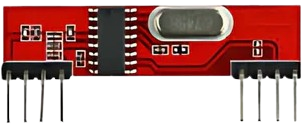
The 433MHz RF Receiver is a device designed to receive radio frequency signals at a frequency of 433 MHz. It is widely used in wireless communication systems due to its simplicity, low cost, and efficiency. This component is commonly paired with a 433MHz RF Transmitter to enable wireless data transmission over short to medium distances. Typical applications include remote controls, wireless sensors, home automation systems, and Internet of Things (IoT) devices.
Explore Projects Built with 433MHz RF Receiver
 Open Project in Cirkit Designer
 Open Project in Cirkit Designer
 Open Project in Cirkit Designer
 Open Project in Cirkit Designer
Explore Projects Built with 433MHz RF Receiver
Open Project in Cirkit DesignerOpen Project in Cirkit DesignerOpen Project in Cirkit DesignerOpen Project in Cirkit DesignerTechnical Specifications
- Frequency Range: 433.92 MHz (±150 kHz)
- Operating Voltage: 3.3V to 5V DC
- Operating Current: ≤5.5 mA
- Sensitivity: -105 dBm (typical)
- Data Rate: 2 kbps (maximum)
- Modulation Type: Amplitude Shift Keying (ASK)
- Operating Temperature: -20°C to +70°C
- Range: Up to 50 meters (line of sight, depending on environment)
Pin Configuration and Descriptions
The 433MHz RF Receiver typically has 4 pins. The table below describes each pin:
| Pin | Name | Description |
|---|---|---|
| 1 | VCC | Power supply pin. Connect to 3.3V or 5V DC. |
| 2 | DATA | Data output pin. Outputs the received digital signal. |
| 3 | DATA | Duplicate data output pin (can be used interchangeably with Pin 2). |
| 4 | GND | Ground pin. Connect to the ground of the power supply. |
Usage Instructions
How to Use the 433MHz RF Receiver in a Circuit
- Power the Receiver: Connect the VCC pin to a 3.3V or 5V DC power source and the GND pin to the ground.
- Connect the Data Pin: Use either of the DATA pins to connect the receiver to a microcontroller or other processing unit.
- Antenna Connection: For optimal performance, attach a 17 cm wire to the antenna input (if available) to improve signal reception.
- Pair with a Transmitter: Ensure the 433MHz RF Transmitter is configured to send data at the same frequency and modulation type.
Important Considerations and Best Practices
- Antenna Placement: Use a properly sized antenna (17 cm for 433 MHz) and position it away from interference sources like metal objects or other RF devices.
- Power Supply: Ensure a stable power supply to avoid noise or signal distortion.
- Environment: The range of the receiver can be affected by obstacles, walls, and interference. For best results, maintain a clear line of sight between the transmitter and receiver.
- Data Decoding: The raw data received from the DATA pin may need to be decoded using a microcontroller or software library.
Example: Using the 433MHz RF Receiver with Arduino UNO
Below is an example of how to use the 433MHz RF Receiver with an Arduino UNO to receive data:
#include <RCSwitch.h> // Include the RC-Switch library for decoding RF signals

RCSwitch mySwitch = RCSwitch();

void setup() {
  Serial.begin(9600); // Initialize serial communication at 9600 baud
  mySwitch.enableReceive(0); // Enable receiver on interrupt pin 2 (Arduino UNO pin 2)
}

void loop() {
  if (mySwitch.available()) {
    // Check if a signal is received
    int receivedValue = mySwitch.getReceivedValue();

    if (receivedValue == 0) {
      Serial.println("Unknown signal received"); // Print error if signal is invalid
    } else {
      Serial.print("Received signal: ");
      Serial.println(receivedValue); // Print the received signal value
    }

    mySwitch.resetAvailable(); // Reset the receiver to listen for the next signal
  }
}
Note: The RC-Switch library must be installed in the Arduino IDE. You can install it via the Library Manager.
Troubleshooting and FAQs
Common Issues
No Signal Received:
- Ensure the transmitter and receiver are operating at the same frequency (433 MHz).
- Check the antenna connection and placement.
- Verify that the transmitter is powered and sending data.
Interference or Noise:
- Use a decoupling capacitor (e.g., 0.1 µF) between VCC and GND to reduce power supply noise.
- Avoid placing the receiver near other RF devices or sources of electromagnetic interference.
Short Range:
- Ensure a clear line of sight between the transmitter and receiver.
- Use a properly sized antenna (17 cm for 433 MHz).
FAQs
Q: Can I use the 433MHz RF Receiver with a 3.3V microcontroller?
A: Yes, the receiver operates at both 3.3V and 5V. Ensure the data pin voltage is compatible with your microcontroller.
Q: What is the maximum range of the 433MHz RF Receiver?
A: The range is up to 50 meters in an open environment with a clear line of sight. Obstacles and interference can reduce the range.
Q: How do I decode the received data?
A: Use a microcontroller with a library like RC-Switch to decode the received signals. The library simplifies the process of interpreting the raw data.
Q: Can I use multiple receivers in the same area?
A: Yes, but ensure that each transmitter is uniquely coded to avoid interference between signals.