
How to Use Engine with gearbox 6 VDC 200rpm up: Examples, Pinouts, and Specs
 Design with Engine with gearbox 6 VDC 200rpm up in Cirkit Designer
Introduction
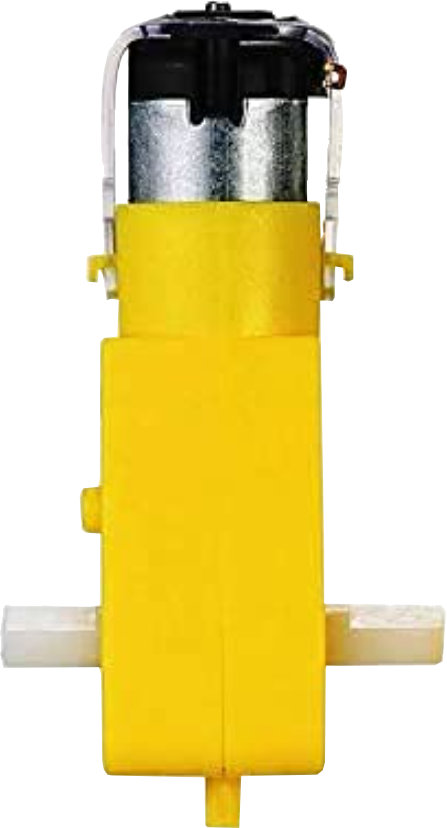
The Engine with Gearbox 6 VDC 200RPM is a compact and efficient DC motor equipped with a built-in gearbox. This combination allows the motor to deliver high torque at a reduced speed of 200 revolutions per minute (RPM). The motor operates at a nominal voltage of 6 volts DC, making it suitable for a wide range of low-power applications. Its robust design and reliable performance make it ideal for robotics, small machinery, and hobbyist projects.
Explore Projects Built with Engine with gearbox 6 VDC 200rpm up
 Open Project in Cirkit Designer
 Open Project in Cirkit Designer
 Open Project in Cirkit Designer
 Open Project in Cirkit Designer
Explore Projects Built with Engine with gearbox 6 VDC 200rpm up
Open Project in Cirkit DesignerOpen Project in Cirkit DesignerOpen Project in Cirkit DesignerOpen Project in Cirkit DesignerCommon Applications
- Robotics: Driving wheels or actuators in small robots.
- Conveyor belts: Providing controlled motion for lightweight systems.
- Automated systems: Used in small-scale automation projects.
- DIY projects: Ideal for hobbyists building motorized models or tools.
Technical Specifications
Below are the key technical details of the Engine with Gearbox 6 VDC 200RPM:
| Parameter | Value |
|---|---|
| Operating Voltage | 6 VDC |
| No-Load Speed | 200 RPM |
| Gearbox Ratio | 1:30 |
| Stall Torque | ~2.5 kg·cm |
| No-Load Current | ~120 mA |
| Stall Current | ~1.2 A |
| Shaft Diameter | 6 mm |
| Shaft Length | 15 mm |
| Motor Dimensions | 70 mm x 30 mm x 25 mm |
| Weight | ~100 g |
Pin Configuration
The motor typically has two terminals for electrical connections:
| Pin | Description |
|---|---|
| + | Positive terminal (connect to VCC) |
| - | Negative terminal (connect to GND) |
Usage Instructions
How to Use the Component in a Circuit
- Power Supply: Connect the motor to a 6 VDC power source. Ensure the power supply can provide sufficient current (at least 1.2 A for stall conditions).
- Polarity: The direction of rotation depends on the polarity of the voltage applied to the terminals:
- Connecting the positive terminal to VCC and the negative terminal to GND will rotate the motor in one direction.
- Reversing the polarity will rotate the motor in the opposite direction.
- Motor Driver: For precise control, use an H-bridge motor driver (e.g., L298N or L293D). This allows you to control the motor's speed and direction using a microcontroller like an Arduino.
Important Considerations
- Current Limiting: Ensure your power supply or motor driver can handle the stall current (~1.2 A) to avoid damage.
- Heat Dissipation: Prolonged operation at high torque may cause the motor to heat up. Allow for adequate cooling.
- Load Matching: Avoid overloading the motor beyond its rated torque to prevent stalling or damage to the gearbox.
Example: Connecting to an Arduino UNO
Below is an example of controlling the motor using an Arduino UNO and an L298N motor driver:
// Define motor control pins
const int motorPin1 = 5; // IN1 on L298N
const int motorPin2 = 6; // IN2 on L298N
const int enablePin = 9; // ENA on L298N (PWM control)

void setup() {
  // Set motor pins as outputs
  pinMode(motorPin1, OUTPUT);
  pinMode(motorPin2, OUTPUT);
  pinMode(enablePin, OUTPUT);
}

void loop() {
  // Rotate motor in one direction
  digitalWrite(motorPin1, HIGH); // Set IN1 high
  digitalWrite(motorPin2, LOW);  // Set IN2 low
  analogWrite(enablePin, 128);   // Set speed (0-255)

  delay(2000); // Run for 2 seconds

  // Stop the motor
  digitalWrite(motorPin1, LOW);
  digitalWrite(motorPin2, LOW);
  delay(1000); // Pause for 1 second

  // Rotate motor in the opposite direction
  digitalWrite(motorPin1, LOW);  // Set IN1 low
  digitalWrite(motorPin2, HIGH); // Set IN2 high
  analogWrite(enablePin, 128);   // Set speed (0-255)

  delay(2000); // Run for 2 seconds

  // Stop the motor
  digitalWrite(motorPin1, LOW);
  digitalWrite(motorPin2, LOW);
  delay(1000); // Pause for 1 second
}
Notes:
- Adjust the
analogWritevalue to control the motor speed (0 = stop, 255 = full speed). - Ensure the motor driver is powered with a 6 VDC supply.
Troubleshooting and FAQs
Common Issues
Motor Not Spinning
- Cause: Insufficient power supply or incorrect wiring.
- Solution: Verify the power supply voltage and current. Check the wiring for proper connections.
Motor Spins in the Wrong Direction
- Cause: Polarity of the motor terminals is reversed.
- Solution: Swap the connections to the motor terminals or adjust the control logic in your code.
Motor Overheats
- Cause: Prolonged operation at high torque or insufficient cooling.
- Solution: Reduce the load on the motor or allow it to cool between operations.
Noisy Operation
- Cause: Gearbox misalignment or wear.
- Solution: Inspect the gearbox for damage and ensure proper alignment.
FAQs
- Can I use a higher voltage power supply?
- No, exceeding 6 VDC may damage the motor or gearbox.
- What is the maximum load the motor can handle?
- The motor can handle up to ~2.5 kg·cm of torque. Avoid exceeding this limit to prevent stalling or damage.
- Can I control the motor without a motor driver?
- Yes, but using a motor driver provides better control over speed and direction.
This concludes the documentation for the Engine with Gearbox 6 VDC 200RPM. Follow the guidelines above for optimal performance and longevity of the component.