
How to Use 18650 2s: Examples, Pinouts, and Specs
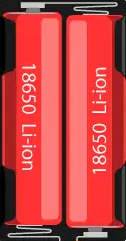
 Design with 18650 2s in Cirkit Designer
Introduction
The 18650 2S is a battery configuration consisting of two 18650 lithium-ion cells connected in series. This arrangement doubles the voltage output of a single 18650 cell while maintaining the same capacity (measured in mAh). The 18650 2S is widely used in applications requiring a higher voltage supply, such as portable electronics, power tools, electric vehicles, and DIY projects.
Explore Projects Built with 18650 2s
 Open Project in Cirkit Designer
 Open Project in Cirkit Designer
 Open Project in Cirkit Designer
 Open Project in Cirkit Designer
Explore Projects Built with 18650 2s
Open Project in Cirkit DesignerOpen Project in Cirkit DesignerOpen Project in Cirkit DesignerOpen Project in Cirkit DesignerCommon Applications and Use Cases
- Powering portable devices like flashlights and radios
- DIY electronics projects and robotics
- Backup power supplies and battery packs
- Electric bicycles and scooters
- Solar energy storage systems
Technical Specifications
The following are the key technical details for the 18650 2S battery configuration:
| Parameter | Value |
|---|---|
| Nominal Voltage | 7.4V (3.7V per cell × 2 in series) |
| Maximum Voltage | 8.4V (4.2V per cell × 2 in series) |
| Capacity | Same as a single 18650 cell (e.g., 2000mAh to 3500mAh) |
| Discharge Current | Depends on the cells used (e.g., 10A to 30A) |
| Charging Voltage | 8.4V (constant voltage charging) |
| Charging Current | Typically 0.5C to 1C of the cell capacity |
| Protection Circuit Module (PCM) | Recommended for overcharge, over-discharge, and short-circuit protection |
| Dimensions | Varies based on cell holder or pack design |
| Weight | Approximately 90g (depending on cells used) |
Pin Configuration and Descriptions
The 18650 2S battery pack typically has three or four terminals, depending on whether a protection circuit is included. Below is a table describing the pin configuration:
| Pin | Label | Description |
|---|---|---|
| 1 | B+ | Positive terminal of the battery pack |
| 2 | B- | Negative terminal of the battery pack |
| 3 | BM (optional) | Midpoint connection between the two cells (used for balancing) |
| 4 | P+ / P- (optional) | Output terminals with protection circuit (if included) |
Usage Instructions
How to Use the 18650 2S in a Circuit
- Connect the Battery Pack: Ensure the B+ and B- terminals are connected to the appropriate points in your circuit. If using a protection circuit, connect to the P+ and P- terminals instead.
- Charging the Battery: Use a dedicated 2S lithium-ion battery charger with a constant voltage of 8.4V and a current rating suitable for the cells (e.g., 1A for a 2000mAh pack).
- Load Connection: Ensure the load does not exceed the maximum discharge current of the cells.
- Balancing: If the pack includes a BM pin, use a battery management system (BMS) to balance the cells during charging.
Important Considerations and Best Practices
- Use a Protection Circuit: Always include a PCM or BMS to prevent overcharging, over-discharging, and short circuits.
- Avoid Overloading: Ensure the load current does not exceed the maximum discharge rating of the cells.
- Temperature Monitoring: Avoid using the battery pack in environments exceeding 60°C or below -20°C.
- Storage: Store the battery pack at 40-60% charge in a cool, dry place to prolong its lifespan.
- Wiring: Use appropriate gauge wires to handle the current without overheating.
Example: Connecting to an Arduino UNO
The 18650 2S can be used to power an Arduino UNO via its VIN pin. Below is an example circuit and code:
Circuit
- Connect the B+ terminal of the 18650 2S to the VIN pin of the Arduino UNO.
- Connect the B- terminal to the GND pin of the Arduino UNO.
- Ensure the battery pack voltage is within the Arduino's input voltage range (7-12V).
Code Example
// Example code to blink an LED using an Arduino UNO powered by 18650 2S
// Ensure the battery pack voltage is within the Arduino's safe input range.

const int ledPin = 13; // Pin connected to the onboard LED

void setup() {
  pinMode(ledPin, OUTPUT); // Set the LED pin as an output
}

void loop() {
  digitalWrite(ledPin, HIGH); // Turn the LED on
  delay(1000);                // Wait for 1 second
  digitalWrite(ledPin, LOW);  // Turn the LED off
  delay(1000);                // Wait for 1 second
}
Troubleshooting and FAQs
Common Issues and Solutions
Battery Pack Not Charging
- Cause: Charger not compatible with 2S configuration.
- Solution: Use a dedicated 2S lithium-ion charger with an 8.4V output.
Uneven Cell Voltages
- Cause: Cells are not balanced.
- Solution: Use a BMS or balance charger to equalize the cell voltages.
Overheating During Use
- Cause: Load current exceeds the maximum discharge rating.
- Solution: Reduce the load or use cells with a higher discharge rating.
Short Circuit or No Output
- Cause: Protection circuit triggered due to a fault.
- Solution: Disconnect the load and allow the PCM to reset.
FAQs
Q: Can I use any 18650 cells for a 2S configuration?
A: It is recommended to use cells with the same capacity, voltage, and discharge rating to ensure proper operation and safety.
Q: How do I know if my 18650 2S pack has a protection circuit?
A: Check the pack's specifications or look for additional terminals (P+ and P-) indicating the presence of a PCM.
Q: Can I charge the 18650 2S pack with a USB charger?
A: No, you must use a dedicated 2S lithium-ion charger with an 8.4V output.
Q: What happens if one cell fails in the 2S pack?
A: The pack's performance will degrade, and the failed cell must be replaced to restore functionality. Always replace both cells with matching specifications.