
How to Use CH9329: Examples, Pinouts, and Specs
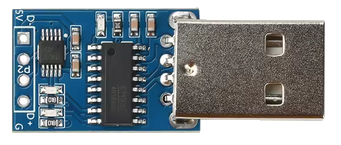
 Design with CH9329 in Cirkit Designer
Introduction
The CH9329 is a USB to UART bridge controller designed to facilitate seamless communication between USB devices and UART (Universal Asynchronous Receiver-Transmitter) interfaces. It acts as a bridge, converting USB signals to UART signals and vice versa, enabling serial communication in embedded systems. The CH9329 supports a wide range of baud rates, making it versatile for various applications.
Explore Projects Built with CH9329
 Open Project in Cirkit Designer
 Open Project in Cirkit Designer
 Open Project in Cirkit Designer
 Open Project in Cirkit Designer
Explore Projects Built with CH9329
Open Project in Cirkit DesignerOpen Project in Cirkit DesignerOpen Project in Cirkit DesignerOpen Project in Cirkit DesignerCommon Applications and Use Cases
- USB-to-serial communication in embedded systems
- Debugging and programming microcontrollers
- Data transfer between computers and UART-enabled devices
- Industrial automation and control systems
- USB-based serial adapters and converters
Technical Specifications
The CH9329 is a highly reliable and efficient component with the following key specifications:
Key Technical Details
- USB Interface: USB 2.0 Full-Speed compliant
- UART Interface: Supports baud rates from 1200 bps to 115200 bps
- Operating Voltage: 3.3V to 5V
- Operating Temperature: -40°C to +85°C
- Power Consumption: Low power consumption in active and idle modes
- Driver Support: Compatible with Windows, Linux, and macOS
- Package Type: SOP-16 or QFN-16
Pin Configuration and Descriptions
The CH9329 is typically available in a 16-pin package. Below is the pin configuration and description:
| Pin Number | Pin Name | Description |
|---|---|---|
| 1 | VCC | Power supply input (3.3V to 5V) |
| 2 | GND | Ground |
| 3 | TXD | UART Transmit Data |
| 4 | RXD | UART Receive Data |
| 5 | RTS | Request to Send (flow control, optional) |
| 6 | CTS | Clear to Send (flow control, optional) |
| 7 | DTR | Data Terminal Ready (optional) |
| 8 | DSR | Data Set Ready (optional) |
| 9 | USB_DM | USB Data Minus |
| 10 | USB_DP | USB Data Plus |
| 11 | RESET | Reset input (active low) |
| 12 | NC | No connection |
| 13 | NC | No connection |
| 14 | NC | No connection |
| 15 | NC | No connection |
| 16 | NC | No connection |
Usage Instructions
The CH9329 is straightforward to use in a circuit. Below are the steps and best practices for integrating it into your design:
How to Use the CH9329 in a Circuit
- Power Supply: Connect the VCC pin to a 3.3V or 5V power source and the GND pin to ground.
- USB Connection: Connect the USB_DM and USB_DP pins to the USB data lines of your device.
- UART Connection: Connect the TXD and RXD pins to the UART interface of your microcontroller or device.
- Optional Flow Control: If required, connect the RTS and CTS pins for hardware flow control.
- Reset: Use the RESET pin to initialize the CH9329. Pull it low momentarily to reset the device.
Important Considerations and Best Practices
- Ensure proper decoupling capacitors are placed near the VCC pin to stabilize the power supply.
- Use appropriate pull-up resistors on the USB_DP and USB_DM lines if required by your USB host.
- Verify the baud rate settings on both the CH9329 and the UART device to ensure proper communication.
- Avoid long traces for the USB and UART lines to minimize signal degradation.
- If connecting to an Arduino UNO, use the SoftwareSerial library to communicate with the CH9329.
Example Code for Arduino UNO
Below is an example of how to use the CH9329 with an Arduino UNO for serial communication:
#include <SoftwareSerial.h>

// Define RX and TX pins for SoftwareSerial
SoftwareSerial mySerial(10, 11); // RX = pin 10, TX = pin 11

void setup() {
  // Start the hardware serial communication (USB to PC)
  Serial.begin(9600);
  // Start the software serial communication (to CH9329)
  mySerial.begin(9600);

  Serial.println("CH9329 Communication Initialized");
}

void loop() {
  // Check if data is available from the CH9329
  if (mySerial.available()) {
    // Read data from CH9329 and send it to the Serial Monitor
    char data = mySerial.read();
    Serial.print("Received: ");
    Serial.println(data);
  }

  // Check if data is available from the Serial Monitor
  if (Serial.available()) {
    // Read data from Serial Monitor and send it to the CH9329
    char data = Serial.read();
    mySerial.write(data);
    Serial.print("Sent: ");
    Serial.println(data);
  }
}
Troubleshooting and FAQs
Common Issues and Solutions
No Communication Between USB and UART
- Cause: Incorrect baud rate settings.
- Solution: Ensure the baud rate of the CH9329 matches the UART device.
Device Not Recognized by USB Host
- Cause: Missing or incorrect USB drivers.
- Solution: Install the appropriate drivers for your operating system.
Data Corruption or Loss
- Cause: Signal degradation or noise on the UART lines.
- Solution: Use shorter traces and proper shielding for UART connections.
CH9329 Not Responding
- Cause: Improper power supply or reset configuration.
- Solution: Verify the power supply voltage and ensure the RESET pin is properly connected.
FAQs
Q1: Can the CH9329 support higher baud rates?
A1: The CH9329 supports baud rates up to 115200 bps. For higher baud rates, consider alternative USB-to-UART bridge controllers.
Q2: Is the CH9329 compatible with 1.8V logic levels?
A2: No, the CH9329 operates at 3.3V or 5V logic levels. Use a level shifter if interfacing with 1.8V devices.
Q3: Do I need external crystal oscillators for the CH9329?
A3: No, the CH9329 has an internal oscillator and does not require an external crystal.
Q4: Can I use the CH9329 with a Raspberry Pi?
A4: Yes, the CH9329 can be connected to the UART pins of a Raspberry Pi for serial communication.
By following this documentation, you can effectively integrate the CH9329 into your projects and troubleshoot common issues.