
How to Use battery level 2S: Examples, Pinouts, and Specs
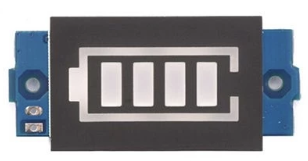
 Design with battery level 2S in Cirkit Designer
Introduction
The Battery Level 2S (Manufacturer: Pin, Part ID: 003) is a monitoring module designed for 2S lithium-ion battery packs. A 2S battery consists of two lithium-ion cells connected in series, providing a nominal voltage of 7.4V. This component is ideal for applications requiring precise battery level monitoring, such as RC vehicles, drones, and portable electronics. Its lightweight and compact design make it a popular choice for energy-dense systems.
Explore Projects Built with battery level 2S
 Open Project in Cirkit Designer
 Open Project in Cirkit Designer
 Open Project in Cirkit Designer
 Open Project in Cirkit Designer
Explore Projects Built with battery level 2S
Open Project in Cirkit DesignerOpen Project in Cirkit DesignerOpen Project in Cirkit DesignerOpen Project in Cirkit DesignerCommon Applications
- Remote-controlled (RC) vehicles and drones
- Portable electronic devices
- Robotics and IoT systems
- Backup power supplies
Technical Specifications
Key Technical Details
| Parameter | Value |
|---|---|
| Nominal Voltage | 7.4V (2S lithium-ion battery) |
| Input Voltage Range | 6.0V - 8.4V |
| Output Signal | Analog or digital (varies by model) |
| Operating Temperature | -20°C to 60°C |
| Dimensions | 25mm x 15mm x 5mm |
| Weight | 5 grams |
Pin Configuration and Descriptions
| Pin Number | Pin Name | Description |
|---|---|---|
| 1 | V+ | Positive terminal of the 2S battery input |
| 2 | V- | Negative terminal of the 2S battery input |
| 3 | OUT | Battery level output signal (analog or digital) |
| 4 | GND | Ground connection |
Usage Instructions
How to Use the Component in a Circuit
- Connect the Battery:
- Attach the positive terminal of the 2S battery to the
V+pin. - Attach the negative terminal of the 2S battery to the
V-pin.
- Attach the positive terminal of the 2S battery to the
- Connect the Output:
- For analog output, connect the
OUTpin to an analog input pin of your microcontroller. - For digital output, connect the
OUTpin to a digital input pin.
- For analog output, connect the
- Ground Connection:
- Ensure the
GNDpin is connected to the ground of your circuit.
- Ensure the
Important Considerations and Best Practices
- Voltage Range: Ensure the battery voltage remains within the specified range (6.0V - 8.4V) to avoid damage to the component.
- Polarity: Double-check the polarity of the connections to prevent short circuits or damage.
- Calibration: If using the analog output, calibrate the microcontroller's ADC (Analog-to-Digital Converter) to interpret the voltage levels accurately.
- Heat Management: Avoid exposing the component to temperatures beyond its operating range (-20°C to 60°C).
Example Code for Arduino UNO
Below is an example of how to read the battery level using the analog output of the Battery Level 2S module:
// Define the analog pin connected to the OUT pin of the Battery Level 2S
const int batteryPin = A0;

// Variable to store the battery voltage
float batteryVoltage;

void setup() {
  // Initialize serial communication for debugging
  Serial.begin(9600);
}

void loop() {
  // Read the analog value from the battery level module
  int analogValue = analogRead(batteryPin);

  // Convert the analog value to voltage (assuming 5V reference and 10-bit ADC)
  batteryVoltage = (analogValue / 1023.0) * 5.0;

  // Scale the voltage to match the 2S battery range (6.0V - 8.4V)
  batteryVoltage = batteryVoltage * (8.4 / 5.0);

  // Print the battery voltage to the Serial Monitor
  Serial.print("Battery Voltage: ");
  Serial.print(batteryVoltage);
  Serial.println(" V");

  // Add a delay for stability
  delay(1000);
}
Troubleshooting and FAQs
Common Issues and Solutions
No Output Signal:
- Cause: Incorrect wiring or loose connections.
- Solution: Verify all connections, ensuring proper polarity and secure contacts.
Inaccurate Voltage Readings:
- Cause: ADC calibration mismatch or noise in the circuit.
- Solution: Calibrate the ADC of your microcontroller and use decoupling capacitors to reduce noise.
Overheating:
- Cause: Operating outside the specified voltage or temperature range.
- Solution: Ensure the battery voltage is within 6.0V - 8.4V and maintain ambient temperatures within -20°C to 60°C.
Module Not Responding:
- Cause: Damaged module due to reverse polarity or overvoltage.
- Solution: Replace the module and ensure proper wiring in future setups.
FAQs
Q1: Can this module be used with a 3S battery?
A1: No, the Battery Level 2S is specifically designed for 2S lithium-ion batteries. Using it with a 3S battery may damage the module.
Q2: How do I interpret the analog output?
A2: The analog output corresponds to the battery voltage. Use the provided formula in the example code to scale the readings to the 2S battery range.
Q3: Is the module compatible with Arduino Nano?
A3: Yes, the module is compatible with Arduino Nano and other microcontrollers with analog or digital input pins.
Q4: Can I use this module for lithium-polymer (LiPo) batteries?
A4: Yes, as long as the LiPo battery is a 2S configuration with a nominal voltage of 7.4V.