
How to Use OPT101P: Examples, Pinouts, and Specs
 Design with OPT101P in Cirkit Designer
Introduction
The OPT101P, manufactured by Texas Instruments, is a precision optical sensor that integrates a photodiode and a transimpedance amplifier into a single package. This design simplifies light measurement applications by eliminating the need for external components to amplify the photodiode's output. The OPT101P is ideal for applications requiring accurate light intensity measurements, such as ambient light sensing, optical instrumentation, and medical devices.
Explore Projects Built with OPT101P
 Open Project in Cirkit Designer
 Open Project in Cirkit Designer
 Open Project in Cirkit Designer
 Open Project in Cirkit Designer
Explore Projects Built with OPT101P
Open Project in Cirkit DesignerOpen Project in Cirkit DesignerOpen Project in Cirkit DesignerOpen Project in Cirkit DesignerCommon Applications
- Ambient light sensing in consumer electronics
- Optical instrumentation and laboratory equipment
- Medical devices for light-based measurements
- Industrial automation and control systems
- Barcode scanners and optical encoders
Technical Specifications
The OPT101P is designed for high-performance light measurement with the following key specifications:
| Parameter | Value |
|---|---|
| Supply Voltage (Vcc) | 2.7V to 36V |
| Supply Current | 120 µA (typical) |
| Output Voltage Range | 0V to (Vcc - 1.2V) |
| Photodiode Active Area | 2.29 mm² |
| Responsivity | 0.45 V/µW/cm² at 650 nm |
| Bandwidth | 14 kHz (typical) |
| Operating Temperature Range | -40°C to +85°C |
| Package Type | 8-pin DIP |
Pin Configuration and Descriptions
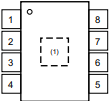
The OPT101P is housed in an 8-pin DIP package. The pinout and descriptions are as follows:
| Pin Number | Pin Name | Description |
|---|---|---|
| 1 | NC | No connection (leave unconnected or grounded for stability). |
| 2 | V- | Negative power supply (typically connected to ground). |
| 3 | NC | No connection (leave unconnected or grounded for stability). |
| 4 | OUT | Output voltage proportional to light intensity. |
| 5 | NC | No connection (leave unconnected or grounded for stability). |
| 6 | V+ | Positive power supply (2.7V to 36V). |
| 7 | NC | No connection (leave unconnected or grounded for stability). |
| 8 | PD | Photodiode cathode (internally connected to the amplifier). |
Usage Instructions
How to Use the OPT101P in a Circuit
- Power Supply: Connect the V+ pin (Pin 6) to a stable power supply within the range of 2.7V to 36V. Connect the V- pin (Pin 2) to ground.
- Output Connection: The output voltage is available at the OUT pin (Pin 4). This voltage is proportional to the intensity of light incident on the photodiode.
- Load Resistor: If required, connect a load resistor to the OUT pin to adjust the output impedance.
- Bypass Capacitor: Place a 0.1 µF ceramic capacitor between V+ and V- to filter noise and stabilize the power supply.
- Light Source: Ensure the photodiode is exposed to the light source you wish to measure. The sensor is most responsive to light in the 650 nm wavelength range.
Important Considerations and Best Practices
- Ambient Light: Avoid exposing the sensor to excessive ambient light, as it may saturate the output.
- Temperature Effects: The sensor's performance may vary slightly with temperature. Ensure proper thermal management in high-temperature environments.
- Output Voltage Range: The output voltage cannot exceed (Vcc - 1.2V). Ensure your circuit design accounts for this limitation.
- PCB Layout: Minimize noise by keeping the traces between the sensor and other components as short as possible. Use a ground plane for better noise immunity.
Example: Connecting OPT101P to an Arduino UNO
The OPT101P can be easily interfaced with an Arduino UNO for light intensity measurement. Below is an example circuit and code:
Circuit Diagram
- Connect Pin 6 (V+) of the OPT101P to the Arduino's 5V pin.
- Connect Pin 2 (V-) of the OPT101P to the Arduino's GND pin.
- Connect Pin 4 (OUT) of the OPT101P to the Arduino's analog input pin (e.g., A0).
Arduino Code
// OPT101P Light Sensor Example
// Reads light intensity from the OPT101P and displays it on the Serial Monitor.

const int sensorPin = A0; // Analog pin connected to OPT101P OUT pin

void setup() {
  Serial.begin(9600); // Initialize serial communication at 9600 baud
}

void loop() {
  int sensorValue = analogRead(sensorPin); // Read the analog value from the sensor
  float voltage = sensorValue * (5.0 / 1023.0); // Convert ADC value to voltage
  Serial.print("Light Intensity Voltage: ");
  Serial.print(voltage);
  Serial.println(" V");
  delay(500); // Wait for 500ms before the next reading
}
Troubleshooting and FAQs
Common Issues and Solutions
No Output Voltage:
- Ensure the power supply is connected correctly to V+ and V-.
- Verify that the photodiode is exposed to a light source.
- Check for loose or incorrect connections in the circuit.
Output Voltage Saturation:
- Reduce the intensity of the light source to avoid saturating the sensor.
- Ensure the output voltage does not exceed (Vcc - 1.2V).
Noisy Output:
- Add a bypass capacitor (0.1 µF) between V+ and V- to filter noise.
- Use shielded cables or a ground plane to minimize electromagnetic interference.
Incorrect Readings with Arduino:
- Verify that the Arduino's analog reference voltage matches the sensor's output range.
- Check the wiring between the sensor and the Arduino.
FAQs
Q: Can the OPT101P measure infrared light?
A: Yes, the OPT101P can measure infrared light, but its peak responsivity is at 650 nm. The sensitivity decreases for wavelengths outside the visible spectrum.
Q: What is the maximum distance for light measurement?
A: The maximum distance depends on the intensity of the light source and the sensor's sensitivity. For weak light sources, the sensor should be placed closer to the source.
Q: Can I use the OPT101P with a 3.3V microcontroller?
A: Yes, the OPT101P operates with supply voltages as low as 2.7V, making it compatible with 3.3V systems.
Q: How do I protect the sensor from damage?
A: Avoid exposing the sensor to excessive light intensity or voltages beyond its specified range. Use proper filtering and shielding to protect against noise and interference.