
How to Use PC-817: Examples, Pinouts, and Specs
 Design with PC-817 in Cirkit Designer
Introduction
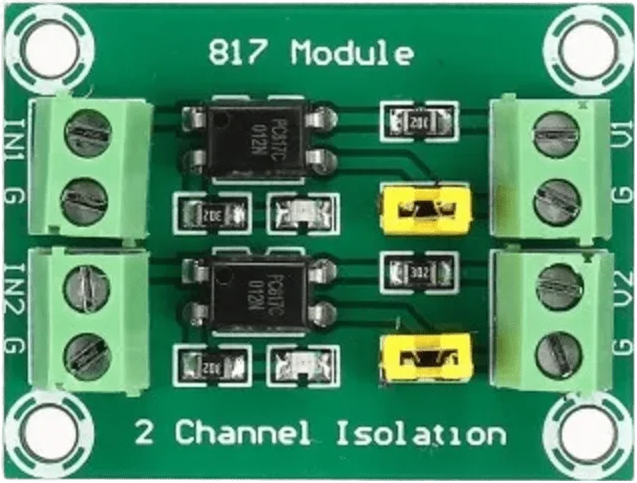
The PC-817 is an optoisolator (or optocoupler) that integrates a light-emitting diode (LED) and a phototransistor within a single compact package. It is designed to transfer electrical signals between two isolated circuits while maintaining electrical isolation. This isolation protects sensitive components from high voltages, surges, and noise, making the PC-817 a critical component in many electronic designs.
Explore Projects Built with PC-817
 Open Project in Cirkit Designer
 Open Project in Cirkit Designer
 Open Project in Cirkit Designer
 Open Project in Cirkit Designer
Explore Projects Built with PC-817
Open Project in Cirkit DesignerOpen Project in Cirkit DesignerOpen Project in Cirkit DesignerOpen Project in Cirkit DesignerCommon Applications and Use Cases
- Microcontroller interfacing with high-voltage circuits
- Signal isolation in industrial control systems
- Noise suppression in communication systems
- Power supply feedback circuits
- Motor control and switching applications
Technical Specifications
Key Technical Details
| Parameter | Value |
|---|---|
| Input Forward Voltage (VF) | 1.2V (typical), 1.4V (maximum) |
| Input Forward Current (IF) | 20mA (typical), 50mA (maximum) |
| Output Collector-Emitter Voltage (VCEO) | 35V (maximum) |
| Output Collector Current (IC) | 50mA (maximum) |
| Isolation Voltage | 5000Vrms |
| Current Transfer Ratio (CTR) | 50% to 600% (depending on model) |
| Operating Temperature Range | -30°C to +100°C |
| Package Type | 4-pin DIP |
Pin Configuration and Descriptions
The PC-817 has a 4-pin configuration, as shown below:
| Pin Number | Name | Description |
|---|---|---|
| 1 | Anode (A) | Positive terminal of the internal LED |
| 2 | Cathode (K) | Negative terminal of the internal LED |
| 3 | Emitter (E) | Emitter terminal of the phototransistor |
| 4 | Collector (C) | Collector terminal of the phototransistor |
Pinout Diagram:
   _______
  |       |
  | 1   4 | Collector (C)
  | 2   3 | Emitter (E)
  |_______|
   Anode  Cathode
Usage Instructions
How to Use the PC-817 in a Circuit
Input Side (LED):
- Connect the anode (Pin 1) to the positive side of the input signal through a current-limiting resistor.
- Connect the cathode (Pin 2) to the ground of the input circuit.
- Calculate the resistor value using Ohm's Law:
[ R = \frac{V_{in} - V_F}{I_F} ]
where (V_{in}) is the input voltage, (V_F) is the forward voltage (1.2V typical), and (I_F) is the desired forward current (e.g., 10mA).
Output Side (Phototransistor):
- Connect the collector (Pin 4) to the positive voltage supply through a pull-up resistor.
- Connect the emitter (Pin 3) to the ground of the output circuit.
- The phototransistor will conduct when the LED is forward-biased, allowing the output signal to change state.
Important Considerations and Best Practices
- Current Transfer Ratio (CTR): Ensure the CTR of the PC-817 matches your circuit requirements. CTR varies with input current and temperature.
- Isolation Voltage: Do not exceed the rated isolation voltage (5000Vrms) to maintain safe operation.
- Resistor Selection: Use appropriate resistors to limit current on both the input and output sides.
- Temperature Range: Operate the PC-817 within its specified temperature range (-30°C to +100°C) to avoid performance degradation.
Example: Connecting PC-817 to an Arduino UNO
Below is an example of how to use the PC-817 to isolate an Arduino UNO from a high-voltage circuit.
Circuit Diagram
- Input Side: Connect the anode (Pin 1) to an Arduino digital pin (e.g., D2) through a 220Ω resistor. Connect the cathode (Pin 2) to the Arduino ground.
- Output Side: Connect the collector (Pin 4) to a 5V supply through a 10kΩ pull-up resistor. Connect the emitter (Pin 3) to the ground of the high-voltage circuit.
Arduino Code Example
// PC-817 Example: Controlling an LED with Arduino and PC-817
const int inputPin = 2;  // Arduino pin connected to PC-817 anode
const int ledPin = 13;   // Arduino onboard LED pin

void setup() {
  pinMode(inputPin, OUTPUT); // Set inputPin as output to drive PC-817
  pinMode(ledPin, OUTPUT);   // Set onboard LED pin as output
}

void loop() {
  digitalWrite(inputPin, HIGH); // Turn on PC-817 LED
  delay(1000);                  // Wait for 1 second
  digitalWrite(inputPin, LOW);  // Turn off PC-817 LED
  delay(1000);                  // Wait for 1 second
}
Notes:
- The onboard LED (Pin 13) is used to indicate the state of the PC-817.
- Ensure the pull-up resistor on the output side is correctly sized for your circuit.
Troubleshooting and FAQs
Common Issues and Solutions
No Output Signal:
- Cause: Insufficient input current to the LED.
- Solution: Check the input resistor value and ensure the LED receives the required forward current (e.g., 10mA).
Output Signal is Weak or Unstable:
- Cause: Incorrect pull-up resistor value or insufficient supply voltage.
- Solution: Use a pull-up resistor in the range of 4.7kΩ to 10kΩ and ensure the supply voltage matches the phototransistor's requirements.
Excessive Heat:
- Cause: Exceeding the maximum input current or output current ratings.
- Solution: Verify that the input and output currents are within the specified limits.
Isolation Failure:
- Cause: Exceeding the isolation voltage rating.
- Solution: Ensure the voltage difference between input and output does not exceed 5000Vrms.
FAQs
Q1: Can the PC-817 handle AC signals?
Yes, the PC-817 can handle AC signals on the input side, but you must use a rectifier circuit to ensure proper operation.
Q2: What is the typical lifespan of the PC-817?
The PC-817 has a long operational lifespan when used within its specified ratings, typically exceeding 100,000 hours.
Q3: Can I use the PC-817 for PWM signals?
Yes, the PC-817 can transmit PWM signals, but ensure the frequency is within the response time limits of the optocoupler.
Q4: How do I calculate the pull-up resistor value?
The pull-up resistor value depends on the supply voltage and desired output current. A typical value is 10kΩ for 5V systems.
By following these guidelines, you can effectively use the PC-817 in your electronic projects while ensuring reliable and safe operation.