Cirkit Designer Logo
Cirkit Designer
Your all-in-one circuit design IDE
Home / 
Component Documentation

How to Use Raspberry pi zero 2w: Examples, Pinouts, and Specs
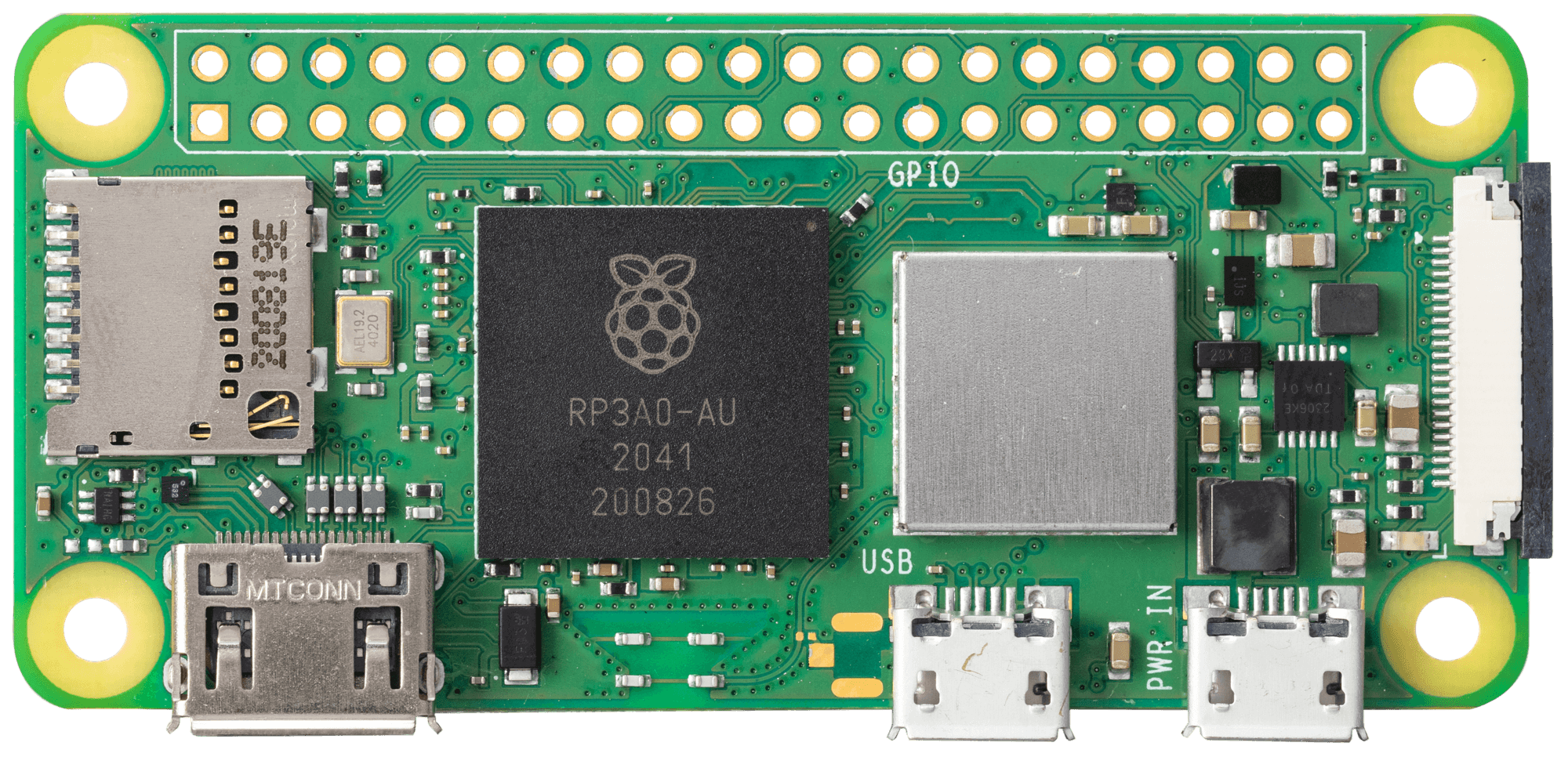

Image of Raspberry pi zero 2w
Cirkit Designer LogoDesign with Raspberry pi zero 2w in Cirkit Designer

Introduction

The Raspberry Pi Zero 2 W is a compact, low-cost single-board computer designed for DIY enthusiasts, hobbyists, and developers. It features a quad-core ARM Cortex-A53 processor, wireless connectivity (Wi-Fi and Bluetooth), and a 40-pin GPIO header for interfacing with various electronic components. Its small form factor and versatile capabilities make it ideal for embedded applications, IoT projects, robotics, and media streaming devices.

Explore Projects Built with Raspberry pi zero 2w
Use Cirkit Designer to design, explore, and prototype these projects online. Some projects support real-time simulation. Click "Open Project" to start designing instantly!
Raspberry Pi Zero W-Based Security System with PIR, Ultrasonic Sensors, and Camera
Image of electronic 2: A project utilizing Raspberry pi zero 2w in a practical application
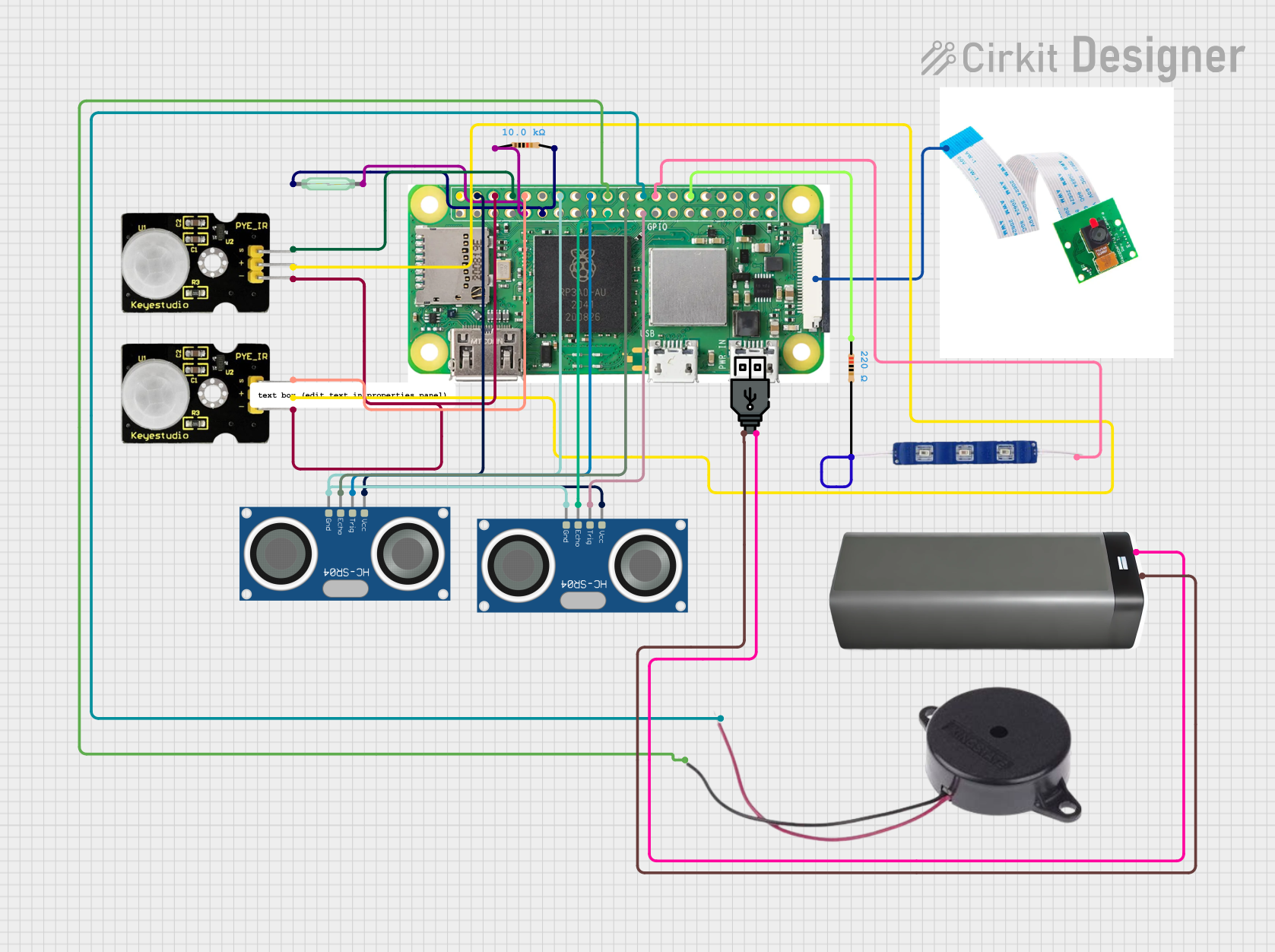
This circuit features a Raspberry Pi Zero W connected to various sensors and output devices. It includes two PIR sensors for motion detection, two HC-SR04 ultrasonic sensors for distance measurement, a reed switch for magnetic field detection, and a Raspberry Pi camera module. Additionally, the circuit has a buzzer for audible alerts and a 12V blue LED for visual indication, both controlled by the Raspberry Pi's GPIO pins. Power is supplied through a USB power connection linked to a battery pack.
Cirkit Designer LogoOpen Project in Cirkit Designer
Raspberry Pi Zero W-Based Security System with Motion Detection and Camera
Image of electronic 2: A project utilizing Raspberry pi zero 2w in a practical application
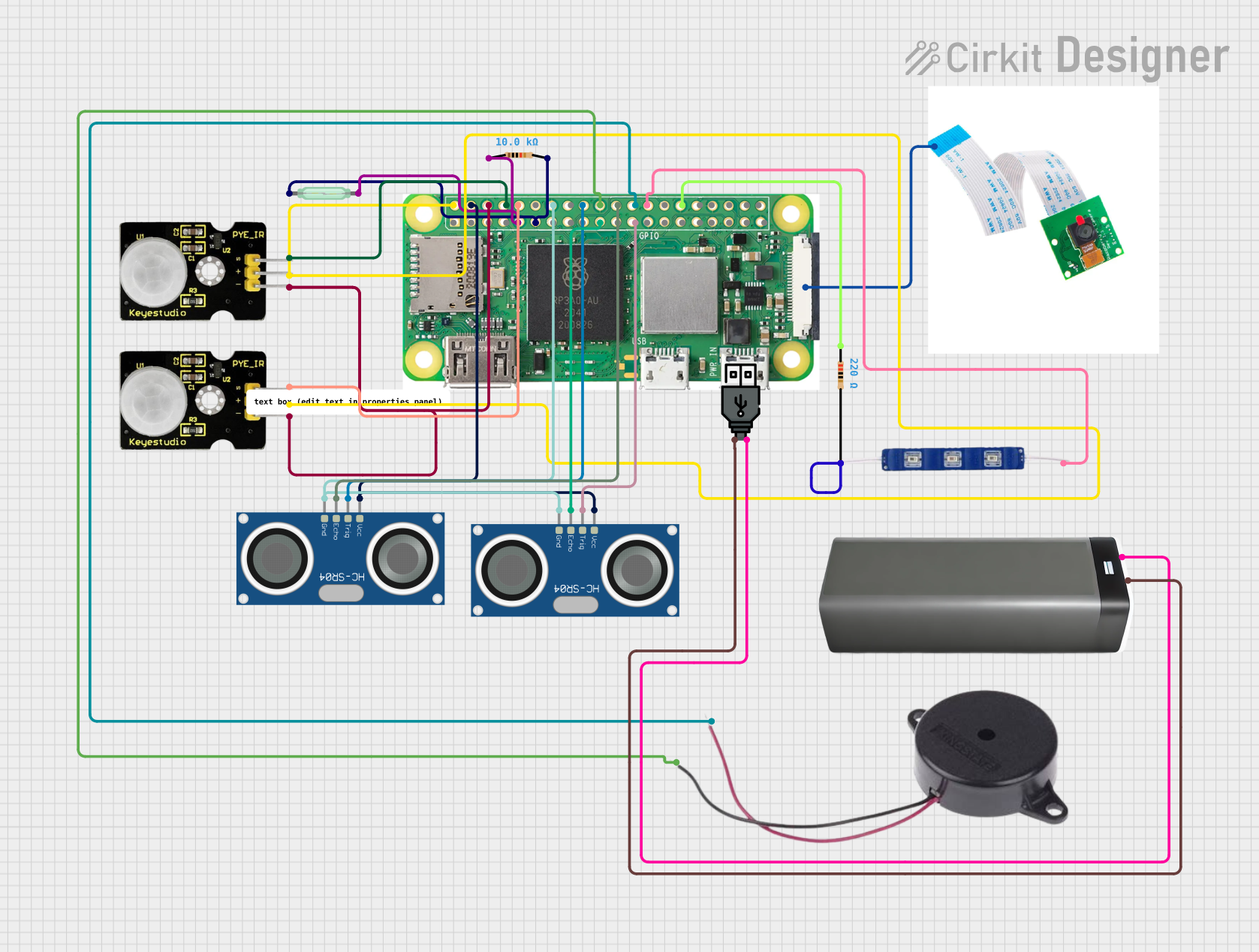
This circuit is a Raspberry Pi Zero W-based security system equipped with two PIR sensors for motion detection, two HC-SR04 ultrasonic sensors for distance measurement, a reed switch for magnetic field detection, and a Raspberry Pi camera module for visual monitoring. It also includes a buzzer and a 12V blue LED for audio-visual alerts. The system is powered through a USB power connection linked to a battery pack, and the Raspberry Pi is programmed to control the sensors and output signals based on detected motion, distance changes, or magnetic field presence.
Cirkit Designer LogoOpen Project in Cirkit Designer
Raspberry Pi Zero W-Based Ultrasonic Distance Measurement with RTC Time-Stamping
Image of Water Logger: A project utilizing Raspberry pi zero 2w in a practical application
This circuit integrates a Raspberry Pi Zero W with an HC-SR04 Ultrasonic Sensor and an RTC DS3231 Real-Time Clock module. The Raspberry Pi is configured to communicate with the RTC via I2C (using GPIO2 for SDA and GPIO3 for SCL) to keep track of real-time, and it controls the ultrasonic sensor (triggering via GPIO23 and receiving echo signals on GPIO24) for distance measurement purposes. Power is supplied to the sensor and RTC from the Raspberry Pi's 5V and 3.3V pins respectively, with common ground connections.
Cirkit Designer LogoOpen Project in Cirkit Designer
Raspberry Pi Zero W Controlled Robotic Vehicle with Ultrasonic Navigation and 9DOF Sensor Feedback
Image of line follower : A project utilizing Raspberry pi zero 2w in a practical application
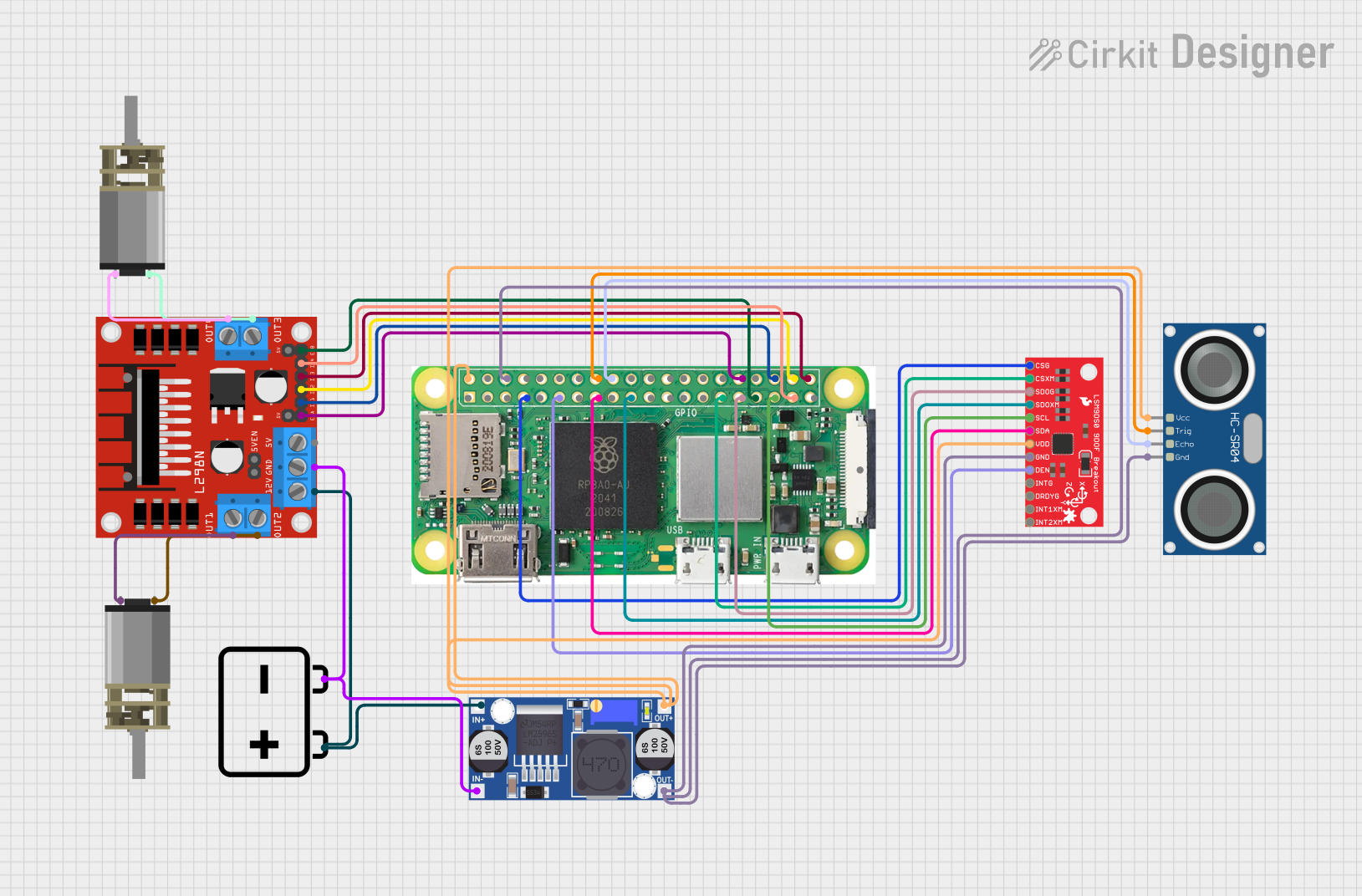
This circuit features a Raspberry Pi Zero W as the central controller, interfaced with an HC-SR04 ultrasonic sensor for distance measurement, a 9DOF sensor LSM9DS0 for motion tracking, and two DC Mini Metal Gear Motors driven by an L298N motor driver for actuation. The motors are powered by a 12V battery, with a buck converter regulating voltage for the Raspberry Pi and sensors. The Raspberry Pi manages sensor data processing and motor control, likely for a mobile robot or a similar automated system.
Cirkit Designer LogoOpen Project in Cirkit Designer

Explore Projects Built with Raspberry pi zero 2w

Use Cirkit Designer to design, explore, and prototype these projects online. Some projects support real-time simulation. Click "Open Project" to start designing instantly!
Image of electronic 2: A project utilizing Raspberry pi zero 2w in a practical application
Raspberry Pi Zero W-Based Security System with PIR, Ultrasonic Sensors, and Camera
This circuit features a Raspberry Pi Zero W connected to various sensors and output devices. It includes two PIR sensors for motion detection, two HC-SR04 ultrasonic sensors for distance measurement, a reed switch for magnetic field detection, and a Raspberry Pi camera module. Additionally, the circuit has a buzzer for audible alerts and a 12V blue LED for visual indication, both controlled by the Raspberry Pi's GPIO pins. Power is supplied through a USB power connection linked to a battery pack.
Cirkit Designer LogoOpen Project in Cirkit Designer
Image of electronic 2: A project utilizing Raspberry pi zero 2w in a practical application
Raspberry Pi Zero W-Based Security System with Motion Detection and Camera
This circuit is a Raspberry Pi Zero W-based security system equipped with two PIR sensors for motion detection, two HC-SR04 ultrasonic sensors for distance measurement, a reed switch for magnetic field detection, and a Raspberry Pi camera module for visual monitoring. It also includes a buzzer and a 12V blue LED for audio-visual alerts. The system is powered through a USB power connection linked to a battery pack, and the Raspberry Pi is programmed to control the sensors and output signals based on detected motion, distance changes, or magnetic field presence.
Cirkit Designer LogoOpen Project in Cirkit Designer
Image of Water Logger: A project utilizing Raspberry pi zero 2w in a practical application
Raspberry Pi Zero W-Based Ultrasonic Distance Measurement with RTC Time-Stamping
This circuit integrates a Raspberry Pi Zero W with an HC-SR04 Ultrasonic Sensor and an RTC DS3231 Real-Time Clock module. The Raspberry Pi is configured to communicate with the RTC via I2C (using GPIO2 for SDA and GPIO3 for SCL) to keep track of real-time, and it controls the ultrasonic sensor (triggering via GPIO23 and receiving echo signals on GPIO24) for distance measurement purposes. Power is supplied to the sensor and RTC from the Raspberry Pi's 5V and 3.3V pins respectively, with common ground connections.
Cirkit Designer LogoOpen Project in Cirkit Designer
Image of line follower : A project utilizing Raspberry pi zero 2w in a practical application
Raspberry Pi Zero W Controlled Robotic Vehicle with Ultrasonic Navigation and 9DOF Sensor Feedback
This circuit features a Raspberry Pi Zero W as the central controller, interfaced with an HC-SR04 ultrasonic sensor for distance measurement, a 9DOF sensor LSM9DS0 for motion tracking, and two DC Mini Metal Gear Motors driven by an L298N motor driver for actuation. The motors are powered by a 12V battery, with a buck converter regulating voltage for the Raspberry Pi and sensors. The Raspberry Pi manages sensor data processing and motor control, likely for a mobile robot or a similar automated system.
Cirkit Designer LogoOpen Project in Cirkit Designer

Common Applications

  • IoT (Internet of Things) devices
  • Home automation systems
  • Robotics and sensor-based projects
  • Media streaming and playback
  • Portable gaming consoles
  • Prototyping and educational projects

Technical Specifications

Key Technical Details

Specification Details
Processor Broadcom BCM2710A1, quad-core Cortex-A53
Clock Speed 1 GHz
RAM 512 MB LPDDR2
Wireless Connectivity 802.11 b/g/n Wi-Fi, Bluetooth 4.2, BLE
GPIO Header 40-pin (unpopulated)
Video Output Mini HDMI (1080p at 30fps)
USB Ports 1x Micro USB (data), 1x Micro USB (power)
Storage MicroSD card slot
Power Supply 5V/2.5A via Micro USB
Dimensions 65mm x 30mm x 5mm

GPIO Pin Configuration

The Raspberry Pi Zero 2 W features a 40-pin GPIO header. Below is the pinout configuration:

Pin Number Pin Name Functionality
1 3.3V Power supply
2 5V Power supply
3 GPIO2 (SDA1) I2C Data
4 5V Power supply
5 GPIO3 (SCL1) I2C Clock
6 GND Ground
7 GPIO4 General-purpose I/O
8 GPIO14 (TXD) UART Transmit
9 GND Ground
10 GPIO15 (RXD) UART Receive
... ... ... (Refer to official pinout)

For the full GPIO pinout, refer to the official Raspberry Pi documentation.

Usage Instructions

How to Use the Raspberry Pi Zero 2 W

  1. Powering the Device: Connect a 5V/2.5A power supply to the Micro USB power port.
  2. Storage Setup: Flash a compatible operating system (e.g., Raspberry Pi OS) onto a MicroSD card using tools like Raspberry Pi Imager or Balena Etcher. Insert the MicroSD card into the slot.
  3. Connecting Peripherals: Use a Mini HDMI adapter for video output, and connect a USB OTG adapter for peripherals like a keyboard, mouse, or USB hub.
  4. Wireless Setup: Configure Wi-Fi and Bluetooth through the operating system settings.
  5. GPIO Usage: Use the GPIO pins to interface with sensors, LEDs, motors, and other components. Libraries like RPi.GPIO or gpiozero in Python can simplify GPIO programming.

Example: Blinking an LED with GPIO

Below is an example of how to blink an LED connected to GPIO17 (pin 11) using Python:


Import necessary libraries

import RPi.GPIO as GPIO import time

Set up GPIO mode and pin

GPIO.setmode(GPIO.BCM) # Use Broadcom pin numbering GPIO.setup(17, GPIO.OUT) # Set GPIO17 as an output pin

try: while True: GPIO.output(17, GPIO.HIGH) # Turn LED on time.sleep(1) # Wait for 1 second GPIO.output(17, GPIO.LOW) # Turn LED off time.sleep(1) # Wait for 1 second except KeyboardInterrupt: # Clean up GPIO settings on exit GPIO.cleanup()


Important Considerations

  • Power Supply: Use a reliable 5V/2.5A power supply to avoid instability.
  • Heat Management: For intensive tasks, consider adding a heatsink to manage heat dissipation.
  • GPIO Precautions: Avoid exceeding the 3.3V limit on GPIO pins to prevent damage.
  • Static Protection: Handle the board with care to avoid static discharge.

Troubleshooting and FAQs

Common Issues and Solutions

  1. Device Not Booting:

    • Ensure the MicroSD card is properly inserted and contains a valid OS image.
    • Verify the power supply is adequate (5V/2.5A).
    • Check for any loose connections.
  2. No Display Output:

    • Confirm the Mini HDMI cable is securely connected.
    • Ensure the correct input source is selected on the monitor.
    • Verify the OS is configured for HDMI output.
  3. Wi-Fi Not Connecting:

    • Double-check the Wi-Fi credentials entered during setup.
    • Ensure the Wi-Fi network is within range.
    • Update the OS to the latest version for improved wireless drivers.
  4. GPIO Not Responding:

    • Verify the correct GPIO pin numbering (BCM vs. BOARD mode).
    • Check the wiring and connections to external components.
    • Ensure the RPi.GPIO library is installed and up to date.

FAQs

  • Q: Can I use the Raspberry Pi Zero 2 W for AI/ML projects?
    A: Yes, lightweight AI/ML models can run on the device, but for intensive tasks, consider using a Raspberry Pi 4 or external accelerators like the Coral USB Accelerator.

  • Q: How do I enable SSH for headless setup?
    A: Place an empty file named ssh (no extension) in the boot partition of the MicroSD card before booting.

  • Q: Can I power the Raspberry Pi Zero 2 W via GPIO pins?
    A: Yes, you can supply 5V to the 5V and GND pins, but ensure proper voltage regulation.

  • Q: Is the Raspberry Pi Zero 2 W compatible with HATs?
    A: Yes, it supports HATs (Hardware Attached on Top) via the 40-pin GPIO header.

This documentation provides a comprehensive guide to using the Raspberry Pi Zero 2 W effectively. For further details, refer to the official Raspberry Pi website.