
How to Use Adafruit SCD4x: Examples, Pinouts, and Specs
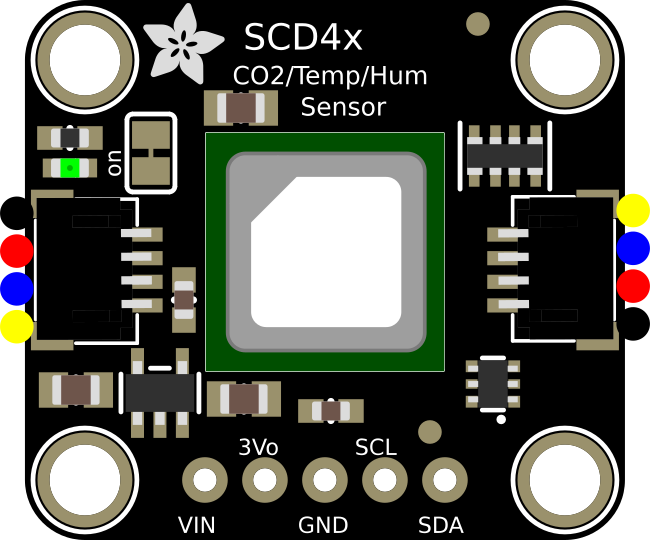
 Design with Adafruit SCD4x in Cirkit Designer
Introduction
The Adafruit SCD4x is a high-precision digital sensor designed for measuring carbon dioxide (CO2) concentration, temperature, and humidity. It leverages non-dispersive infrared (NDIR) sensing technology to provide accurate and reliable measurements. This compact sensor is ideal for applications such as indoor air quality monitoring, HVAC systems, greenhouses, and other environmental monitoring systems.
Explore Projects Built with Adafruit SCD4x
 Open Project in Cirkit Designer
 Open Project in Cirkit Designer
 Open Project in Cirkit Designer
 Open Project in Cirkit Designer
Explore Projects Built with Adafruit SCD4x
Open Project in Cirkit DesignerOpen Project in Cirkit DesignerOpen Project in Cirkit DesignerOpen Project in Cirkit DesignerCommon Applications:
- Indoor air quality monitoring
- HVAC (Heating, Ventilation, and Air Conditioning) systems
- Greenhouse and agricultural monitoring
- Industrial safety and environmental control
- IoT (Internet of Things) devices for environmental sensing
Technical Specifications
The Adafruit SCD4x sensor offers robust performance and a compact design. Below are its key technical details:
Key Specifications:
| Parameter | Value |
|---|---|
| CO2 Measurement Range | 400 ppm to 5,000 ppm |
| CO2 Accuracy | ±(40 ppm + 5% of reading) |
| Temperature Accuracy | ±0.8°C |
| Humidity Accuracy | ±5% RH |
| Operating Voltage | 2.4V to 5.5V |
| Interface | I2C |
| Power Consumption | 2 mA (typical) |
| Dimensions | 10.1 mm x 10.1 mm x 6.5 mm |
Pin Configuration:
The Adafruit SCD4x sensor has the following pinout:
| Pin Name | Description |
|---|---|
| VIN | Power supply input (2.4V to 5.5V) |
| GND | Ground |
| SCL | I2C clock line |
| SDA | I2C data line |
Usage Instructions
The Adafruit SCD4x is easy to integrate into a circuit using its I2C interface. Below are the steps to use the sensor effectively:
Connecting the Sensor:
- Power Supply: Connect the VIN pin to a 3.3V or 5V power source and the GND pin to ground.
- I2C Interface: Connect the SCL pin to the I2C clock line and the SDA pin to the I2C data line of your microcontroller.
- Pull-up Resistors: Ensure that the I2C lines (SCL and SDA) have appropriate pull-up resistors (typically 4.7kΩ).
Using with Arduino UNO:
The Adafruit SCD4x is compatible with Arduino boards. Below is an example of how to use the sensor with an Arduino UNO:
Required Libraries:
- Install the
Adafruit_SCD4xlibrary from the Arduino Library Manager. - Install the
Adafruit_Sensorlibrary for additional functionality.
Example Code:
#include <Wire.h>
#include "Adafruit_SCD4x.h"

// Create an instance of the SCD4x sensor
Adafruit_SCD4x scd4x;

void setup() {
  Serial.begin(115200);
  while (!Serial) delay(10); // Wait for Serial Monitor to open

  Serial.println("Adafruit SCD4x Test");

  // Initialize the sensor
  if (!scd4x.begin()) {
    Serial.println("Failed to find SCD4x sensor!");
    while (1) delay(10);
  }
  Serial.println("SCD4x sensor found!");

  // Start periodic measurement
  if (!scd4x.startPeriodicMeasurement()) {
    Serial.println("Failed to start periodic measurement!");
    while (1) delay(10);
  }
}

void loop() {
  delay(5000); // Wait 5 seconds between readings

  // Read sensor data
  float co2, temperature, humidity;
  if (scd4x.getEvent(&co2, &temperature, &humidity)) {
    Serial.print("CO2: ");
    Serial.print(co2);
    Serial.println(" ppm");

    Serial.print("Temperature: ");
    Serial.print(temperature);
    Serial.println(" °C");

    Serial.print("Humidity: ");
    Serial.print(humidity);
    Serial.println(" %RH");
  } else {
    Serial.println("Failed to read data from SCD4x sensor!");
  }
}
Important Considerations:
- I2C Address: The default I2C address of the SCD4x is
0x62. Ensure no other devices on the I2C bus conflict with this address. - Warm-Up Time: Allow the sensor to warm up for a few seconds after powering it on for accurate readings.
- Ventilation: Ensure proper airflow around the sensor for accurate CO2, temperature, and humidity measurements.
Troubleshooting and FAQs
Common Issues:
Sensor Not Detected:
- Ensure the I2C connections (SCL and SDA) are correct.
- Verify that the pull-up resistors are properly connected.
- Check the power supply voltage (2.4V to 5.5V).
Inaccurate Readings:
- Allow the sensor to warm up for at least 5 seconds after power-up.
- Ensure the sensor is not exposed to extreme environmental conditions (e.g., high humidity or temperature).
I2C Communication Errors:
- Verify the I2C address (
0x62) and ensure no conflicts with other devices. - Check for loose or faulty wiring.
- Verify the I2C address (
FAQs:
Q: Can the SCD4x measure CO2 levels below 400 ppm?
A: No, the SCD4x is designed to measure CO2 concentrations in the range of 400 ppm to 5,000 ppm.
Q: Can I use the SCD4x with a 5V microcontroller?
A: Yes, the SCD4x supports an operating voltage range of 2.4V to 5.5V, making it compatible with both 3.3V and 5V systems.
Q: How often should I calibrate the sensor?
A: The SCD4x features automatic self-calibration. However, for optimal performance, ensure the sensor is exposed to fresh air periodically.
Q: Can the sensor operate in high humidity environments?
A: Yes, the SCD4x is designed to operate in environments with up to 95% relative humidity. However, prolonged exposure to condensation should be avoided.
By following this documentation, you can effectively integrate and use the Adafruit SCD4x sensor in your projects.