
How to Use Lithium Battery : Examples, Pinouts, and Specs
 Design with Lithium Battery in Cirkit Designer
Introduction
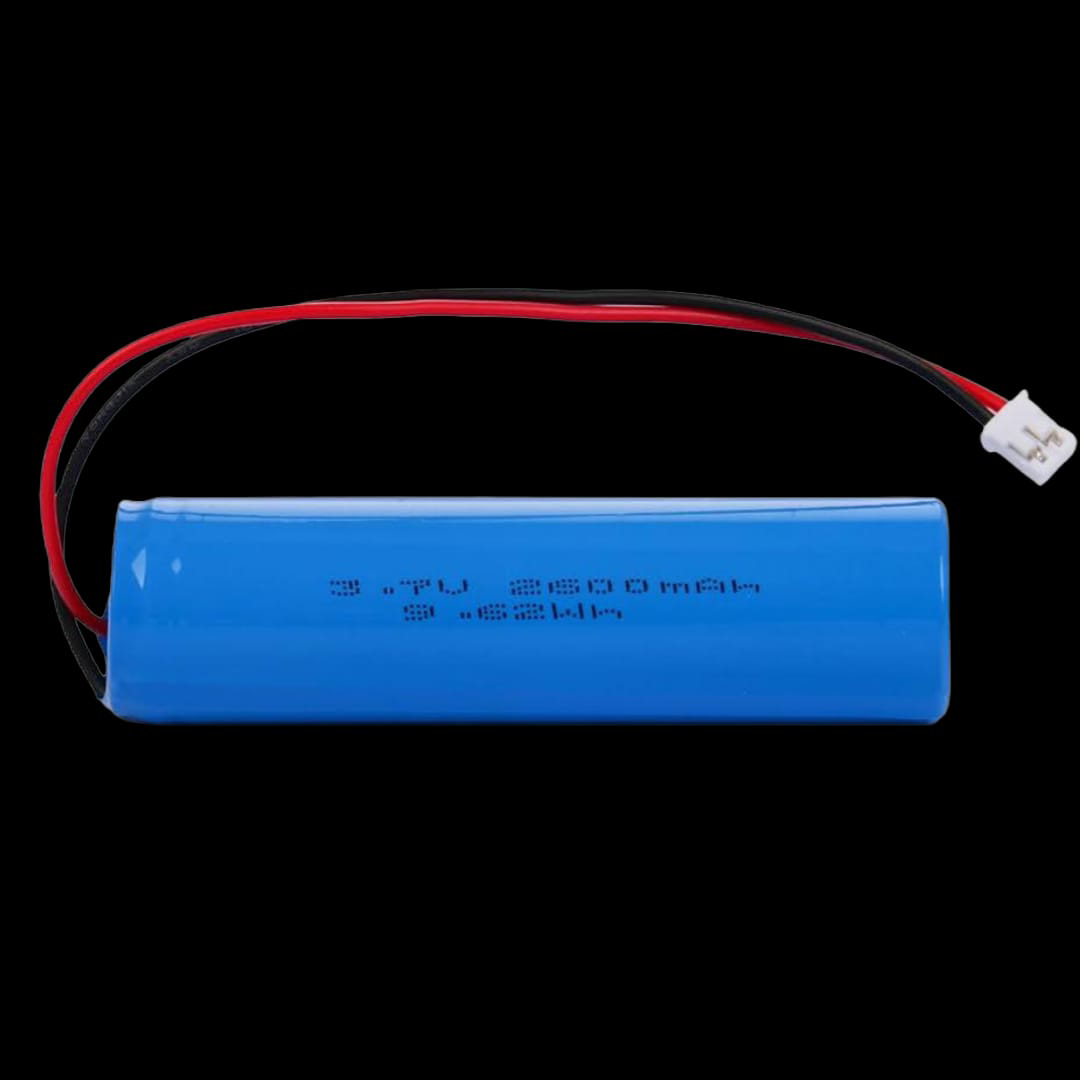
The Lithium Battery (Manufacturer: JTES, Part ID: JTESC00011) is a rechargeable power source that utilizes lithium-ion technology to store and release energy. Known for its high energy density, lightweight design, and long cycle life, this battery is widely used in various electronic applications. It is an ideal choice for portable devices, electric vehicles, and renewable energy systems.
Explore Projects Built with Lithium Battery
 Open Project in Cirkit Designer
 Open Project in Cirkit Designer
 Open Project in Cirkit Designer
 Open Project in Cirkit Designer
Explore Projects Built with Lithium Battery
Open Project in Cirkit DesignerOpen Project in Cirkit DesignerOpen Project in Cirkit DesignerOpen Project in Cirkit DesignerCommon Applications and Use Cases
- Consumer Electronics: Smartphones, laptops, tablets, and cameras.
- Electric Vehicles (EVs): Powering electric cars, scooters, and bicycles.
- Renewable Energy Systems: Energy storage for solar panels and wind turbines.
- IoT Devices: Sensors, trackers, and other low-power devices.
- Robotics: Powering motors and control systems in robots.
Technical Specifications
The following table outlines the key technical details of the JTES Lithium Battery (JTESC00011):
| Parameter | Value |
|---|---|
| Nominal Voltage | 3.7V |
| Capacity | 2000mAh |
| Maximum Charge Voltage | 4.2V |
| Discharge Cut-off Voltage | 2.5V |
| Maximum Discharge Current | 2A |
| Charging Current | 1A (Standard), 2A (Maximum) |
| Energy Density | 250 Wh/kg |
| Operating Temperature | -20°C to 60°C |
| Cycle Life | ≥ 500 cycles |
| Dimensions | 18mm (Diameter) x 65mm (Length) |
| Weight | 45g |
Pin Configuration and Descriptions
The JTES Lithium Battery typically has two terminals:
| Pin | Label | Description |
|---|---|---|
| 1 | Positive (+) | The positive terminal for charging/discharging. |
| 2 | Negative (-) | The negative terminal for charging/discharging. |
Note: Ensure proper polarity when connecting the battery to avoid damage.
Usage Instructions
How to Use the Component in a Circuit
Connection:
- Connect the positive terminal of the battery to the positive input of your circuit.
- Connect the negative terminal to the ground (GND) of your circuit.
- Use a battery holder or soldered connections for secure mounting.
Charging:
- Use a dedicated lithium-ion battery charger with a constant current/constant voltage (CC/CV) charging profile.
- Ensure the charging voltage does not exceed 4.2V and the charging current is within the specified range (1A standard, 2A maximum).
Discharging:
- Do not allow the battery voltage to drop below 2.5V to prevent damage.
- Use a protection circuit module (PCM) or battery management system (BMS) to monitor and protect the battery during operation.
Safety Precautions:
- Avoid short-circuiting the terminals.
- Do not expose the battery to fire, water, or extreme temperatures.
- Store the battery in a cool, dry place when not in use.
Example: Connecting to an Arduino UNO
The JTES Lithium Battery can be used to power an Arduino UNO via its VIN pin. Below is an example circuit and code:
Circuit:
- Connect the positive terminal of the battery to the VIN pin of the Arduino UNO.
- Connect the negative terminal to the GND pin of the Arduino UNO.
- Use a 5V voltage regulator if the battery voltage exceeds the Arduino's input voltage range.
Code:
// Example code to blink an LED using an Arduino UNO powered by a lithium battery
// Ensure the battery voltage is regulated to avoid damaging the Arduino

const int ledPin = 13; // Pin connected to the onboard LED

void setup() {
  pinMode(ledPin, OUTPUT); // Set the LED pin as an output
}

void loop() {
  digitalWrite(ledPin, HIGH); // Turn the LED on
  delay(1000);                // Wait for 1 second
  digitalWrite(ledPin, LOW);  // Turn the LED off
  delay(1000);                // Wait for 1 second
}
Important Considerations and Best Practices
- Always use a protection circuit to prevent overcharging, over-discharging, and short circuits.
- Avoid puncturing or physically damaging the battery.
- Dispose of the battery responsibly according to local regulations.
Troubleshooting and FAQs
Common Issues and Solutions
| Issue | Possible Cause | Solution |
|---|---|---|
| Battery not charging | Charger not compatible or faulty | Use a charger designed for lithium-ion batteries with CC/CV charging profile. |
| Battery overheating during use | Excessive current draw or short circuit | Reduce the load or check for short circuits in the circuit. |
| Rapid capacity loss | Overcharging or deep discharging | Use a protection circuit and avoid exceeding voltage limits. |
| Battery not powering the circuit | Incorrect polarity or loose connections | Verify polarity and ensure secure connections. |
FAQs
Can I use this battery in series or parallel configurations?
- Yes, but ensure all batteries are of the same type, capacity, and charge level. Use a BMS for safety.
How do I know when the battery is fully charged?
- The charger will typically indicate full charge when the current drops to a minimal level at 4.2V.
What happens if the battery is over-discharged?
- Over-discharging can permanently damage the battery. Use a PCM or BMS to prevent this.
Can I use this battery in extreme temperatures?
- The battery operates best between -20°C and 60°C. Avoid using it outside this range to prevent performance degradation.
By following this documentation, users can safely and effectively integrate the JTES Lithium Battery (JTESC00011) into their projects.