
How to Use Load Cell Amplifier: Examples, Pinouts, and Specs
 Design with Load Cell Amplifier in Cirkit Designer
Introduction
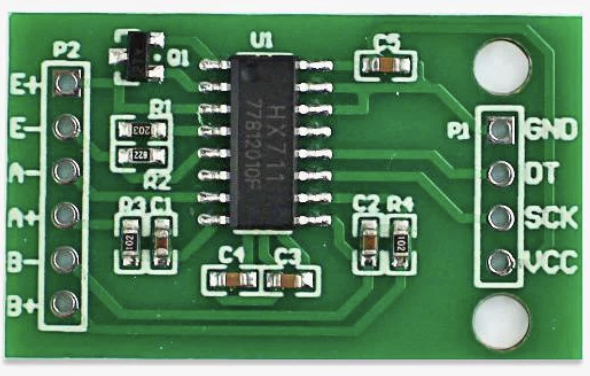
A Load Cell Amplifier is an electronic device designed to amplify the small electrical signals generated by a load cell, which measures weight or force. Load cells typically produce millivolt-level signals that are too weak to be directly processed by most microcontrollers or data acquisition systems. The amplifier boosts these signals to a more usable voltage range, enabling accurate measurement and processing.
Explore Projects Built with Load Cell Amplifier
 Open Project in Cirkit Designer
 Open Project in Cirkit Designer
 Open Project in Cirkit Designer
 Open Project in Cirkit Designer
Explore Projects Built with Load Cell Amplifier
Open Project in Cirkit DesignerOpen Project in Cirkit DesignerOpen Project in Cirkit DesignerOpen Project in Cirkit DesignerCommon Applications and Use Cases
- Digital weighing scales
- Industrial force measurement systems
- Robotics and automation for weight sensing
- Laboratory testing equipment
- IoT-based weight monitoring systems
Technical Specifications
Below are the typical technical specifications for a Load Cell Amplifier. Note that actual values may vary depending on the specific model.
| Parameter | Specification |
|---|---|
| Input Voltage Range | 3.3V to 5V DC |
| Output Voltage Range | 0V to 5V (or proportional to input signal) |
| Gain | Adjustable (e.g., 64x, 128x) |
| Input Signal Range | ±20mV (typical for load cells) |
| Operating Temperature | -40°C to 85°C |
| Communication Interface | Analog output or digital (e.g., I2C/SPI) |
Pin Configuration and Descriptions
The following table describes the pinout for a common Load Cell Amplifier module, such as the HX711:
| Pin Name | Description |
|---|---|
| VCC | Power supply input (3.3V or 5V DC) |
| GND | Ground connection |
| DT (Data) | Digital data output (used for communication with microcontrollers) |
| SCK (Clock) | Serial clock input (used for synchronizing data communication) |
| E+ | Positive excitation voltage for the load cell |
| E- | Negative excitation voltage for the load cell |
| A+ | Positive signal input from the load cell |
| A- | Negative signal input from the load cell |
Usage Instructions
How to Use the Load Cell Amplifier in a Circuit
- Connect the Load Cell:
- Attach the load cell wires to the amplifier's input pins (A+, A-, E+, E-). Ensure proper polarity.
- Power the Amplifier:
- Connect the VCC pin to a 3.3V or 5V power source and the GND pin to ground.
- Interface with a Microcontroller:
- Connect the DT and SCK pins to the corresponding digital pins on your microcontroller.
- Calibrate the System:
- Perform a calibration routine to map the amplifier's output to actual weight or force values.
Important Considerations and Best Practices
- Shielded Cables: Use shielded cables for the load cell connections to minimize noise.
- Stable Power Supply: Ensure a stable and noise-free power supply for accurate measurements.
- Temperature Effects: Be aware that temperature changes can affect load cell readings; consider temperature compensation if needed.
- Gain Adjustment: Adjust the amplifier's gain setting to match the sensitivity of your load cell.
Example: Using the HX711 Load Cell Amplifier with Arduino UNO
Below is an example Arduino sketch for interfacing the HX711 Load Cell Amplifier with an Arduino UNO:
#include "HX711.h" // Include the HX711 library

// Define the pins connected to the HX711 module
#define DT_PIN 3  // Data pin connected to Arduino digital pin 3
#define SCK_PIN 2 // Clock pin connected to Arduino digital pin 2

HX711 scale; // Create an instance of the HX711 class

void setup() {
  Serial.begin(9600); // Initialize serial communication at 9600 baud
  scale.begin(DT_PIN, SCK_PIN); // Initialize the HX711 with the defined pins

  Serial.println("Calibrating... Place a known weight on the scale.");
  delay(5000); // Wait for 5 seconds to allow calibration
  scale.set_scale(); // Set the scale to default calibration factor
  scale.tare(); // Reset the scale to zero
  Serial.println("Calibration complete.");
}

void loop() {
  // Read the weight from the load cell
  float weight = scale.get_units(10); // Average 10 readings for stability
  Serial.print("Weight: ");
  Serial.print(weight);
  Serial.println(" kg"); // Display the weight in kilograms

  delay(1000); // Wait 1 second before the next reading
}
Notes:
- Install the HX711 library in the Arduino IDE before uploading the code.
- Replace
scale.set_scale()with a calibration factor specific to your load cell for accurate readings.
Troubleshooting and FAQs
Common Issues and Solutions
No Output or Incorrect Readings:
- Verify all connections, especially the load cell wiring.
- Ensure the power supply voltage matches the amplifier's requirements.
- Check for loose or damaged wires.
Fluctuating or Noisy Readings:
- Use shielded cables to reduce electromagnetic interference.
- Place the load cell on a stable surface to avoid vibrations.
- Add a capacitor across the power supply pins to filter noise.
Calibration Problems:
- Ensure the load cell is unloaded during the tare process.
- Use a precise known weight for calibration.
FAQs
Q: Can I use a 3.3V microcontroller with the Load Cell Amplifier?
A: Yes, most amplifiers like the HX711 support both 3.3V and 5V logic levels.
Q: How do I determine the calibration factor for my load cell?
A: Place a known weight on the load cell, read the raw output, and calculate the factor by dividing the known weight by the raw value.
Q: Can I connect multiple load cells to a single amplifier?
A: No, most amplifiers are designed for a single load cell. Use a summing junction or a multi-channel amplifier for multiple load cells.
Q: What is the maximum weight my load cell can measure?
A: This depends on the load cell's rated capacity. Check the load cell's datasheet for details.