
How to Use RockBlock 9603 : Examples, Pinouts, and Specs
 Design with RockBlock 9603 in Cirkit Designer
Introduction
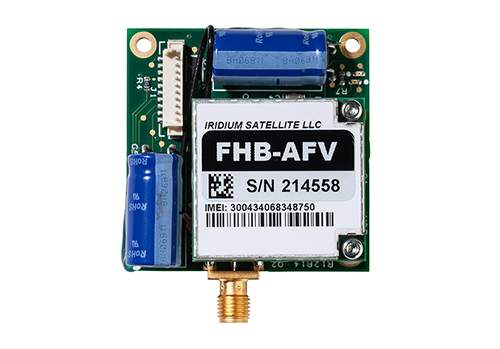
The RockBlock 9603, manufactured by Ground Control, is a compact satellite modem designed for low-power, two-way communication via the Iridium satellite network. This device enables remote devices to send and receive data from virtually anywhere on the planet, making it an essential component for IoT applications in remote or challenging environments.
Explore Projects Built with RockBlock 9603
 Open Project in Cirkit Designer
 Open Project in Cirkit Designer
 Open Project in Cirkit Designer
 Open Project in Cirkit Designer
Explore Projects Built with RockBlock 9603
Open Project in Cirkit DesignerOpen Project in Cirkit DesignerOpen Project in Cirkit DesignerOpen Project in Cirkit DesignerCommon Applications and Use Cases
- Remote monitoring and control of IoT devices in agriculture, maritime, and energy sectors.
- Asset tracking in remote or mobile environments.
- Emergency communication systems in disaster-prone areas.
- Scientific research in remote locations, such as polar regions or deserts.
- Environmental monitoring, including weather stations and wildlife tracking.
Technical Specifications
The RockBlock 9603 is designed to be compact, efficient, and reliable. Below are its key technical details:
General Specifications
| Parameter | Value |
|---|---|
| Dimensions | 45 x 45 x 15 mm |
| Weight | 23 grams |
| Power Supply Voltage | 5V DC (regulated) |
| Average Power Consumption | 0.5W (idle), 1.6W (transmitting) |
| Operating Temperature | -40°C to +85°C |
| Communication Protocol | AT Commands over UART |
| Network | Iridium Satellite Network |
Pin Configuration and Descriptions
The RockBlock 9603 uses a 10-pin Molex connector for interfacing. Below is the pinout:
| Pin Number | Name | Description |
|---|---|---|
| 1 | GND | Ground |
| 2 | VCC | 5V DC Power Supply |
| 3 | TXD | UART Transmit (to host device) |
| 4 | RXD | UART Receive (from host device) |
| 5 | CTS | Clear to Send (flow control) |
| 6 | RTS | Request to Send (flow control) |
| 7 | RING | Incoming call/message notification |
| 8 | NETAVAIL | Network availability indicator |
| 9 | SLEEP | Sleep mode control |
| 10 | RESERVED | Reserved for future use |
Usage Instructions
The RockBlock 9603 is straightforward to integrate into a circuit. Below are the steps and best practices for using the device:
Connecting the RockBlock 9603
- Power Supply: Ensure a stable 5V DC power supply is available. Connect the VCC pin to the 5V source and the GND pin to ground.
- UART Communication: Connect the TXD and RXD pins to the UART pins of your microcontroller or computer. Use CTS and RTS for hardware flow control if required.
- Antenna: Attach an Iridium-certified antenna to the SMA connector for satellite communication.
- Network Availability: Monitor the NETAVAIL pin to check if the device is connected to the Iridium network.
Important Considerations
- Antenna Placement: Ensure the antenna has a clear view of the sky for optimal satellite connectivity.
- Power Management: Use the SLEEP pin to reduce power consumption when the device is idle.
- AT Commands: Communicate with the RockBlock 9603 using AT commands over UART. Refer to the manufacturer's AT command guide for detailed instructions.
Example: Using RockBlock 9603 with Arduino UNO
Below is an example of how to interface the RockBlock 9603 with an Arduino UNO:
#include <SoftwareSerial.h>

// Define RX and TX pins for SoftwareSerial
SoftwareSerial rockBlockSerial(10, 11); // RX = pin 10, TX = pin 11

void setup() {
  Serial.begin(9600); // Initialize Serial Monitor
  rockBlockSerial.begin(19200); // Initialize RockBlock UART communication

  Serial.println("RockBlock 9603 Test");
  delay(1000);

  // Send an AT command to check communication
  rockBlockSerial.println("AT");
}

void loop() {
  // Check for data from RockBlock
  if (rockBlockSerial.available()) {
    String response = rockBlockSerial.readString();
    Serial.println("RockBlock Response: " + response);
  }

  // Check for user input from Serial Monitor
  if (Serial.available()) {
    String command = Serial.readString();
    rockBlockSerial.println(command); // Send command to RockBlock
  }
}
Note: Ensure the RockBlock 9603 is connected to the Arduino UNO as follows:
- TXD (RockBlock) → Pin 10 (Arduino RX)
- RXD (RockBlock) → Pin 11 (Arduino TX)
- VCC → 5V
- GND → GND
Troubleshooting and FAQs
Common Issues and Solutions
No Response to AT Commands
- Ensure the RockBlock 9603 is powered correctly (5V DC).
- Verify the UART connections (TXD, RXD) and baud rate (default: 19200).
- Check if the antenna is securely connected and has a clear view of the sky.
Network Unavailable
- Confirm the NETAVAIL pin status. If low, the device is not connected to the Iridium network.
- Ensure the antenna is Iridium-certified and properly positioned.
High Power Consumption
- Use the SLEEP pin to enable low-power mode when the device is idle.
- Check for any short circuits or incorrect wiring.
Data Transmission Fails
- Verify the AT command syntax and parameters.
- Ensure the device has an active subscription to the Iridium network.
FAQs
Q: Can the RockBlock 9603 be powered by a 3.3V source?
A: No, the RockBlock 9603 requires a regulated 5V DC power supply.
Q: What is the maximum data rate supported?
A: The RockBlock 9603 supports a maximum data rate of 2.4 kbps for uplink and downlink.
Q: Can I use the RockBlock 9603 indoors?
A: The device requires a clear view of the sky for satellite communication. Indoor use may result in poor or no connectivity.
Q: Is the RockBlock 9603 waterproof?
A: No, the RockBlock 9603 is not waterproof. Use an appropriate enclosure for outdoor applications.
By following this documentation, users can effectively integrate and operate the RockBlock 9603 in their projects.