
How to Use DS-K2602T: Examples, Pinouts, and Specs
 Design with DS-K2602T in Cirkit Designer
Introduction
The DS-K2602T is a biometric access control terminal designed for secure and efficient entry management. It utilizes advanced fingerprint recognition technology to ensure high levels of security. This device supports multiple authentication methods, including fingerprint, card, and PIN, making it versatile for various applications. Its user-friendly interface and robust integration capabilities allow seamless operation with existing security systems.
Explore Projects Built with DS-K2602T
 Open Project in Cirkit Designer
 Open Project in Cirkit Designer
 Open Project in Cirkit Designer
 Open Project in Cirkit Designer
Explore Projects Built with DS-K2602T
Open Project in Cirkit DesignerOpen Project in Cirkit DesignerOpen Project in Cirkit DesignerOpen Project in Cirkit DesignerCommon Applications and Use Cases
- Office buildings and corporate environments for employee access control
- Residential complexes for secure entry management
- Educational institutions to monitor and control access to restricted areas
- Industrial facilities requiring multi-layered security
- Integration with larger security systems for comprehensive access management
Technical Specifications
Key Technical Details
| Parameter | Specification |
|---|---|
| Power Supply | 12 V DC ± 10% |
| Power Consumption | ≤ 10 W |
| Fingerprint Capacity | 3,000 templates |
| Card Capacity | 100,000 cards |
| Log Capacity | 300,000 events |
| Communication Interface | TCP/IP, RS-485 |
| Authentication Methods | Fingerprint, Card, PIN, or combinations |
| Operating Temperature | -10°C to 55°C (14°F to 131°F) |
| Operating Humidity | 10% to 90% (non-condensing) |
| Dimensions | 200 mm × 90 mm × 35 mm |
Pin Configuration and Descriptions
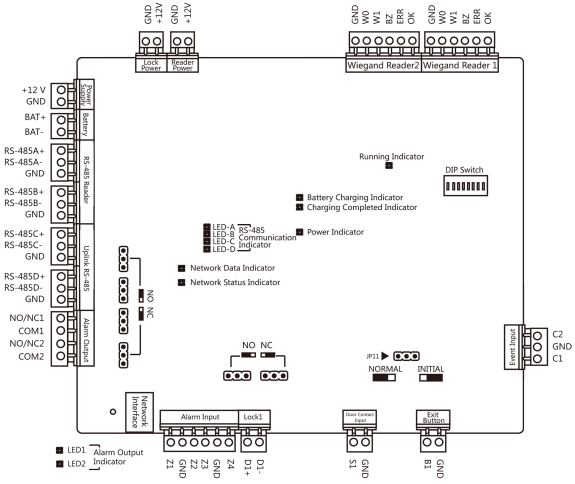
The DS-K2602T features a terminal block for wiring connections. Below is the pin configuration:
| Pin Number | Label | Description |
|---|---|---|
| 1 | GND | Ground connection |
| 2 | 12V | Power supply input (12 V DC) |
| 3 | RS485+ | RS-485 communication line (positive) |
| 4 | RS485- | RS-485 communication line (negative) |
| 5 | Wiegand D0 | Wiegand data line 0 |
| 6 | Wiegand D1 | Wiegand data line 1 |
| 7 | IN1 | Input signal 1 (e.g., door sensor) |
| 8 | OUT1 | Output signal 1 (e.g., door lock) |
Usage Instructions
How to Use the DS-K2602T in a Circuit
- Power Connection: Connect the
12Vpin to a 12 V DC power supply and theGNDpin to ground. - Communication Setup: Use the
RS485+andRS485-pins for RS-485 communication or connect the device to a network via TCP/IP. - Peripheral Integration:
- Connect door sensors to the
IN1pin. - Connect door locks or alarms to the
OUT1pin.
- Connect door sensors to the
- Authentication Configuration:
- Enroll fingerprints, cards, or PINs using the device's interface or management software.
- Configure authentication modes (e.g., fingerprint-only, card + PIN) as required.
Important Considerations and Best Practices
- Ensure the power supply is stable and within the specified range (12 V DC ± 10%).
- Avoid exposing the device to extreme temperatures or humidity beyond the operating range.
- Regularly clean the fingerprint sensor to maintain accuracy.
- Use shielded cables for RS-485 communication to minimize interference.
- For enhanced security, enable multi-factor authentication (e.g., fingerprint + PIN).
Arduino UNO Integration Example
The DS-K2602T can communicate with an Arduino UNO via RS-485. Below is an example code snippet for interfacing:
#include <SoftwareSerial.h>

// Define RS-485 communication pins
#define RS485_RX 10  // Arduino pin connected to RS-485 receiver
#define RS485_TX 11  // Arduino pin connected to RS-485 transmitter

SoftwareSerial rs485(RS485_RX, RS485_TX); // Initialize software serial

void setup() {
  Serial.begin(9600); // Start serial communication with PC
  rs485.begin(9600);  // Start RS-485 communication

  Serial.println("DS-K2602T RS-485 Communication Initialized");
}

void loop() {
  // Check if data is available from the DS-K2602T
  if (rs485.available()) {
    String data = "";
    while (rs485.available()) {
      char c = rs485.read(); // Read a byte from RS-485
      data += c;
    }
    Serial.println("Received from DS-K2602T: " + data);
  }

  // Example: Send a command to the DS-K2602T
  if (Serial.available()) {
    String command = Serial.readString();
    rs485.print(command); // Send command via RS-485
    Serial.println("Command sent to DS-K2602T: " + command);
  }
}
Note: Use an RS-485 module to interface the Arduino UNO with the DS-K2602T. Ensure proper wiring between the module and the Arduino.
Troubleshooting and FAQs
Common Issues and Solutions
Device Not Powering On:
- Verify the power supply voltage is within the specified range (12 V DC ± 10%).
- Check the wiring connections for loose or incorrect connections.
Fingerprint Recognition Fails:
- Ensure the fingerprint sensor is clean and free of debris.
- Re-enroll the fingerprint if recognition issues persist.
Communication Failure:
- Confirm the RS-485 or TCP/IP connections are secure.
- Check the baud rate and communication settings in the management software.
Door Lock Not Activating:
- Verify the wiring between the
OUT1pin and the door lock. - Ensure the door lock is functioning correctly and receiving power.
- Verify the wiring between the
FAQs
Q1: Can the DS-K2602T be used outdoors?
A1: The DS-K2602T is not weatherproof. Use it indoors or in a protected environment.
Q2: How many users can the device support?
A2: The device supports up to 3,000 fingerprint templates and 100,000 card users.
Q3: Can I integrate the DS-K2602T with third-party security systems?
A3: Yes, the device supports Wiegand and RS-485 protocols for integration with third-party systems.
Q4: What happens if the power supply is interrupted?
A4: The DS-K2602T retains user data and logs in non-volatile memory, ensuring no data loss during power outages.