
How to Use AC-DC power converter: Examples, Pinouts, and Specs
 Design with AC-DC power converter in Cirkit Designer
Introduction
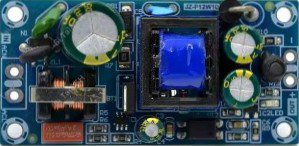
The AC-DC Power Converter (Manufacturer Part ID: 120V-AC to 5V-DC) by AliExpress is a compact and efficient device designed to convert alternating current (AC) from a standard power outlet into direct current (DC) suitable for powering electronic devices. This component is widely used in power supply circuits for microcontrollers, sensors, and other low-power electronic systems.
Explore Projects Built with AC-DC power converter
 Open Project in Cirkit Designer
 Open Project in Cirkit Designer
 Open Project in Cirkit Designer
 Open Project in Cirkit Designer
Explore Projects Built with AC-DC power converter
Open Project in Cirkit DesignerOpen Project in Cirkit DesignerOpen Project in Cirkit DesignerOpen Project in Cirkit DesignerCommon Applications and Use Cases
- Powering microcontroller boards (e.g., Arduino, Raspberry Pi)
- Supplying DC voltage to sensors, relays, and other peripherals
- Charging USB-powered devices
- Embedded systems and IoT applications
- General-purpose DC power supplies for small electronic projects
Technical Specifications
The following table outlines the key technical details of the AC-DC Power Converter:
| Parameter | Specification |
|---|---|
| Input Voltage Range | 100V - 240V AC |
| Output Voltage | 5V DC |
| Output Current | 1A (maximum) |
| Power Rating | 5W |
| Efficiency | ≥ 80% |
| Operating Temperature | -20°C to +60°C |
| Dimensions | 50mm x 25mm x 20mm |
| Weight | 30g |
| Isolation Voltage | 3000V AC |
| Safety Standards | CE, RoHS compliant |
Pin Configuration and Descriptions
The AC-DC Power Converter typically has four pins or terminals for input and output connections. The table below describes each pin:
| Pin/Terminal | Label | Description |
|---|---|---|
| 1 | AC-L | Live wire input for AC voltage |
| 2 | AC-N | Neutral wire input for AC voltage |
| 3 | DC+ | Positive terminal for 5V DC output |
| 4 | DC- | Negative terminal (ground) for 5V DC output |
Usage Instructions
How to Use the Component in a Circuit
Input Connection:
- Connect the AC-L terminal to the live wire of the AC power source.
- Connect the AC-N terminal to the neutral wire of the AC power source.
- Ensure proper insulation and secure connections to avoid electrical hazards.
Output Connection:
- Connect the DC+ terminal to the positive input of your load (e.g., microcontroller, sensor).
- Connect the DC- terminal to the ground of your load.
Power On:
- Once all connections are secure, plug the AC source into a power outlet.
- The converter will output a stable 5V DC to power your device.
Important Considerations and Best Practices
- Safety First: Always handle AC connections with care. Ensure the power is turned off before making connections.
- Load Compatibility: Verify that the connected load does not exceed the maximum output current (1A).
- Heat Dissipation: If the converter operates near its maximum power rating, ensure adequate ventilation to prevent overheating.
- Polarity: Double-check the polarity of the DC output connections to avoid damaging your components.
- Testing: Use a multimeter to confirm the output voltage before connecting sensitive devices.
Example: Using with an Arduino UNO
The AC-DC Power Converter can be used to power an Arduino UNO. Below is an example circuit and code:
Circuit Setup
- Connect the DC+ terminal of the converter to the Arduino's 5V pin.
- Connect the DC- terminal of the converter to the Arduino's GND pin.
- Ensure the AC input is properly connected to a power outlet.
Sample Code
// Example code to blink an LED connected to pin 13 of the Arduino UNO
// Ensure the AC-DC converter is providing stable 5V DC to the Arduino

void setup() {
  pinMode(13, OUTPUT); // Set pin 13 as an output pin
}

void loop() {
  digitalWrite(13, HIGH); // Turn the LED on
  delay(1000);            // Wait for 1 second
  digitalWrite(13, LOW);  // Turn the LED off
  delay(1000);            // Wait for 1 second
}
Troubleshooting and FAQs
Common Issues and Solutions
No Output Voltage:
- Cause: Loose or incorrect connections.
- Solution: Double-check all input and output connections. Ensure the AC source is active.
Overheating:
- Cause: Operating near or beyond the maximum power rating.
- Solution: Reduce the load or improve ventilation around the converter.
Output Voltage Fluctuations:
- Cause: Unstable AC input or excessive load.
- Solution: Use a stable AC power source and ensure the load does not exceed 1A.
Device Not Powering On:
- Cause: Incorrect polarity or insufficient current.
- Solution: Verify the polarity of the DC output and ensure the load's current requirements are within the converter's limits.
FAQs
Q1: Can this converter be used outdoors?
A1: No, this converter is not weatherproof. Use it only in dry, indoor environments.
Q2: Can I use this to charge a smartphone?
A2: Yes, if the smartphone's charging current requirement is 1A or less. However, ensure proper connections and safety precautions.
Q3: What happens if I connect a load requiring more than 1A?
A3: The converter may overheat, shut down, or fail. Always ensure the load does not exceed the specified current rating.
Q4: Is the output voltage adjustable?
A4: No, this converter provides a fixed 5V DC output.
By following this documentation, you can safely and effectively use the AC-DC Power Converter in your electronic projects.