
How to Use Li-Po Battery 600 mAh: Examples, Pinouts, and Specs
 Design with Li-Po Battery 600 mAh in Cirkit Designer
Introduction
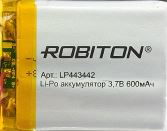
The Robiton Li-Po Battery 600 mAh is a lightweight and compact lithium polymer battery designed for portable electronic devices. With a capacity of 600 milliampere-hours (mAh), it provides a reliable power source for applications requiring high energy density and low weight. This battery is ideal for powering small devices such as drones, wearables, IoT devices, and handheld gadgets.
Explore Projects Built with Li-Po Battery 600 mAh
 Open Project in Cirkit Designer
 Open Project in Cirkit Designer
 Open Project in Cirkit Designer
 Open Project in Cirkit Designer
Explore Projects Built with Li-Po Battery 600 mAh
Open Project in Cirkit DesignerOpen Project in Cirkit DesignerOpen Project in Cirkit DesignerOpen Project in Cirkit DesignerCommon Applications
- Remote-controlled devices (e.g., drones, cars, and planes)
- Wearable electronics (e.g., fitness trackers, smartwatches)
- IoT devices and sensors
- Portable audio devices
- DIY electronics projects
Technical Specifications
Below are the key technical details of the Robiton Li-Po Battery 600 mAh:
| Parameter | Specification |
|---|---|
| Nominal Voltage | 3.7 V |
| Capacity | 600 mAh |
| Maximum Discharge Rate | 1C (600 mA) |
| Charging Voltage | 4.2 V ± 0.05 V |
| Charging Current | Standard: 0.2C (120 mA), Max: 0.5C (300 mA) |
| Dimensions | 40 mm x 20 mm x 5 mm (L x W x H) |
| Weight | ~12 grams |
| Connector Type | JST-PH 2.0 (2-pin) |
| Protection Circuit | Built-in overcharge and over-discharge protection |
Pin Configuration
The Robiton Li-Po Battery 600 mAh typically comes with a JST-PH 2.0 connector. Below is the pin configuration:
| Pin | Description |
|---|---|
| Pin 1 | Positive terminal (+) |
| Pin 2 | Negative terminal (-) |
Usage Instructions
How to Use the Battery in a Circuit
- Connection: Connect the battery to your circuit using the JST-PH 2.0 connector. Ensure the polarity matches the circuit's power input terminals (Pin 1: Positive, Pin 2: Negative).
- Charging: Use a Li-Po battery charger that supports 3.7 V batteries. Set the charging current to 0.2C (120 mA) for standard charging or up to 0.5C (300 mA) for faster charging.
- Discharge: Ensure the connected device does not draw more than the maximum discharge rate of 600 mA (1C). Exceeding this limit may damage the battery or reduce its lifespan.
Important Considerations and Best Practices
- Avoid Overcharging: Do not charge the battery above 4.2 V. Use a charger with overcharge protection.
- Avoid Over-Discharging: Do not let the battery voltage drop below 3.0 V, as this can permanently damage the battery.
- Temperature Range: Operate the battery within the temperature range of 0°C to 45°C for charging and -20°C to 60°C for discharging.
- Storage: Store the battery at 40-60% charge in a cool, dry place if not in use for an extended period.
- Safety: Do not puncture, short-circuit, or expose the battery to fire or water.
Example: Using the Battery with an Arduino UNO
To power an Arduino UNO with the Robiton Li-Po Battery 600 mAh, follow these steps:
- Connect the battery's positive terminal to the Arduino's VIN pin and the negative terminal to the GND pin.
- Ensure the battery voltage is within the Arduino's operating range (7-12 V). If necessary, use a step-up converter to boost the 3.7 V to 9 V.
Sample Code for Monitoring Battery Voltage
You can use the Arduino's analog input to monitor the battery voltage. Below is an example:
// Define the analog pin connected to the battery voltage divider
const int batteryPin = A0;

// Define the voltage divider ratio (e.g., 10k and 10k resistors)
const float voltageDividerRatio = 2.0;

// Reference voltage of the Arduino (5V for most boards)
const float referenceVoltage = 5.0;

void setup() {
  Serial.begin(9600); // Initialize serial communication
}

void loop() {
  int sensorValue = analogRead(batteryPin); // Read the analog value
  float batteryVoltage = (sensorValue / 1023.0) * referenceVoltage * voltageDividerRatio;

  // Print the battery voltage to the Serial Monitor
  Serial.print("Battery Voltage: ");
  Serial.print(batteryVoltage);
  Serial.println(" V");

  delay(1000); // Wait for 1 second before the next reading
}
Note: Use a voltage divider circuit to scale down the battery voltage to a safe range for the Arduino's analog input (0-5 V).
Troubleshooting and FAQs
Common Issues and Solutions
Battery Not Charging
- Cause: Faulty charger or incorrect charging voltage.
- Solution: Verify the charger is designed for 3.7 V Li-Po batteries and outputs 4.2 V ± 0.05 V.
Battery Drains Quickly
- Cause: Excessive current draw or degraded battery capacity.
- Solution: Ensure the connected device does not exceed the maximum discharge rate (600 mA). Replace the battery if it has reached the end of its lifespan.
Battery Swells or Overheats
- Cause: Overcharging, over-discharging, or physical damage.
- Solution: Stop using the battery immediately. Dispose of it safely according to local regulations.
Arduino Not Powering On
- Cause: Insufficient voltage or incorrect connection.
- Solution: Use a step-up converter to boost the battery voltage to 9 V. Double-check the polarity of the connections.
FAQs
Q: Can I use this battery for high-current applications?
A: No, this battery is designed for a maximum discharge rate of 600 mA. For high-current applications, consider a battery with a higher capacity and discharge rate.Q: How long will the battery last on a full charge?
A: The runtime depends on the load current. For example, at a 300 mA load, the battery will last approximately 2 hours (600 mAh ÷ 300 mA).Q: Is the battery safe to use without a protection circuit?
A: The Robiton Li-Po Battery 600 mAh includes a built-in protection circuit to prevent overcharging and over-discharging, making it safe for most applications.Q: Can I connect multiple batteries in series or parallel?
A: Yes, but ensure proper balancing and use a battery management system (BMS) to avoid overcharging or over-discharging individual cells.