
How to Use WS2812B 5050SMD RGB: Examples, Pinouts, and Specs
 Design with WS2812B 5050SMD RGB in Cirkit Designer
Introduction
The WS2812B 5050SMD RGB, manufactured by BTF-LIGHTING, is a smart RGB LED that integrates a control circuit and RGB chip into a single 5050-sized package. This component allows for individually addressable color control and brightness adjustment, making it a versatile choice for a wide range of lighting applications. The WS2812B is widely used in decorative lighting, LED displays, signage, and creative projects requiring dynamic and customizable lighting effects.
Explore Projects Built with WS2812B 5050SMD RGB
 Open Project in Cirkit Designer
 Open Project in Cirkit Designer
 Open Project in Cirkit Designer
 Open Project in Cirkit Designer
Explore Projects Built with WS2812B 5050SMD RGB
Open Project in Cirkit DesignerOpen Project in Cirkit DesignerOpen Project in Cirkit DesignerOpen Project in Cirkit DesignerCommon Applications
- Decorative lighting for homes, events, and holidays
- LED displays and signage
- Wearable electronics and art installations
- Gaming peripherals and PC case lighting
- IoT-based smart lighting systems
Technical Specifications
The WS2812B is a highly efficient and compact RGB LED with the following key specifications:
| Parameter | Value |
|---|---|
| Operating Voltage | 3.5V to 5.3V |
| Recommended Voltage | 5V |
| Maximum Current (per LED) | ~60mA (at full brightness, white) |
| Communication Protocol | Single-wire serial (NRZ) |
| Data Transfer Rate | 800 Kbps |
| LED Package Size | 5050 (5mm x 5mm) |
| Viewing Angle | 120° |
| Operating Temperature | -25°C to +80°C |
Pin Configuration
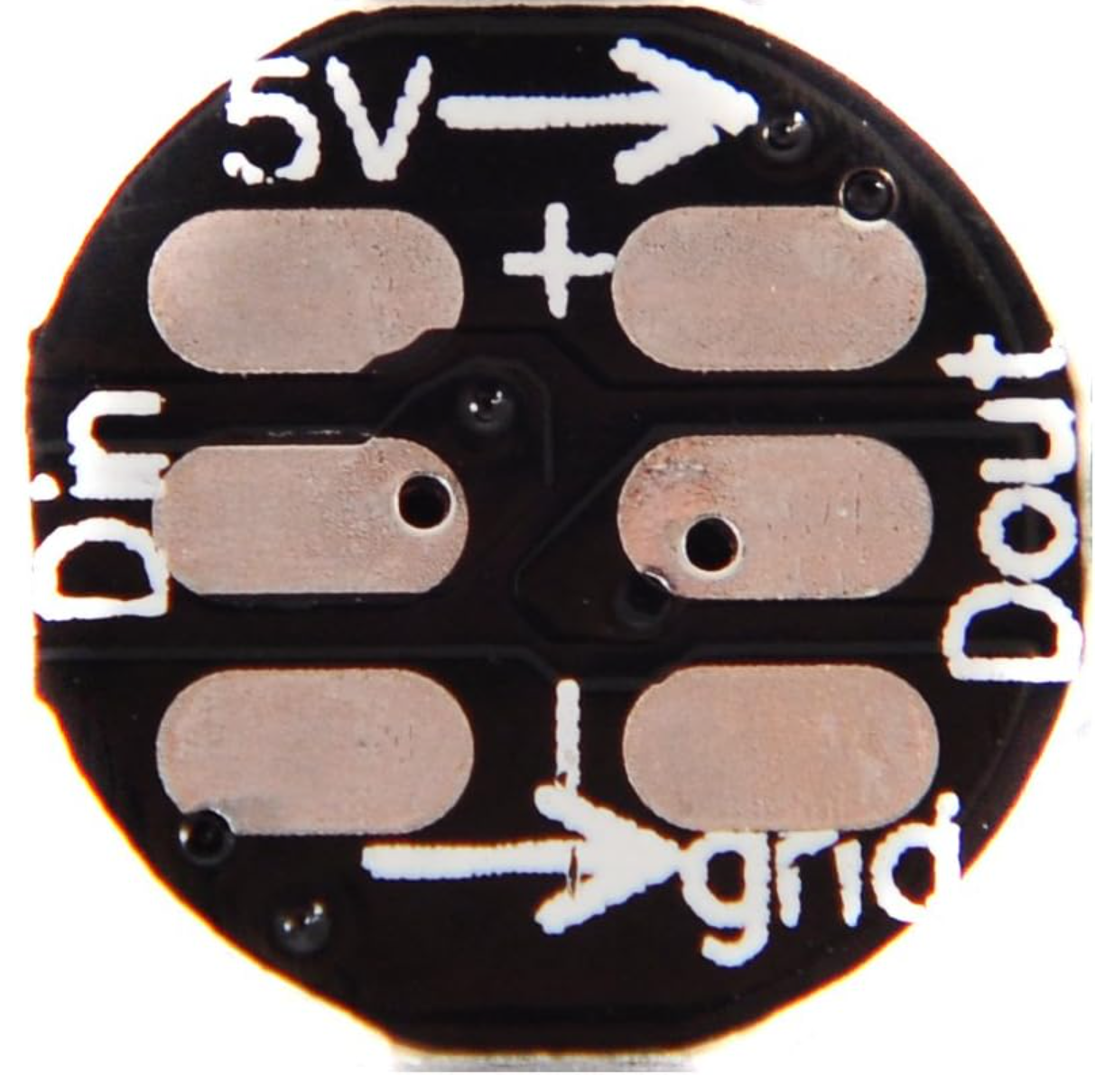
The WS2812B has three pins for operation. Below is the pinout description:
| Pin Name | Pin Number | Description |
|---|---|---|
| VDD | 1 | Power supply input (3.5V to 5.3V) |
| DOUT | 2 | Data output for chaining multiple LEDs |
| DIN | 3 | Data input for receiving control signals |
| GND | 4 | Ground connection |
Usage Instructions
How to Use the WS2812B in a Circuit
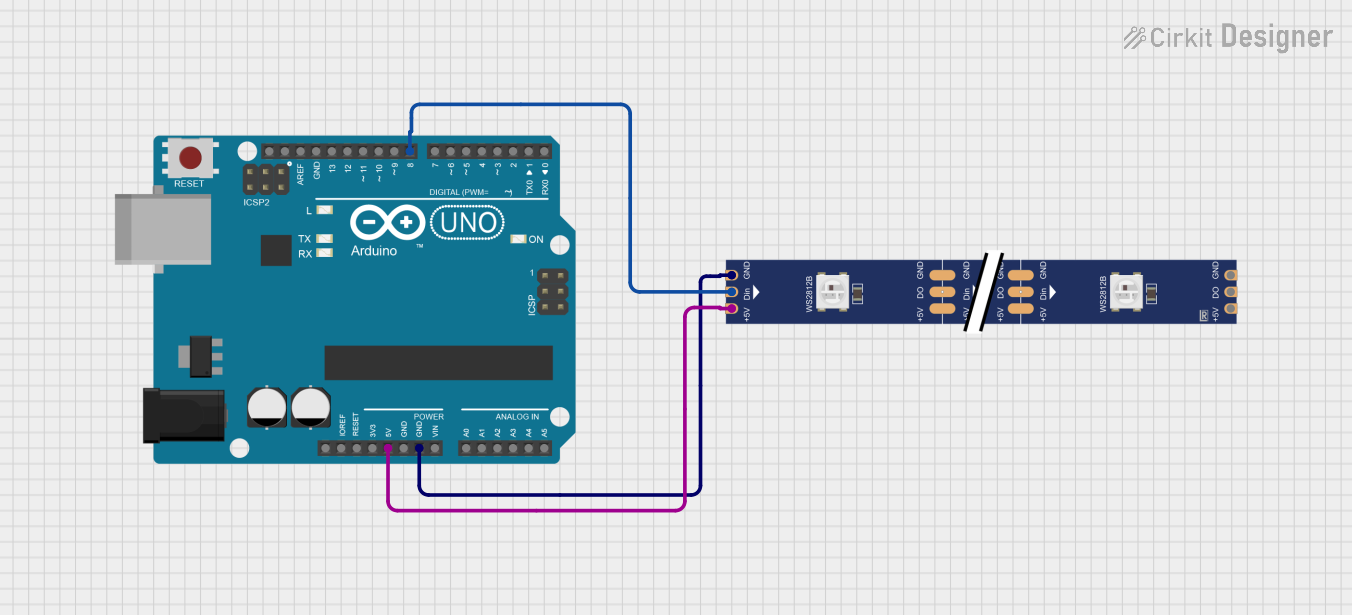
- Power Supply: Connect the VDD pin to a 5V power source and the GND pin to ground. Ensure the power supply can handle the total current draw of all LEDs in the chain.
- Data Input: Connect the DIN pin to the microcontroller's data output pin. Use a resistor (330-500 ohms) in series with the data line to reduce noise and protect the LED.
- Capacitor: Place a 1000µF capacitor across the VDD and GND pins to stabilize the power supply.
- Chaining LEDs: For multiple LEDs, connect the DOUT pin of one LED to the DIN pin of the next LED in the chain.
Important Considerations
- Voltage Regulation: Ensure the power supply voltage does not exceed 5.3V to avoid damaging the LEDs.
- Data Signal Timing: The WS2812B uses a strict timing protocol. Use a microcontroller or library that supports WS2812B communication.
- Heat Management: For large arrays, consider heat dissipation to prevent overheating.
- Wiring Length: Minimize the length of the data line to reduce signal degradation.
Example Code for Arduino UNO
Below is an example of how to control a WS2812B LED strip using an Arduino UNO and the Adafruit NeoPixel library:
#include <Adafruit_NeoPixel.h>

// Define the number of LEDs in the strip
#define NUM_LEDS 16

// Define the pin connected to the DIN of the WS2812B
#define DATA_PIN 6

// Create a NeoPixel object
Adafruit_NeoPixel strip = Adafruit_NeoPixel(NUM_LEDS, DATA_PIN, NEO_GRB + NEO_KHZ800);

void setup() {
  // Initialize the NeoPixel library
  strip.begin();
  strip.show(); // Turn off all LEDs initially
}

void loop() {
  // Set the first LED to red
  strip.setPixelColor(0, strip.Color(255, 0, 0)); // RGB: Red
  // Set the second LED to green
  strip.setPixelColor(1, strip.Color(0, 255, 0)); // RGB: Green
  // Set the third LED to blue
  strip.setPixelColor(2, strip.Color(0, 0, 255)); // RGB: Blue
  // Update the strip to display the colors
  strip.show();
  delay(500); // Wait for 500ms before repeating
}
Notes on the Code
- Install the Adafruit NeoPixel library via the Arduino Library Manager before uploading the code.
- Adjust
NUM_LEDSto match the number of LEDs in your strip. - Use
strip.setPixelColor()to set the color of individual LEDs.
Troubleshooting and FAQs
Common Issues
LEDs Not Lighting Up
- Check the power supply voltage and ensure it is within the recommended range (5V).
- Verify the data connection and ensure the DIN pin is connected to the correct microcontroller pin.
- Ensure the ground of the LED strip is connected to the ground of the microcontroller.
Incorrect Colors or Flickering
- Verify the timing of the data signal. Use a library like Adafruit NeoPixel to handle the protocol.
- Check for loose or poor connections in the wiring.
- Add a resistor (330-500 ohms) in series with the data line to reduce noise.
Overheating
- Ensure the power supply can handle the total current draw of all LEDs.
- Use proper heat dissipation methods for large LED arrays.
FAQs
Q: Can I power the WS2812B with a 3.3V microcontroller?
A: Yes, but you may need a level shifter to boost the 3.3V data signal to 5V for reliable communication.
Q: How many LEDs can I chain together?
A: Theoretically, you can chain hundreds of LEDs, but the power supply and signal integrity will limit the practical number.
Q: Can I cut the LED strip to a custom length?
A: Yes, the LED strip can be cut at designated points, usually marked with a scissor icon.
Q: Do I need an external clock signal?
A: No, the WS2812B uses an internal clock for data processing.
By following this documentation, you can effectively integrate the WS2812B into your projects and create stunning lighting effects!