
How to Use 0.25 Watt Speaker: Examples, Pinouts, and Specs
 Design with 0.25 Watt Speaker in Cirkit Designer
Introduction
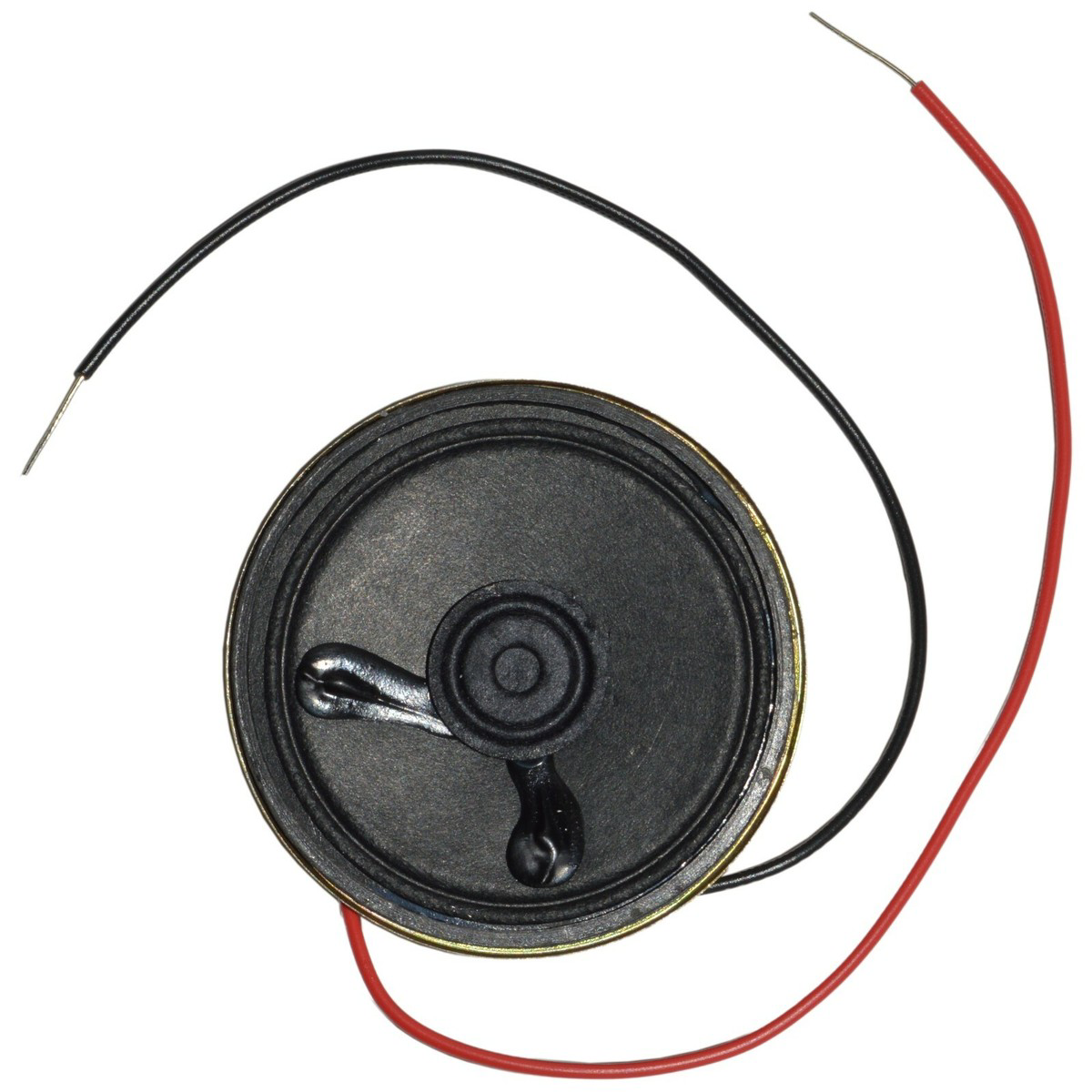
The 0.25 Watt Speaker is a compact audio output device designed to convert electrical signals into sound. It is ideal for low-power applications where space and energy efficiency are critical. Commonly used in alarms, toys, small electronic devices, and DIY projects, this speaker provides a simple and effective way to add audio functionality to your circuits.
Explore Projects Built with 0.25 Watt Speaker
 Open Project in Cirkit Designer
 Open Project in Cirkit Designer
 Open Project in Cirkit Designer
 Open Project in Cirkit Designer
Explore Projects Built with 0.25 Watt Speaker
Open Project in Cirkit DesignerOpen Project in Cirkit DesignerOpen Project in Cirkit DesignerOpen Project in Cirkit DesignerTechnical Specifications
Below are the key technical details and pin configuration for the 0.25 Watt Speaker:
Key Specifications
| Parameter | Value |
|---|---|
| Power Rating | 0.25 Watts |
| Impedance | 8 Ohms |
| Frequency Response | 300 Hz – 10 kHz |
| Sensitivity | 85 dB ± 3 dB |
| Diameter | 40 mm (varies by model) |
| Operating Voltage | 3V – 12V (depending on circuit) |
| Weight | ~10 grams |
Pin Configuration
The 0.25 Watt Speaker typically has two terminals for connection:
| Pin Name | Description |
|---|---|
| Positive (+) | Connects to the positive terminal of the audio signal or amplifier. |
| Negative (-) | Connects to the ground or negative terminal of the audio signal. |
Usage Instructions
How to Use the 0.25 Watt Speaker in a Circuit
Connect the Speaker to an Audio Source:
- Identify the positive (+) and negative (-) terminals of the speaker.
- Connect the positive terminal to the output of an audio amplifier or microcontroller pin (via a resistor or transistor if necessary).
- Connect the negative terminal to the ground of the circuit.
Amplify the Signal:
- The speaker requires an amplified signal for proper operation. Use an audio amplifier IC (e.g., LM386) or a transistor-based amplifier circuit to drive the speaker.
Power Considerations:
- Ensure the power supplied to the speaker does not exceed its 0.25W rating to avoid damage.
- Use a series resistor or a current-limiting circuit if necessary.
Mounting:
- Secure the speaker in place using screws, adhesive, or a speaker enclosure to enhance sound quality and protect the component.
Example: Connecting the Speaker to an Arduino UNO
Below is an example of how to connect and use the 0.25 Watt Speaker with an Arduino UNO to generate simple tones.
Circuit Diagram
- Connect the positive terminal of the speaker to Arduino pin 8 through a 100-ohm resistor.
- Connect the negative terminal of the speaker to the Arduino's GND pin.
Arduino Code
// Example code to generate tones using a 0.25 Watt Speaker
// Connect the speaker's positive terminal to pin 8 via a 100-ohm resistor
// Connect the speaker's negative terminal to GND

void setup() {
  // No setup required for this example
}

void loop() {
  // Generate a 1 kHz tone for 500 ms
  tone(8, 1000, 500);
  delay(1000); // Wait for 1 second before the next tone

  // Generate a 500 Hz tone for 500 ms
  tone(8, 500, 500);
  delay(1000); // Wait for 1 second before the next tone
}
Important Considerations and Best Practices
- Avoid Overloading: Do not exceed the speaker's power rating (0.25W) to prevent damage.
- Use an Enclosure: For better sound quality, mount the speaker in an enclosure to amplify and direct the sound.
- Amplification: Always use an amplifier circuit if the audio signal is too weak to drive the speaker directly.
- Polarity: Ensure correct polarity when connecting the speaker to avoid phase issues.
Troubleshooting and FAQs
Common Issues and Solutions
| Issue | Possible Cause | Solution |
|---|---|---|
| No sound from the speaker | Incorrect wiring or loose connections | Verify all connections and ensure proper polarity. |
| Distorted sound | Signal is too strong or overdriven | Reduce the input signal or use a series resistor. |
| Low volume | Insufficient amplification | Use an audio amplifier circuit to boost the signal. |
| Speaker not working at all | Speaker damaged or power issue | Test the speaker with a multimeter and replace if necessary. |
FAQs
Can I connect the speaker directly to a microcontroller?
- It is not recommended to connect the speaker directly to a microcontroller pin without a resistor or amplifier, as the microcontroller may not provide enough current to drive the speaker.
What type of amplifier should I use with this speaker?
- A low-power audio amplifier IC like the LM386 is ideal for driving a 0.25 Watt Speaker.
Can I use this speaker for music playback?
- While the 0.25 Watt Speaker can produce sound, it is not designed for high-quality music playback due to its limited frequency response and power rating.
How do I test if the speaker is working?
- You can test the speaker by briefly connecting it to a 1.5V battery. A clicking sound indicates that the speaker is functional.
By following this documentation, you can effectively integrate the 0.25 Watt Speaker into your projects and troubleshoot any issues that arise.