
How to Use BMS 1S 10A: Examples, Pinouts, and Specs
 Design with BMS 1S 10A in Cirkit Designer
Introduction
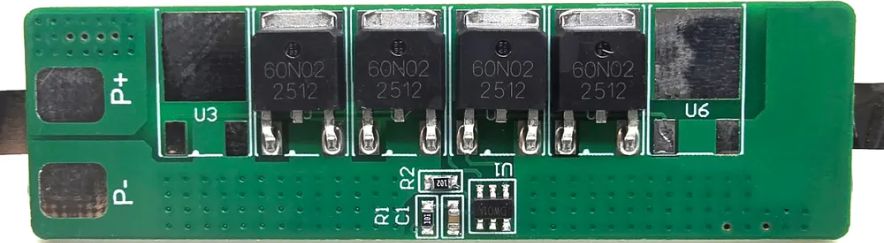
The BMS 1S 10A is a Battery Management System (BMS) designed for single-cell lithium-ion batteries. Manufactured by Shenzhen Li-ion Battery Bodyguard Technology Co., Limited, this component ensures the safe operation of lithium-ion batteries by monitoring and managing their charging and discharging processes. It provides essential protection features such as overcharge, over-discharge, and overcurrent protection, which help extend battery life and prevent damage.
Explore Projects Built with BMS 1S 10A
 Open Project in Cirkit Designer
 Open Project in Cirkit Designer
 Open Project in Cirkit Designer
 Open Project in Cirkit Designer
Explore Projects Built with BMS 1S 10A
Open Project in Cirkit DesignerOpen Project in Cirkit DesignerOpen Project in Cirkit DesignerOpen Project in Cirkit DesignerCommon Applications and Use Cases
- Power banks and portable chargers
- Single-cell lithium-ion battery packs
- Small electronic devices (e.g., flashlights, toys, and wearables)
- DIY battery-powered projects
- Backup power systems
Technical Specifications
The following table outlines the key technical details of the BMS 1S 10A:
| Parameter | Value |
|---|---|
| Manufacturer | Shenzhen Li-ion Battery Bodyguard Technology Co., Limited |
| Part ID | Lithium battery protection boards (BMS) |
| Battery Type Supported | Single-cell lithium-ion (1S) |
| Maximum Continuous Current | 10A |
| Overcharge Protection Voltage | 4.25V ± 0.05V |
| Over-discharge Protection Voltage | 2.5V ± 0.05V |
| Overcurrent Protection | 10A ± 1A |
| Operating Temperature Range | -40°C to +85°C |
| Dimensions | 20mm x 15mm x 3mm |
Pin Configuration and Descriptions
The BMS 1S 10A has the following pin configuration:
| Pin Name | Description |
|---|---|
| B+ | Positive terminal of the battery |
| B- | Negative terminal of the battery |
| P+ | Positive terminal of the load/charger |
| P- | Negative terminal of the load/charger |
Usage Instructions
How to Use the Component in a Circuit
Connect the Battery:
- Connect the positive terminal of the battery to the B+ pin.
- Connect the negative terminal of the battery to the B- pin.
Connect the Load/Charger:
- Connect the positive terminal of the load or charger to the P+ pin.
- Connect the negative terminal of the load or charger to the P- pin.
Verify Connections:
- Double-check all connections to ensure they are secure and correct.
- Ensure the battery voltage is within the supported range (typically 2.5V to 4.2V).
Power On:
- Once all connections are made, the BMS will automatically manage the battery's charging and discharging processes.
Important Considerations and Best Practices
- Avoid Overloading: Ensure the load does not exceed the maximum continuous current rating of 10A.
- Use a Compatible Charger: Use a charger designed for single-cell lithium-ion batteries with a maximum output voltage of 4.2V.
- Heat Management: Avoid placing the BMS in environments with poor ventilation or high temperatures to prevent overheating.
- Battery Quality: Use high-quality lithium-ion batteries to ensure reliable performance and safety.
- Short Circuit Protection: Avoid shorting the terminals, as this may damage the BMS or the battery.
Example: Using the BMS 1S 10A with an Arduino UNO
The BMS 1S 10A can be used in projects involving an Arduino UNO to power the board or connected peripherals. Below is an example of how to monitor the battery voltage using the Arduino:
// Example code to monitor battery voltage using Arduino UNO
// Connect the battery's positive terminal to an analog pin (e.g., A0)
// Ensure the voltage divider is used to step down the voltage to <5V

const int batteryPin = A0;  // Analog pin connected to the battery
const float voltageDividerRatio = 2.0; // Adjust based on your resistor values
const float referenceVoltage = 5.0;    // Arduino's reference voltage (5V)

void setup() {
  Serial.begin(9600); // Initialize serial communication
}

void loop() {
  int analogValue = analogRead(batteryPin); // Read the analog value
  float batteryVoltage = (analogValue / 1023.0) * referenceVoltage * voltageDividerRatio;

  // Print the battery voltage to the Serial Monitor
  Serial.print("Battery Voltage: ");
  Serial.print(batteryVoltage);
  Serial.println(" V");

  delay(1000); // Wait for 1 second before the next reading
}
Note: Use a voltage divider circuit to ensure the battery voltage is within the Arduino's analog input range (0-5V). For example, use two resistors with a 1:1 ratio to divide the voltage by half.
Troubleshooting and FAQs
Common Issues and Solutions
BMS Not Powering On:
- Cause: Incorrect wiring or loose connections.
- Solution: Verify all connections and ensure the battery voltage is within the supported range.
Overheating:
- Cause: Excessive current draw or poor ventilation.
- Solution: Reduce the load current and ensure proper airflow around the BMS.
Battery Not Charging:
- Cause: Faulty charger or incorrect connections.
- Solution: Check the charger output voltage and ensure proper connections to the BMS.
Load Not Powering On:
- Cause: Over-discharge protection activated.
- Solution: Recharge the battery to restore normal operation.
FAQs
Q1: Can I use the BMS 1S 10A with a multi-cell battery pack?
A1: No, this BMS is designed specifically for single-cell (1S) lithium-ion batteries. Using it with multi-cell packs may result in improper operation or damage.
Q2: What happens if the battery voltage drops below 2.5V?
A2: The BMS will activate over-discharge protection and disconnect the load to prevent battery damage. Recharge the battery to resume operation.
Q3: Can I use this BMS for lithium-polymer (LiPo) batteries?
A3: Yes, as long as the LiPo battery is a single-cell (1S) type with a nominal voltage of 3.7V.
Q4: Is the BMS waterproof?
A4: No, the BMS is not waterproof. Avoid exposing it to moisture or liquids.
By following this documentation, users can safely and effectively integrate the BMS 1S 10A into their projects, ensuring reliable battery management and protection.