
How to Use Phoenix QUINT4-PS/1AC/24DC/10: Examples, Pinouts, and Specs
 Design with Phoenix QUINT4-PS/1AC/24DC/10 in Cirkit Designer
Introduction
The Phoenix QUINT4-PS/1AC/24DC/10 (Manufacturer Part ID: 2904601) is a high-performance industrial power supply unit designed to convert a single-phase AC input into a stable 24V DC output. With a maximum output current of 10A, this power supply is ideal for demanding industrial applications requiring reliable and efficient power delivery. Its compact design, high efficiency, and advanced monitoring features make it a versatile choice for powering sensitive electronic devices and automation systems.
Explore Projects Built with Phoenix QUINT4-PS/1AC/24DC/10
 Open Project in Cirkit Designer
 Open Project in Cirkit Designer
 Open Project in Cirkit Designer
 Open Project in Cirkit Designer
Explore Projects Built with Phoenix QUINT4-PS/1AC/24DC/10
Open Project in Cirkit DesignerOpen Project in Cirkit DesignerOpen Project in Cirkit DesignerOpen Project in Cirkit DesignerCommon Applications
- Industrial automation and control systems
- PLCs (Programmable Logic Controllers) and HMIs (Human-Machine Interfaces)
- Sensors, actuators, and relays
- Communication systems and industrial networking devices
- Test and measurement equipment
Technical Specifications
Key Technical Details
| Parameter | Specification |
|---|---|
| Input Voltage Range | 100-240V AC (85-264V AC operational) |
| Input Frequency | 50/60 Hz |
| Output Voltage | 24V DC |
| Output Current | 10A |
| Output Power | 240W |
| Efficiency | Up to 94.6% |
| Operating Temperature Range | -25°C to +70°C |
| Dimensions (W x H x D) | 48 x 130 x 125 mm |
| Weight | Approx. 0.9 kg |
| Protection Features | Overload, short-circuit, overvoltage, and thermal protection |
| Certifications | CE, UL, IEC 61010, and more |
Pin Configuration and Descriptions
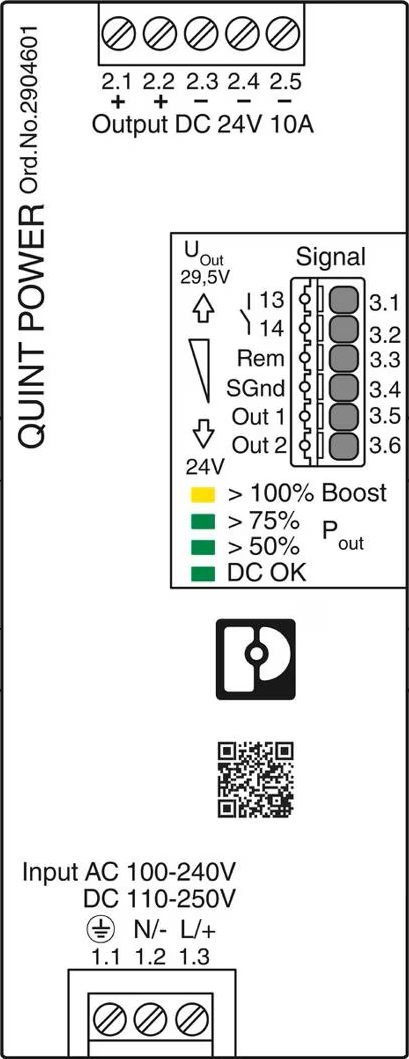
The Phoenix QUINT4-PS/1AC/24DC/10 features screw terminal connections for input and output wiring. Below is the pin configuration:
Input Terminals
| Pin Label | Description |
|---|---|
| L | Live AC input |
| N | Neutral AC input |
| PE | Protective Earth (Ground) |
Output Terminals
| Pin Label | Description |
|---|---|
| + | Positive DC output (24V) |
| - | Negative DC output (Ground) |
Signal Terminals (Optional Monitoring)
| Pin Label | Description |
|---|---|
| DC OK | Monitoring signal for output status (active high) |
| Remote | Remote on/off control input |
Usage Instructions
How to Use the Component in a Circuit
- Mounting: Secure the power supply to a DIN rail or panel using the provided mounting clips. Ensure proper ventilation around the unit to prevent overheating.
- Input Connection:
- Connect the AC input wires to the
L(Live) andN(Neutral) terminals. - Connect the ground wire to the
PEterminal for safety.
- Connect the AC input wires to the
- Output Connection:
- Connect the load to the
+(Positive) and-(Negative) terminals. - Ensure the load does not exceed the maximum output current of 10A.
- Connect the load to the
- Signal Connection (Optional):
- Use the
DC OKterminal to monitor the output status. This can be connected to a PLC or indicator circuit. - Use the
Remoteterminal for remote on/off control if required.
- Use the
- Power On:
- After verifying all connections, apply AC power to the input terminals. The power supply will automatically regulate the output to 24V DC.
Important Considerations and Best Practices
- Input Voltage: Ensure the input voltage is within the specified range (100-240V AC). Operating outside this range may damage the unit.
- Load Capacity: Do not exceed the maximum output current of 10A. Use a fuse or circuit breaker for additional protection.
- Ventilation: Maintain at least 50mm of clearance around the unit for proper airflow.
- Wiring: Use appropriately rated wires for both input and output connections. Tighten all terminal screws securely to prevent loose connections.
- Monitoring: Utilize the
DC OKsignal to monitor the health of the power supply in critical applications.
Example: Connecting to an Arduino UNO
The Phoenix QUINT4-PS/1AC/24DC/10 can be used to power an Arduino UNO. Below is an example wiring and code snippet:
Wiring
- Connect the
+terminal of the power supply to the Arduino'sVINpin. - Connect the
-terminal of the power supply to the Arduino'sGNDpin.
Code Example
// Example code to monitor the DC OK signal from the power supply
const int dcOkPin = 2; // Connect DC OK signal to digital pin 2

void setup() {
  pinMode(dcOkPin, INPUT); // Set DC OK pin as input
  Serial.begin(9600);      // Initialize serial communication
}

void loop() {
  int dcOkStatus = digitalRead(dcOkPin); // Read DC OK signal
  if (dcOkStatus == HIGH) {
    Serial.println("Power supply is operating normally.");
  } else {
    Serial.println("Power supply output is not OK!");
  }
  delay(1000); // Wait for 1 second before checking again
}
Troubleshooting and FAQs
Common Issues and Solutions
| Issue | Possible Cause | Solution |
|---|---|---|
| No output voltage | No AC input or incorrect wiring | Verify AC input voltage and wiring |
| Output voltage too low or unstable | Overloaded output or poor connections | Reduce load or check wiring |
| Power supply overheating | Insufficient ventilation or overload | Improve airflow or reduce load |
| DC OK signal not active | Faulty output or incorrect connection | Check load and signal wiring |
FAQs
Can this power supply be used with a 12V DC load?
- No, the output voltage is fixed at 24V DC. Using it with a 12V load may damage the connected device.
What happens if the load exceeds 10A?
- The power supply will activate overload protection and may shut down to prevent damage.
Is the power supply suitable for outdoor use?
- No, this unit is designed for indoor use only. Use an enclosure for outdoor applications.
Can I connect multiple units in parallel for higher current?
- Yes, the QUINT4 series supports parallel operation. Refer to the manufacturer's manual for detailed instructions.
By following this documentation, users can effectively integrate the Phoenix QUINT4-PS/1AC/24DC/10 into their systems for reliable and efficient power delivery.