
How to Use lamp holder: Examples, Pinouts, and Specs
 Design with lamp holder in Cirkit Designer
Introduction
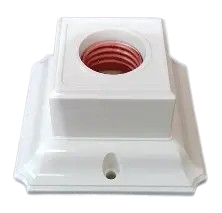
A lamp holder, also known as a light bulb socket, is a device designed to secure and connect a light bulb to an electrical circuit. It provides a stable base for the bulb while ensuring proper electrical contact for operation. The Generic E27 Socket is a widely used lamp holder compatible with E27 screw-type bulbs, commonly found in residential, commercial, and industrial lighting applications.
Explore Projects Built with lamp holder
 Open Project in Cirkit Designer
 Open Project in Cirkit Designer
 Open Project in Cirkit Designer
 Open Project in Cirkit Designer
Explore Projects Built with lamp holder
Open Project in Cirkit DesignerOpen Project in Cirkit DesignerOpen Project in Cirkit DesignerOpen Project in Cirkit DesignerCommon Applications and Use Cases
- Residential lighting fixtures (e.g., table lamps, ceiling lights)
- Commercial lighting systems
- DIY lighting projects
- Temporary lighting setups for construction or events
- Industrial machinery requiring illumination
Technical Specifications
Key Technical Details
| Parameter | Specification |
|---|---|
| Manufacturer | Generic |
| Part ID | E27 Socket |
| Compatible Bulb Type | E27 screw-type bulbs |
| Rated Voltage | 110V - 250V AC |
| Rated Current | Up to 4A |
| Material | Heat-resistant plastic or ceramic |
| Mounting Type | Screw or clip-on |
| Wire Connection Type | Screw terminals or solder points |
Pin Configuration and Descriptions
The E27 lamp holder typically has two connection points for wiring:
| Pin/Terminal | Description |
|---|---|
| Live (L) | Connects to the live wire of the circuit |
| Neutral (N) | Connects to the neutral wire of the circuit |
Note: Some models may include an additional grounding terminal for enhanced safety.
Usage Instructions
How to Use the Lamp Holder in a Circuit
Preparation:
- Ensure the power supply is turned off before handling the lamp holder.
- Verify that the lamp holder is compatible with the bulb and voltage of your circuit.
Wiring:
- Identify the live (L) and neutral (N) terminals on the lamp holder.
- Strip the insulation from the ends of the wires (approximately 5-7mm).
- Connect the live wire to the live terminal and the neutral wire to the neutral terminal.
- Tighten the screws securely to ensure a solid connection.
Mounting:
- Secure the lamp holder to the desired surface using screws or clips, depending on the mounting type.
- Ensure the holder is stable and positioned to avoid accidental contact with live parts.
Bulb Installation:
- Screw the E27 bulb into the holder until it is snug but not overtightened.
Power On:
- Turn on the power supply and test the bulb for proper operation.
Important Considerations and Best Practices
- Always use a bulb that matches the voltage and wattage rating of the lamp holder.
- Avoid overtightening the bulb to prevent damage to the holder or bulb threads.
- Use heat-resistant wiring if the lamp holder is exposed to high temperatures.
- For outdoor or damp environments, use a weatherproof lamp holder to prevent moisture ingress.
- If connecting to an Arduino or microcontroller, use a relay module to safely control the lamp holder.
Example: Controlling a Lamp Holder with Arduino UNO
Below is an example of using an Arduino UNO and a relay module to control an E27 lamp holder:
/*
  Example: Controlling an E27 Lamp Holder with Arduino UNO
  This code toggles the lamp holder ON and OFF every 2 seconds using a relay module.
  Ensure the relay module is properly connected to the lamp holder and power supply.
*/

const int relayPin = 7; // Pin connected to the relay module

void setup() {
  pinMode(relayPin, OUTPUT); // Set relay pin as output
  digitalWrite(relayPin, LOW); // Start with the relay OFF
}

void loop() {
  digitalWrite(relayPin, HIGH); // Turn the lamp ON
  delay(2000); // Wait for 2 seconds
  digitalWrite(relayPin, LOW); // Turn the lamp OFF
  delay(2000); // Wait for 2 seconds
}
Warning: Ensure proper isolation between the high-voltage lamp holder circuit and the low-voltage Arduino circuit. Use a relay module with optocoupler isolation for safety.
Troubleshooting and FAQs
Common Issues and Solutions
| Issue | Possible Cause | Solution |
|---|---|---|
| Bulb does not light up | Loose wiring or poor connections | Check and tighten all connections |
| Flickering light | Faulty bulb or unstable power supply | Replace the bulb or stabilize power |
| Overheating of lamp holder | Bulb wattage exceeds holder rating | Use a bulb within the rated wattage |
| Difficulty screwing in the bulb | Damaged or dirty threads | Clean threads or replace the holder |
| No power to the lamp holder | Faulty relay or power supply issue | Test and replace the relay or supply |
FAQs
Can I use an E27 lamp holder with LED bulbs?
- Yes, as long as the LED bulb has an E27 base and operates within the voltage range of the lamp holder.
Is the E27 socket safe for outdoor use?
- Standard E27 sockets are not weatherproof. Use a weatherproof version for outdoor applications.
What is the maximum wattage supported by the E27 socket?
- The maximum wattage depends on the material and design of the lamp holder. Check the product label or datasheet for specific details.
Can I connect the lamp holder directly to a microcontroller?
- No, microcontrollers cannot handle high voltages. Use a relay module to safely control the lamp holder.
By following this documentation, users can safely and effectively utilize the Generic E27 Socket lamp holder in various applications.