
How to Use SENSOR DO: Examples, Pinouts, and Specs
 Design with SENSOR DO in Cirkit Designer
Introduction
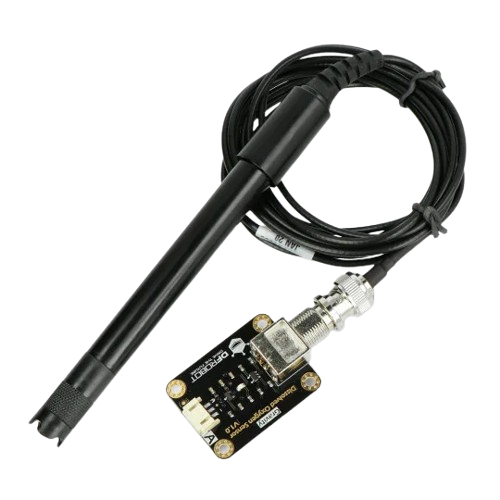
The SENSOR DO, manufactured by DF Robot (Part ID: DO SENSOR), is a versatile device designed to detect and measure physical properties or changes in the environment. It is commonly used in monitoring and control systems to gather real-time data for applications such as environmental analysis, industrial automation, and IoT systems. This sensor is particularly well-suited for detecting dissolved oxygen levels in liquids, making it an essential tool in water quality monitoring and aquaculture.
Explore Projects Built with SENSOR DO
 Open Project in Cirkit Designer
 Open Project in Cirkit Designer
 Open Project in Cirkit Designer
 Open Project in Cirkit Designer
Explore Projects Built with SENSOR DO
Open Project in Cirkit DesignerOpen Project in Cirkit DesignerOpen Project in Cirkit DesignerOpen Project in Cirkit DesignerCommon Applications
- Water quality monitoring in environmental studies
- Aquaculture systems for maintaining optimal oxygen levels
- Industrial process control in chemical and pharmaceutical industries
- IoT-based environmental monitoring systems
- Laboratory experiments and research
Technical Specifications
The SENSOR DO is designed to provide accurate and reliable measurements in a variety of conditions. Below are its key technical specifications:
| Parameter | Value |
|---|---|
| Operating Voltage | 3.3V - 5.0V |
| Operating Current | ≤ 50mA |
| Output Signal | Analog voltage (0-3.0V) |
| Measurement Range | 0 - 20 mg/L (Dissolved Oxygen) |
| Accuracy | ±0.1 mg/L |
| Operating Temperature | 0°C to 50°C |
| Response Time | ≤ 60 seconds |
| Sensor Lifespan | Approximately 1 year (depending on usage) |
Pin Configuration
The SENSOR DO features a simple 3-pin interface for easy integration into circuits. Below is the pin configuration:
| Pin | Name | Description |
|---|---|---|
| 1 | VCC | Power supply input (3.3V - 5.0V) |
| 2 | GND | Ground connection |
| 3 | Signal | Analog output signal proportional to oxygen levels |
Usage Instructions
How to Use the SENSOR DO in a Circuit
- Power the Sensor: Connect the VCC pin to a 3.3V or 5.0V power source and the GND pin to the ground of your circuit.
- Read the Signal: Connect the Signal pin to an analog input pin of your microcontroller (e.g., Arduino UNO) to read the output voltage.
- Calibrate the Sensor: Before use, calibrate the sensor in a known oxygen concentration environment (e.g., air-saturated water) to ensure accurate readings.
- Measure Dissolved Oxygen: Place the sensor probe in the liquid to measure dissolved oxygen levels. The analog output voltage will correspond to the oxygen concentration.
Important Considerations
- Calibration: Regular calibration is essential for maintaining accuracy, especially in varying environmental conditions.
- Temperature Compensation: Dissolved oxygen levels are temperature-dependent. Use a temperature sensor for compensation if precise measurements are required.
- Probe Maintenance: Clean the sensor probe regularly to prevent fouling, which can affect accuracy.
- Avoid Overvoltage: Ensure the input voltage does not exceed the specified range to prevent damage to the sensor.
Example Code for Arduino UNO
Below is an example of how to interface the SENSOR DO with an Arduino UNO to measure dissolved oxygen levels:
// SENSOR DO Example Code for Arduino UNO
// Reads the analog signal from the SENSOR DO and converts it to dissolved oxygen (mg/L)

const int DO_PIN = A0; // Analog pin connected to the Signal pin of SENSOR DO
float voltage = 0.0;   // Variable to store the sensor output voltage
float doLevel = 0.0;   // Variable to store the dissolved oxygen level (mg/L)

void setup() {
  Serial.begin(9600); // Initialize serial communication at 9600 baud
  pinMode(DO_PIN, INPUT); // Set the DO_PIN as an input
}

void loop() {
  // Read the analog value from the SENSOR DO
  int analogValue = analogRead(DO_PIN);

  // Convert the analog value to voltage (assuming 5V reference)
  voltage = analogValue * (5.0 / 1023.0);

  // Convert the voltage to dissolved oxygen level (mg/L)
  // Example conversion formula: DO = voltage * scaling_factor
  // Replace 'scaling_factor' with the appropriate value from the sensor datasheet
  doLevel = voltage * 6.67; // Example scaling factor

  // Print the results to the Serial Monitor
  Serial.print("Voltage: ");
  Serial.print(voltage);
  Serial.print(" V, Dissolved Oxygen: ");
  Serial.print(doLevel);
  Serial.println(" mg/L");

  delay(1000); // Wait for 1 second before the next reading
}
Notes on the Code
- Replace the
scaling_factorin the code with the appropriate value provided in the SENSOR DO datasheet for accurate conversion. - Ensure the Arduino UNO is powered within its operating voltage range (5V) when interfacing with the sensor.
Troubleshooting and FAQs
Common Issues and Solutions
No Output Signal
- Cause: Incorrect wiring or insufficient power supply.
- Solution: Verify the connections and ensure the VCC pin is receiving 3.3V - 5.0V.
Inaccurate Readings
- Cause: Sensor not calibrated or probe fouling.
- Solution: Calibrate the sensor in a known oxygen concentration environment and clean the probe regularly.
Fluctuating Readings
- Cause: Electrical noise or unstable power supply.
- Solution: Use a decoupling capacitor (e.g., 0.1µF) across the VCC and GND pins to stabilize the power supply.
Short Sensor Lifespan
- Cause: Exposure to harsh chemicals or improper maintenance.
- Solution: Avoid exposing the sensor to corrosive substances and follow the maintenance guidelines.
FAQs
Q: Can the SENSOR DO be used in saltwater environments?
A: Yes, but regular cleaning and maintenance are required to prevent salt buildup on the probe.
Q: How often should the sensor be calibrated?
A: Calibration frequency depends on usage, but it is recommended to calibrate before each use for critical applications.
Q: Can the SENSOR DO be used with microcontrollers other than Arduino?
A: Yes, the SENSOR DO can be used with any microcontroller that has an analog input pin and supports the required operating voltage.
Q: What is the lifespan of the sensor probe?
A: The probe typically lasts about 1 year, depending on usage and maintenance.
By following this documentation, users can effectively integrate and utilize the SENSOR DO in their projects for accurate dissolved oxygen measurements.