
How to Use TIMER LARKIN H3CR A8: Examples, Pinouts, and Specs
 Design with TIMER LARKIN H3CR A8 in Cirkit Designer
Introduction
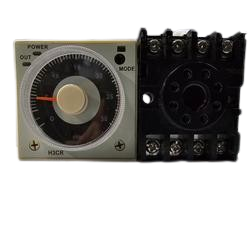
The Larkin H3CR A8 is a versatile timer relay designed for use in industrial and automation applications. This component provides precise control over electrical circuits by offering adjustable timing ranges and multiple timing modes. Its robust design and flexibility make it suitable for a wide range of applications, including motor control, lighting systems, and process automation.
Explore Projects Built with TIMER LARKIN H3CR A8
 Open Project in Cirkit Designer
 Open Project in Cirkit Designer
 Open Project in Cirkit Designer
 Open Project in Cirkit Designer
Explore Projects Built with TIMER LARKIN H3CR A8
Open Project in Cirkit DesignerOpen Project in Cirkit DesignerOpen Project in Cirkit DesignerOpen Project in Cirkit DesignerCommon Applications
- Industrial automation systems
- Conveyor belt timing and control
- Sequential control in manufacturing processes
- HVAC systems for timed operations
- Lighting control in commercial and industrial settings
Technical Specifications
Key Technical Details
| Parameter | Specification |
|---|---|
| Manufacturer | Larkin |
| Part ID | H3CR A8 |
| Power Supply Voltage | 100-240V AC or 24-48V DC |
| Timing Ranges | 0.05 seconds to 300 hours (adjustable) |
| Timing Modes | ON-delay, OFF-delay, Interval, One-shot |
| Contact Configuration | DPDT (Double Pole Double Throw) |
| Contact Rating | 5A at 250V AC / 30V DC |
| Operating Temperature | -10°C to +55°C |
| Mounting Style | DIN rail or panel mount |
| Dimensions | 48mm x 48mm x 90mm |
Pin Configuration and Descriptions
The Larkin H3CR A8 features an 8-pin configuration. Below is the pinout description:
| Pin Number | Name | Description |
|---|---|---|
| 1 | A1 | Power supply input (AC/DC positive terminal) |
| 2 | A2 | Power supply input (AC/DC negative terminal) |
| 3 | 15 (COM1) | Common terminal for relay 1 |
| 4 | 16 (NO1) | Normally open contact for relay 1 |
| 5 | 18 (NC1) | Normally closed contact for relay 1 |
| 6 | 25 (COM2) | Common terminal for relay 2 |
| 7 | 26 (NO2) | Normally open contact for relay 2 |
| 8 | 28 (NC2) | Normally closed contact for relay 2 |
Usage Instructions
How to Use the Larkin H3CR A8 in a Circuit
- Power Supply Connection: Connect the power supply to pins A1 and A2. Ensure the voltage matches the specified range (100-240V AC or 24-48V DC).
- Load Connection: Connect the load to the relay contacts (pins 15, 16, 18 for relay 1 and pins 25, 26, 28 for relay 2). Use the normally open (NO) or normally closed (NC) contacts based on your application.
- Set Timing Range: Use the rotary switches on the front panel to select the desired timing range and mode.
- Adjust Timing: Fine-tune the timing using the adjustable knob.
- Operation: Once powered, the timer will operate based on the selected mode and timing settings.
Important Considerations
- Ensure the power supply voltage is within the specified range to avoid damage.
- Use appropriate wiring and connectors to handle the rated current and voltage.
- Avoid exposing the timer to extreme temperatures or moisture.
- For safety, disconnect the power supply before making any wiring changes.
Example: Using the H3CR A8 with an Arduino UNO
The Larkin H3CR A8 can be used with an Arduino UNO to control timing operations. Below is an example of how to interface the timer with an Arduino:
/*
  Example: Controlling the Larkin H3CR A8 Timer with Arduino UNO
  This code demonstrates how to use a digital output pin to trigger the timer.
  Ensure proper wiring between the Arduino and the timer relay.
*/

const int timerTriggerPin = 7; // Arduino pin connected to the timer relay input

void setup() {
  pinMode(timerTriggerPin, OUTPUT); // Set the pin as an output
}

void loop() {
  digitalWrite(timerTriggerPin, HIGH); // Activate the timer relay
  delay(5000); // Keep the relay active for 5 seconds
  digitalWrite(timerTriggerPin, LOW);  // Deactivate the timer relay
  delay(5000); // Wait for 5 seconds before repeating
}
Note: Use an optocoupler or transistor circuit to interface the Arduino with the timer relay if the relay requires higher voltage or current than the Arduino can provide.
Troubleshooting and FAQs
Common Issues and Solutions
| Issue | Possible Cause | Solution |
|---|---|---|
| Timer does not power on | Incorrect power supply voltage | Verify and correct the power supply voltage. |
| Relay does not activate | Faulty wiring or incorrect connections | Check and ensure proper wiring of relay contacts. |
| Timing is inaccurate | Incorrect timing range or knob setting | Recheck and adjust the timing range and knob. |
| Timer overheats | Exceeding rated current or voltage | Ensure the load does not exceed the rated specifications. |
FAQs
Can the H3CR A8 operate on both AC and DC power?
- Yes, it supports both 100-240V AC and 24-48V DC power supplies.
What is the maximum load current for the relay contacts?
- The relay contacts can handle up to 5A at 250V AC or 30V DC.
Can I use the H3CR A8 for delayed motor start applications?
- Yes, the ON-delay mode is ideal for delayed motor start applications.
How do I reset the timer?
- Disconnect the power supply to reset the timer. Reapply power to restart the operation.
By following this documentation, users can effectively integrate the Larkin H3CR A8 timer into their projects and troubleshoot common issues with ease.