
How to Use 12V 20A Toggle Switch: Examples, Pinouts, and Specs
 Design with 12V 20A Toggle Switch in Cirkit Designer
Introduction
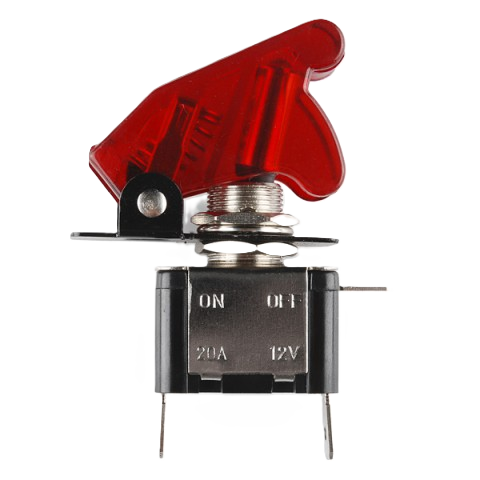
The 12V 20A Toggle Switch is a robust and reliable switch designed to control electrical circuits with ease. It is rated for 12 volts and can handle up to 20 amps of current, making it suitable for a wide range of applications. This switch is commonly used in automotive, marine, and industrial systems to control lights, motors, or other electrical devices. Its simple on/off operation and durable construction make it a popular choice for both hobbyists and professionals.
Explore Projects Built with 12V 20A Toggle Switch
 Open Project in Cirkit Designer
 Open Project in Cirkit Designer
 Open Project in Cirkit Designer
 Open Project in Cirkit Designer
Explore Projects Built with 12V 20A Toggle Switch
Open Project in Cirkit DesignerOpen Project in Cirkit DesignerOpen Project in Cirkit DesignerOpen Project in Cirkit DesignerCommon Applications and Use Cases
- Automotive systems (e.g., controlling auxiliary lights, fans, or pumps)
- Marine applications (e.g., navigation lights or bilge pumps)
- Industrial equipment control
- DIY electronics projects
- Home automation systems
Technical Specifications
The following table outlines the key technical details of the 12V 20A Toggle Switch:
| Parameter | Specification |
|---|---|
| Rated Voltage | 12V DC |
| Rated Current | 20A |
| Switch Type | SPST (Single Pole Single Throw) |
| Operation | On/Off |
| Terminal Type | Screw or solder terminals |
| Material | Metal and plastic housing |
| Mounting Hole Diameter | 12mm |
| Operating Temperature | -25°C to 85°C |
Pin Configuration and Descriptions
The 12V 20A Toggle Switch typically has two terminals:
| Pin | Description |
|---|---|
| Pin 1 | Input terminal (connect to power source) |
| Pin 2 | Output terminal (connect to load/device) |
Usage Instructions
How to Use the Component in a Circuit
- Prepare the Circuit: Ensure the power source is 12V DC and the load does not exceed 20A.
- Mount the Switch: Drill a 12mm hole in the desired mounting surface and secure the switch using the provided nut.
- Connect the Wires:
- Connect the positive wire from the power source to Pin 1 (input terminal).
- Connect the positive wire from the load/device to Pin 2 (output terminal).
- Ensure all connections are secure and insulated to prevent short circuits.
- Test the Circuit: Toggle the switch to the "On" position to power the load. Toggle it to the "Off" position to disconnect the load.
Important Considerations and Best Practices
- Current Rating: Do not exceed the 20A current rating to avoid overheating or damage.
- Wire Gauge: Use appropriately rated wires (e.g., 12 AWG or thicker) for high-current applications.
- Fuse Protection: Install a fuse between the power source and the switch to protect the circuit from overcurrent.
- Polarity: Ensure correct polarity when connecting the switch to avoid malfunction.
- Environment: If used in harsh environments (e.g., marine applications), consider using a waterproof toggle switch cover.
Example: Connecting to an Arduino UNO
While the 12V 20A Toggle Switch is not directly connected to an Arduino UNO due to its high current rating, it can be used to control a relay module, which in turn controls high-power devices. Below is an example of how to use the switch with a relay and Arduino:
Circuit Description
- The toggle switch controls the 12V power supply to the relay module.
- The Arduino controls the relay's signal pin to switch the load on/off.
Arduino Code Example
// Example code to control a relay module with an Arduino UNO
// The relay is connected to pin 7 on the Arduino

const int relayPin = 7; // Define the relay control pin

void setup() {
  pinMode(relayPin, OUTPUT); // Set the relay pin as an output
  digitalWrite(relayPin, LOW); // Ensure the relay is off at startup
}

void loop() {
  // Turn the relay on for 5 seconds
  digitalWrite(relayPin, HIGH); // Activate the relay
  delay(5000); // Wait for 5 seconds

  // Turn the relay off for 5 seconds
  digitalWrite(relayPin, LOW); // Deactivate the relay
  delay(5000); // Wait for 5 seconds
}
Troubleshooting and FAQs
Common Issues and Solutions
Switch Does Not Turn On the Load:
- Cause: Loose or incorrect wiring.
- Solution: Double-check all connections and ensure wires are securely attached to the terminals.
Switch Overheats:
- Cause: Current exceeds the 20A rating.
- Solution: Verify the load's current draw and use a switch with a higher current rating if necessary.
Load Flickers When Switch is On:
- Cause: Poor contact or insufficient wire gauge.
- Solution: Use thicker wires and ensure the terminals are clean and tightly connected.
Switch Feels Loose in the Mounting Hole:
- Cause: Incorrect hole size or loose mounting nut.
- Solution: Ensure the mounting hole is 12mm in diameter and tighten the nut securely.
FAQs
Q: Can this switch be used for AC circuits?
A: No, this switch is designed for DC circuits only. Using it with AC circuits may cause damage or unsafe operation.
Q: Is the switch waterproof?
A: The standard version is not waterproof. For outdoor or marine use, consider a waterproof toggle switch or use a protective cover.
Q: Can I use this switch to control multiple devices?
A: Yes, as long as the total current draw of all devices does not exceed 20A.
Q: What happens if I reverse the input and output connections?
A: The switch will still function, as it is not polarity-sensitive. However, it is recommended to follow the standard connection for consistency.