
How to Use Stop Kontaks: Examples, Pinouts, and Specs
 Design with Stop Kontaks in Cirkit Designer
Introduction
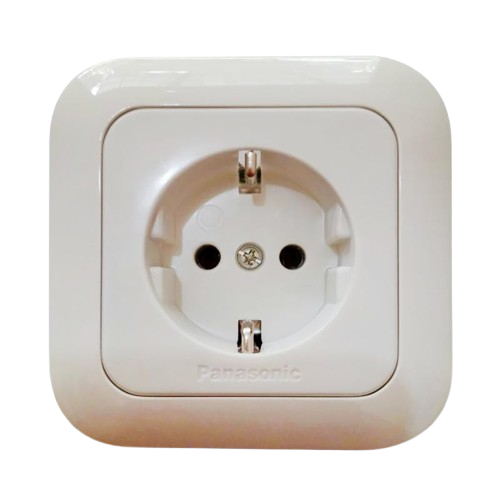
A stop kontak is an electrical outlet or socket designed to connect electrical devices to a power supply. It typically features multiple sockets, allowing users to power several devices simultaneously. Stop kontaks are widely used in residential, commercial, and industrial settings due to their convenience and versatility. They are essential for powering appliances, tools, and electronic devices.
Explore Projects Built with Stop Kontaks
 Open Project in Cirkit Designer
 Open Project in Cirkit Designer
 Open Project in Cirkit Designer
 Open Project in Cirkit Designer
Explore Projects Built with Stop Kontaks
Open Project in Cirkit DesignerOpen Project in Cirkit DesignerOpen Project in Cirkit DesignerOpen Project in Cirkit DesignerCommon Applications and Use Cases
- Powering household appliances such as televisions, refrigerators, and lamps.
- Charging electronic devices like smartphones, laptops, and tablets.
- Providing power to office equipment such as printers and computers.
- Industrial use for powering machinery and tools.
Technical Specifications
Below are the general technical specifications for a standard stop kontak. Note that specifications may vary depending on the model and manufacturer.
Key Technical Details
- Input Voltage: 220V AC (typical for most regions; may vary by country)
- Maximum Current Rating: 10A to 16A
- Power Rating: Up to 3500W (depending on the model)
- Frequency: 50Hz or 60Hz
- Socket Type: Varies by region (e.g., Type A, B, C, G, etc.)
- Material: Flame-retardant plastic or thermoplastic
- Safety Features: Surge protection, child safety shutters, and overload protection (optional)
Pin Configuration and Descriptions
The pin configuration of a stop kontak depends on the socket type. Below is an example for a Type C socket, commonly used in Europe and Asia.
| Pin Name | Description | Notes |
|---|---|---|
| Line (L) | Live wire carrying current | Connects to the power source |
| Neutral (N) | Returns current to the power source | Completes the circuit |
| Ground (G) | Safety ground connection | Optional in some socket designs |
For other socket types, refer to the specific regional standards.
Usage Instructions
How to Use the Component in a Circuit
Installation:
- Ensure the power supply is turned off before installation.
- Mount the stop kontak securely on a wall or surface using screws or adhesive, as applicable.
- Connect the live (L), neutral (N), and ground (G) wires to the corresponding terminals on the stop kontak.
Connecting Devices:
- Plug the device's power cord into one of the sockets.
- Ensure the plug fits securely to avoid loose connections.
Power On:
- Turn on the power supply to the stop kontak.
- Verify that the connected devices are receiving power.
Important Considerations and Best Practices
- Voltage Compatibility: Ensure the stop kontak matches the voltage rating of your region (e.g., 220V or 110V).
- Load Capacity: Do not exceed the maximum current or power rating of the stop kontak.
- Surge Protection: Use a stop kontak with built-in surge protection to safeguard sensitive electronics.
- Child Safety: If used in households with children, opt for models with child safety shutters.
- Regular Inspection: Periodically check for signs of wear, damage, or overheating.
Arduino UNO Example
While a stop kontak is not directly connected to an Arduino UNO, it can be used in projects involving relays to control high-power devices. Below is an example of using an Arduino UNO to control a device connected to a stop kontak via a relay module.
/*
  Example: Controlling a device connected to a stop kontak using a relay module.
  This code turns the device ON for 5 seconds and then OFF for 5 seconds in a loop.
*/

const int relayPin = 7; // Pin connected to the relay module

void setup() {
  pinMode(relayPin, OUTPUT); // Set relay pin as output
  digitalWrite(relayPin, LOW); // Ensure relay is off at startup
}

void loop() {
  digitalWrite(relayPin, HIGH); // Turn the relay ON (device ON)
  delay(5000); // Wait for 5 seconds
  digitalWrite(relayPin, LOW); // Turn the relay OFF (device OFF)
  delay(5000); // Wait for 5 seconds
}
Note: Ensure proper isolation between the low-voltage Arduino circuit and the high-voltage stop kontak circuit when using a relay.
Troubleshooting and FAQs
Common Issues Users Might Face
Loose Connections:
- Problem: The plug does not fit securely into the socket.
- Solution: Check for wear or damage to the socket. Replace the stop kontak if necessary.
Overheating:
- Problem: The stop kontak becomes excessively hot during use.
- Solution: Ensure the connected devices do not exceed the stop kontak's power rating. Inspect for loose wiring.
No Power Output:
- Problem: Devices connected to the stop kontak do not receive power.
- Solution: Verify that the power supply is active. Check the wiring connections and ensure the stop kontak is properly installed.
Tripped Circuit Breaker:
- Problem: The circuit breaker trips when using the stop kontak.
- Solution: Reduce the load on the stop kontak. Check for short circuits or faulty devices.
Solutions and Tips for Troubleshooting
- Use a multimeter to check the voltage at the stop kontak terminals.
- Inspect the wiring for loose or damaged connections.
- If the stop kontak includes surge protection, check if the protection mechanism has been triggered and reset it if possible.
- Replace the stop kontak if it shows signs of physical damage or wear.
By following this documentation, users can safely and effectively use a stop kontak in various applications.