
How to Use Flight Controller: Examples, Pinouts, and Specs
 Design with Flight Controller in Cirkit Designer
Introduction
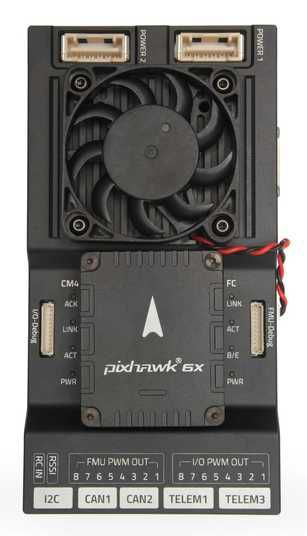
The Pixhawk 6x Rpi Flight Controller is a high-performance electronic device designed to manage the flight dynamics of aircraft or drones. It processes data from various onboard sensors, such as gyroscopes, accelerometers, GPS modules, and barometers, to stabilize and control the vehicle's movements. This flight controller is widely used in unmanned aerial vehicles (UAVs) for applications such as aerial photography, surveying, mapping, and autonomous navigation.
Explore Projects Built with Flight Controller
 Open Project in Cirkit Designer
 Open Project in Cirkit Designer
 Open Project in Cirkit Designer
 Open Project in Cirkit Designer
Explore Projects Built with Flight Controller
Open Project in Cirkit DesignerOpen Project in Cirkit DesignerOpen Project in Cirkit DesignerOpen Project in Cirkit DesignerCommon Applications and Use Cases
- Aerial Photography and Videography: Ensures smooth and stable flight for capturing high-quality images and videos.
- Autonomous Drones: Enables waypoint navigation and mission planning for fully autonomous operations.
- Surveying and Mapping: Provides precise control for drones used in geospatial data collection.
- Research and Development: Serves as a platform for testing and developing new UAV technologies.
- Hobbyist and DIY Projects: Popular among drone enthusiasts for building custom UAVs.
Technical Specifications
The Pixhawk 6x Rpi Flight Controller is equipped with advanced hardware and software features to ensure reliable and precise flight control.
Key Technical Details
- Processor: STM32H7 microcontroller with dual-core architecture
- IMU Sensors: Triple redundant IMUs (gyroscopes and accelerometers)
- Barometer: High-precision barometer for altitude measurement
- GPS Support: Compatible with external GPS modules for navigation
- Input Voltage Range: 4.5V to 5.5V
- Communication Interfaces: UART, I2C, CAN, SPI, and USB
- PWM Outputs: 8 PWM outputs for motor and servo control
- Dimensions: 38mm x 55mm x 15mm
- Weight: 37 grams
Pin Configuration and Descriptions
The Pixhawk 6x Rpi Flight Controller features multiple connectors for interfacing with sensors, motors, and other peripherals. Below is the pin configuration:
Power Input
| Pin Name | Description |
|---|---|
| VCC | 4.5V to 5.5V power input |
| GND | Ground connection |
PWM Outputs
| Pin Name | Description |
|---|---|
| PWM1 | Motor/Servo output channel 1 |
| PWM2 | Motor/Servo output channel 2 |
| PWM3 | Motor/Servo output channel 3 |
| PWM4 | Motor/Servo output channel 4 |
| PWM5 | Motor/Servo output channel 5 |
| PWM6 | Motor/Servo output channel 6 |
| PWM7 | Motor/Servo output channel 7 |
| PWM8 | Motor/Servo output channel 8 |
Communication Interfaces
| Pin Name | Description |
|---|---|
| UART_TX | UART transmit pin |
| UART_RX | UART receive pin |
| I2C_SCL | I2C clock line |
| I2C_SDA | I2C data line |
| CAN_H | CAN bus high line |
| CAN_L | CAN bus low line |
| USB_D+ | USB data positive |
| USB_D- | USB data negative |
Usage Instructions
How to Use the Pixhawk 6x Rpi Flight Controller in a Circuit
- Powering the Flight Controller: Connect a regulated power supply (4.5V to 5.5V) to the VCC and GND pins.
- Connecting Motors and Servos: Attach the motor or servo signal wires to the PWM output pins. Ensure the correct mapping of motors for your drone configuration (e.g., quadcopter, hexacopter).
- Sensor Integration: Connect external sensors (e.g., GPS, barometer) to the appropriate communication interfaces (UART, I2C, or CAN).
- Flight Software Setup: Install compatible flight control software, such as PX4 or ArduPilot, on the Pixhawk 6x Rpi. Configure the software using a ground control station (e.g., QGroundControl or Mission Planner).
- Calibrating Sensors: Perform sensor calibration (e.g., accelerometer, gyroscope, compass) through the ground control station software.
- Testing and Tuning: Conduct a test flight in a safe environment and fine-tune the flight parameters for optimal performance.
Important Considerations and Best Practices
- Power Supply: Use a stable and noise-free power source to avoid interference with the flight controller's operation.
- Wiring: Keep signal wires short and well-organized to minimize electromagnetic interference.
- Firmware Updates: Regularly update the flight controller's firmware to access new features and bug fixes.
- Failsafe Configuration: Set up failsafe mechanisms (e.g., return-to-home) to ensure safety in case of signal loss or other issues.
- Pre-Flight Checks: Always perform a thorough pre-flight check, including verifying sensor calibration and motor functionality.
Example Code for Arduino UNO Integration
The Pixhawk 6x Rpi can communicate with an Arduino UNO via UART. Below is an example code snippet for reading data from the flight controller:
#include <SoftwareSerial.h>

// Define RX and TX pins for UART communication
SoftwareSerial pixhawkSerial(10, 11); // RX = pin 10, TX = pin 11

void setup() {
  // Initialize serial communication
  Serial.begin(9600); // For debugging
  pixhawkSerial.begin(57600); // Pixhawk communication baud rate

  Serial.println("Pixhawk-Arduino Communication Initialized");
}

void loop() {
  // Check if data is available from Pixhawk
  if (pixhawkSerial.available()) {
    // Read and print data from Pixhawk
    char data = pixhawkSerial.read();
    Serial.print("Received: ");
    Serial.println(data);
  }

  // Optional: Send data to Pixhawk
  if (Serial.available()) {
    char command = Serial.read();
    pixhawkSerial.write(command);
    Serial.print("Sent: ");
    Serial.println(command);
  }
}
Troubleshooting and FAQs
Common Issues and Solutions
Issue: Flight controller does not power on.
- Solution: Verify the power supply voltage and connections. Ensure the power source provides 4.5V to 5.5V.
Issue: Motors do not respond to commands.
- Solution: Check the PWM connections and ensure the motors are properly mapped in the flight control software.
Issue: GPS module not detected.
- Solution: Confirm the GPS module is connected to the correct UART port and configured in the software.
Issue: Unstable flight or drifting.
- Solution: Recalibrate the accelerometer, gyroscope, and compass. Verify the propeller orientation and motor alignment.
FAQs
Q: Can the Pixhawk 6x Rpi be used with fixed-wing aircraft?
- A: Yes, the flight controller supports fixed-wing, multirotor, and VTOL configurations.
Q: What software is compatible with the Pixhawk 6x Rpi?
- A: The flight controller is compatible with PX4 and ArduPilot firmware.
Q: How do I update the firmware?
- A: Use a ground control station like QGroundControl or Mission Planner to download and install the latest firmware.
Q: Can I use the Pixhawk 6x Rpi for autonomous missions?
- A: Yes, the flight controller supports waypoint navigation and mission planning for autonomous operations.