
How to Use E22-400M33S: Examples, Pinouts, and Specs
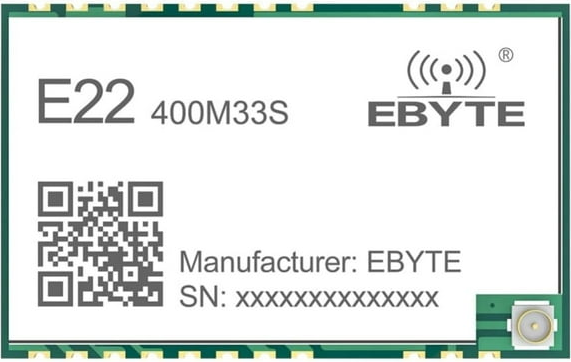
 Design with E22-400M33S in Cirkit Designer
Introduction
The E22-400M33S is a high-performance RF module manufactured by EByte, based on the SX1268 chipset. This module operates in the 410–493 MHz frequency range and is designed for wireless communication applications. It features a compact design, low power consumption, and long-range communication capabilities, making it ideal for IoT, remote sensing, and telemetry projects.
Explore Projects Built with E22-400M33S
 Open Project in Cirkit Designer
 Open Project in Cirkit Designer
 Open Project in Cirkit Designer
 Open Project in Cirkit Designer
Explore Projects Built with E22-400M33S
Open Project in Cirkit DesignerOpen Project in Cirkit DesignerOpen Project in Cirkit DesignerOpen Project in Cirkit DesignerCommon Applications
- Internet of Things (IoT) devices
- Remote sensing and telemetry systems
- Industrial automation
- Smart agriculture
- Wireless sensor networks
- Home automation
Technical Specifications
Key Specifications
| Parameter | Value |
|---|---|
| Frequency Range | 410–493 MHz |
| Modulation | LoRa, (G)FSK, (G)MSK |
| Maximum Output Power | 33 dBm (2 W) |
| Sensitivity | -148 dBm |
| Communication Distance | Up to 10 km (line of sight) |
| Supply Voltage | 2.8–5.5 V |
| Operating Current | 120 mA (transmit at 33 dBm) |
| Sleep Current | < 2 µA |
| Data Rate | 0.018–62.5 kbps (LoRa mode) |
| Operating Temperature | -40°C to +85°C |
| Dimensions | 22 × 19 × 3 mm |
Pin Configuration
The E22-400M33S module has a total of 8 pins. Below is the pinout and description:
| Pin Number | Pin Name | Description |
|---|---|---|
| 1 | M0 | Mode selection pin 0 (used for configuring operating modes) |
| 2 | M1 | Mode selection pin 1 (used for configuring operating modes) |
| 3 | RXD | UART receive pin (connect to MCU TXD) |
| 4 | TXD | UART transmit pin (connect to MCU RXD) |
| 5 | AUX | Auxiliary pin (indicates module status, e.g., busy or idle) |
| 6 | VCC | Power supply input (2.8–5.5 V) |
| 7 | GND | Ground |
| 8 | ANT | Antenna interface (connect to a 50-ohm antenna for optimal performance) |
Usage Instructions
How to Use the E22-400M33S in a Circuit
- Power Supply: Connect the VCC pin to a stable power source (2.8–5.5 V) and GND to ground.
- UART Communication: Connect the RXD pin to the TXD pin of your microcontroller and the TXD pin to the RXD pin of your microcontroller.
- Mode Selection: Use the M0 and M1 pins to configure the module's operating mode:
- Mode 0 (Normal): M0 = 0, M1 = 0
- Mode 1 (Wake-up): M0 = 1, M1 = 0
- Mode 2 (Power-saving): M0 = 0, M1 = 1
- Mode 3 (Sleep/Configuration): M0 = 1, M1 = 1
- Antenna Connection: Attach a 50-ohm antenna to the ANT pin for optimal signal transmission and reception.
- Data Transmission: Send and receive data via the UART interface. Ensure the baud rate matches the module's configuration (default: 9600 bps).
Important Considerations
- Use a decoupling capacitor (e.g., 10 µF) near the VCC pin to stabilize the power supply.
- Avoid placing the module near high-frequency noise sources to prevent interference.
- Ensure the antenna is properly matched and positioned for maximum range.
- Configure the module's parameters (e.g., frequency, power, data rate) using AT commands in configuration mode (Mode 3).
Example: Connecting to an Arduino UNO
Below is an example of how to connect the E22-400M33S to an Arduino UNO and send data.
Wiring Diagram
| E22-400M33S Pin | Arduino UNO Pin |
|---|---|
| VCC | 5V |
| GND | GND |
| RXD | D3 |
| TXD | D2 |
| M0 | GND |
| M1 | GND |
Arduino Code
#include <SoftwareSerial.h>

// Define RX and TX pins for SoftwareSerial
SoftwareSerial E22Serial(2, 3); // RX = Pin 2, TX = Pin 3

void setup() {
  // Initialize serial communication
  Serial.begin(9600); // For debugging
  E22Serial.begin(9600); // Communication with E22 module

  Serial.println("E22-400M33S Test");
  delay(1000);
}

void loop() {
  // Send data to the E22 module
  E22Serial.println("Hello, E22!");
  Serial.println("Data sent: Hello, E22!");

  // Check for incoming data from the E22 module
  if (E22Serial.available()) {
    String receivedData = E22Serial.readString();
    Serial.print("Data received: ");
    Serial.println(receivedData);
  }

  delay(1000); // Wait 1 second before sending again
}
Troubleshooting and FAQs
Common Issues and Solutions
No Communication with the Module
- Cause: Incorrect wiring or baud rate mismatch.
- Solution: Double-check the wiring and ensure the UART baud rate matches the module's configuration.
Short Communication Range
- Cause: Poor antenna connection or interference.
- Solution: Ensure the antenna is securely connected and positioned away from interference sources.
Module Not Responding to AT Commands
- Cause: Module not in configuration mode.
- Solution: Set M0 and M1 to HIGH (Mode 3) before sending AT commands.
High Power Consumption
- Cause: Module operating in high-power transmit mode.
- Solution: Use power-saving mode (Mode 2) when the module is idle.
FAQs
What is the maximum communication distance?
- The E22-400M33S can achieve up to 10 km in line-of-sight conditions with a proper antenna.
Can I use this module with a 3.3V microcontroller?
- Yes, the module supports a supply voltage range of 2.8–5.5 V, making it compatible with 3.3V systems.
How do I change the module's frequency or data rate?
- Use AT commands in configuration mode (Mode 3) to modify parameters such as frequency, power, and data rate.
Is the module compatible with LoRaWAN?
- No, the E22-400M33S supports LoRa modulation but does not implement the LoRaWAN protocol.
By following this documentation, users can effectively integrate the E22-400M33S into their wireless communication projects.