
How to Use Sensor Am312: Examples, Pinouts, and Specs
 Design with Sensor Am312 in Cirkit Designer
Introduction
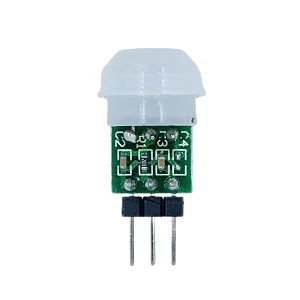
The AM312 is a passive infrared (PIR) motion sensor designed to detect motion by sensing changes in infrared radiation emitted by objects, such as humans or animals, within its detection range. This compact and energy-efficient sensor is widely used in security systems, home automation, lighting control, and other motion-detection applications. Its small size and low power consumption make it ideal for battery-powered devices and embedded systems.
Explore Projects Built with Sensor Am312
 Open Project in Cirkit Designer
 Open Project in Cirkit Designer
 Open Project in Cirkit Designer
 Open Project in Cirkit Designer
Explore Projects Built with Sensor Am312
Open Project in Cirkit DesignerOpen Project in Cirkit DesignerOpen Project in Cirkit DesignerOpen Project in Cirkit DesignerCommon Applications
- Security systems for detecting intruders
- Automatic lighting systems
- Smart home automation
- Motion-activated alarms
- Energy-saving devices
Technical Specifications
The AM312 PIR motion sensor is designed for simplicity and reliability. Below are its key technical details:
| Parameter | Value |
|---|---|
| Operating Voltage | 2.7V to 12V DC |
| Quiescent Current | < 50 µA |
| Detection Range | Up to 3-5 meters |
| Detection Angle | Approximately 100° |
| Output Signal | High (3.3V) when motion detected, Low (0V) otherwise |
| Trigger Mode | Non-retriggerable (default) |
| Operating Temperature | -20°C to +70°C |
| Dimensions | 10mm x 12mm x 8mm |
Pin Configuration
The AM312 PIR motion sensor has three pins for easy integration into circuits. Below is the pinout description:
| Pin | Name | Description |
|---|---|---|
| 1 | VCC | Power supply input (2.7V to 12V DC) |
| 2 | OUT | Digital output signal (High when motion is detected) |
| 3 | GND | Ground connection |
Usage Instructions
How to Use the AM312 in a Circuit
- Power the Sensor: Connect the VCC pin to a DC power source (2.7V to 12V) and the GND pin to the ground.
- Connect the Output: The OUT pin provides a digital signal. Connect it to a microcontroller input pin or directly to a device (e.g., an LED or buzzer) for motion detection.
- Place the Sensor: Position the sensor in an area where it can detect motion within its range and angle. Avoid obstructions and direct sunlight for optimal performance.
Important Considerations
- Warm-Up Time: The sensor requires a warm-up time of approximately 30 seconds after powering on to stabilize.
- Avoid Interference: Keep the sensor away from heat sources, reflective surfaces, and strong electromagnetic fields to prevent false triggers.
- Trigger Mode: The AM312 operates in a non-retriggerable mode, meaning the output will remain high for a fixed duration (approximately 2 seconds) after detecting motion, regardless of continued motion.
Example: Connecting the AM312 to an Arduino UNO
Below is an example of how to connect and use the AM312 PIR motion sensor with an Arduino UNO:
Circuit Diagram
- Connect the VCC pin of the AM312 to the 5V pin on the Arduino.
- Connect the GND pin of the AM312 to the GND pin on the Arduino.
- Connect the OUT pin of the AM312 to digital pin 2 on the Arduino.
Arduino Code
// AM312 PIR Motion Sensor Example with Arduino UNO
// This code reads the sensor's output and turns on an LED when motion is detected.

const int pirPin = 2;  // Pin connected to the OUT pin of the AM312
const int ledPin = 13; // Built-in LED on Arduino UNO

void setup() {
  pinMode(pirPin, INPUT);  // Set the PIR sensor pin as input
  pinMode(ledPin, OUTPUT); // Set the LED pin as output
  Serial.begin(9600);      // Initialize serial communication for debugging
}

void loop() {
  int motionDetected = digitalRead(pirPin); // Read the PIR sensor output

  if (motionDetected == HIGH) { // If motion is detected
    digitalWrite(ledPin, HIGH); // Turn on the LED
    Serial.println("Motion detected!"); // Print message to serial monitor
  } else {
    digitalWrite(ledPin, LOW);  // Turn off the LED
  }

  delay(100); // Small delay to stabilize readings
}
Troubleshooting and FAQs
Common Issues and Solutions
Sensor Not Detecting Motion
- Ensure the sensor is powered correctly (check VCC and GND connections).
- Verify that the detection range and angle are not obstructed.
- Allow the sensor to complete its warm-up time (approximately 30 seconds).
False Triggers
- Avoid placing the sensor near heat sources, such as radiators or direct sunlight.
- Ensure the sensor is not exposed to strong electromagnetic interference.
Output Signal Not Working
- Check the wiring of the OUT pin to the microcontroller or device.
- Verify that the connected device (e.g., LED or buzzer) is functioning properly.
FAQs
Q: Can the AM312 detect motion through glass or walls?
A: No, the AM312 cannot detect motion through glass, walls, or other solid objects. It requires a clear line of sight to detect infrared radiation.
Q: Can I adjust the detection range or duration?
A: The AM312 has a fixed detection range and duration. For adjustable settings, consider using a different PIR sensor model with configurable parameters.
Q: Is the AM312 suitable for outdoor use?
A: The AM312 is not weatherproof. If used outdoors, it must be enclosed in a protective, weather-resistant housing.
By following this documentation, you can effectively integrate the AM312 PIR motion sensor into your projects for reliable motion detection.