
How to Use Orin Nano: Examples, Pinouts, and Specs
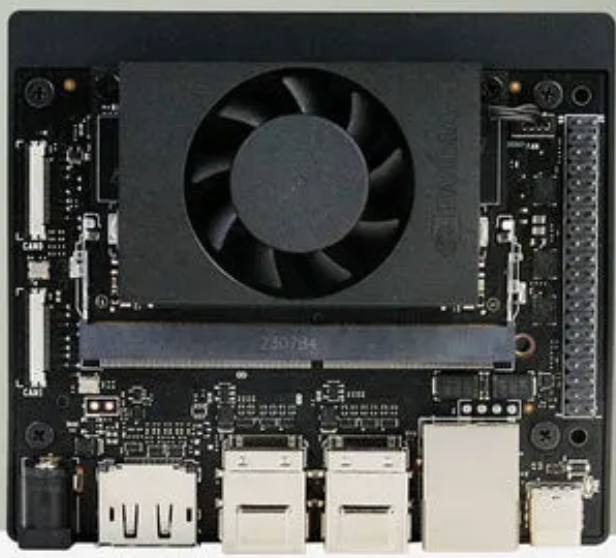
 Design with Orin Nano in Cirkit Designer
Introduction
The NVIDIA Orin Nano is a compact, high-performance computing platform designed for AI and robotics applications. It is powered by the NVIDIA Orin system-on-chip (SoC), which integrates advanced GPU capabilities, making it ideal for edge computing tasks, real-time processing, and AI inference workloads. The Orin Nano is specifically engineered to deliver exceptional performance in a small form factor, enabling developers to build intelligent systems for a wide range of use cases.
Explore Projects Built with Orin Nano
 Open Project in Cirkit Designer
 Open Project in Cirkit Designer
 Open Project in Cirkit Designer
 Open Project in Cirkit Designer
Explore Projects Built with Orin Nano
Open Project in Cirkit DesignerOpen Project in Cirkit DesignerOpen Project in Cirkit DesignerOpen Project in Cirkit DesignerCommon Applications and Use Cases
- Autonomous robots and drones
- Smart cameras and video analytics
- Industrial automation and IoT devices
- AI-powered medical devices
- Edge AI systems for real-time decision-making
- Natural language processing and computer vision tasks
Technical Specifications
The Orin Nano is available in multiple configurations to suit different performance and power requirements. Below are the key technical details:
Key Specifications
| Parameter | Value |
|---|---|
| GPU Architecture | NVIDIA Ampere |
| GPU Cores | Up to 1024 CUDA cores |
| Tensor Cores | 32 |
| CPU | Quad-core ARM Cortex-A78AE |
| Memory | Up to 8GB LPDDR5 |
| Storage | eMMC 5.1 (16GB) |
| AI Performance | Up to 40 TOPS (Tera Operations Per Second) |
| Power Consumption | Configurable: 7W to 15W |
| Connectivity | 1x Gigabit Ethernet, USB 3.2, PCIe Gen 3 |
| Operating System Support | Linux-based JetPack SDK |
Pin Configuration and Descriptions
The Orin Nano is typically used with a carrier board that provides access to its I/O pins. Below is a table summarizing the key pin configurations:
GPIO and I/O Pins
| Pin Number | Pin Name | Description |
|---|---|---|
| 1 | 3.3V Power | Provides 3.3V power output |
| 2 | GND | Ground pin |
| 3 | GPIO_1 | General-purpose input/output pin |
| 4 | GPIO_2 | General-purpose input/output pin |
| 5 | I2C_SCL | I2C clock line |
| 6 | I2C_SDA | I2C data line |
| 7 | UART_TX | UART transmit pin |
| 8 | UART_RX | UART receive pin |
| 9 | SPI_MOSI | SPI Master Out Slave In |
| 10 | SPI_MISO | SPI Master In Slave Out |
| 11 | SPI_CLK | SPI clock line |
| 12 | SPI_CS | SPI chip select |
Usage Instructions
The Orin Nano is designed to be integrated into custom hardware solutions or used with NVIDIA's developer kits. Below are the steps to get started:
Setting Up the Orin Nano
- Power Supply: Ensure a stable power supply (7W to 15W) is connected to the carrier board.
- Operating System: Download and flash the NVIDIA JetPack SDK onto a microSD card or eMMC storage. JetPack provides the necessary drivers, libraries, and tools for development.
- Peripheral Connections: Connect peripherals such as a monitor (via HDMI), keyboard, mouse, and Ethernet for network access.
- Boot the System: Insert the microSD card (if applicable), power on the device, and follow the on-screen instructions to complete the setup.
Using the Orin Nano with an Arduino UNO
The Orin Nano can communicate with an Arduino UNO via UART, I2C, or SPI. Below is an example of using UART communication:
Example Code for Arduino UNO
// Arduino code to send data to the Orin Nano via UART
// Ensure the Orin Nano is connected to the Arduino's TX and RX pins

void setup() {
  Serial.begin(9600); // Initialize UART communication at 9600 baud rate
  delay(1000);        // Wait for the Orin Nano to initialize
}

void loop() {
  Serial.println("Hello from Arduino!"); // Send a message to the Orin Nano
  delay(1000);                           // Wait 1 second before sending again
}
Example Code for Orin Nano (Python)
Python code to receive data from the Arduino UNO via UART
Ensure the correct serial port is specified (e.g., /dev/ttyUSB0)
import serial
Initialize UART communication
ser = serial.Serial('/dev/ttyUSB0', 9600, timeout=1)
while True: data = ser.readline().decode('utf-8').strip() # Read and decode data if data: print(f"Received: {data}") # Print the received message
Important Considerations and Best Practices
- Cooling: Use an appropriate heatsink or fan to prevent overheating during high-performance tasks.
- Power Supply: Ensure the power supply meets the voltage and current requirements to avoid instability.
- Software Updates: Regularly update the JetPack SDK to access the latest features and security patches.
- Peripheral Compatibility: Verify that connected peripherals (e.g., cameras, sensors) are supported by the Orin Nano.
Troubleshooting and FAQs
Common Issues and Solutions
Device Does Not Boot:
- Ensure the power supply is connected and providing sufficient power.
- Verify that the microSD card or eMMC storage contains a valid JetPack image.
Overheating:
- Check that the cooling solution (heatsink or fan) is properly installed.
- Reduce the power mode if the workload allows.
No UART Communication:
- Confirm that the TX and RX pins are correctly connected between the Orin Nano and Arduino.
- Ensure the baud rate matches on both devices.
Peripheral Not Detected:
- Verify that the peripheral is compatible with the Orin Nano.
- Check the connections and ensure the necessary drivers are installed.
FAQs
Q: Can the Orin Nano run AI models out of the box?
A: Yes, the Orin Nano supports AI frameworks such as TensorFlow, PyTorch, and ONNX. Pre-trained models can be deployed using NVIDIA's TensorRT for optimized inference.
Q: What is the maximum resolution for video processing?
A: The Orin Nano supports video processing up to 4K resolution at 60 FPS.
Q: Can I use the Orin Nano for battery-powered applications?
A: Yes, but ensure the battery can provide sufficient power (7W to 15W) and consider power optimization techniques.
Q: Is the Orin Nano compatible with Raspberry Pi HATs?
A: Compatibility depends on the specific HAT and its interface. GPIO-based HATs may require additional configuration.
This concludes the documentation for the NVIDIA Orin Nano. For further assistance, refer to the official NVIDIA developer resources.