
How to Use FDC1004: Examples, Pinouts, and Specs
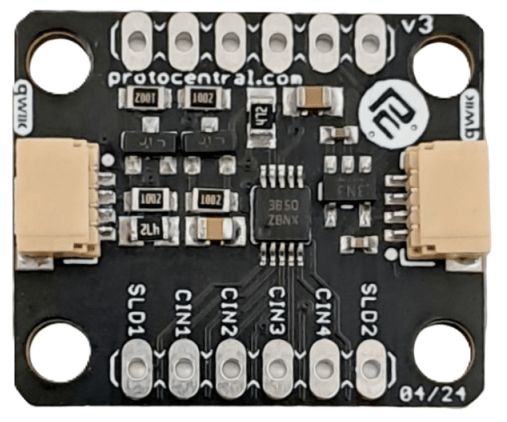
 Design with FDC1004 in Cirkit Designer
Introduction
The FDC1004, manufactured by Protocentral (Part ID: FDC), is a high-precision capacitance-to-digital converter (CDC) designed to measure capacitance with exceptional accuracy and resolution. This component is ideal for applications requiring precise capacitive sensing, such as proximity sensing, liquid level sensing, and touch sensing. Its advanced features and ease of integration make it a popular choice for both industrial and consumer electronics.
Explore Projects Built with FDC1004
 Open Project in Cirkit Designer
 Open Project in Cirkit Designer
 Open Project in Cirkit Designer
 Open Project in Cirkit Designer
Explore Projects Built with FDC1004
Open Project in Cirkit DesignerOpen Project in Cirkit DesignerOpen Project in Cirkit DesignerOpen Project in Cirkit DesignerCommon Applications
- Proximity Sensing: Detecting the presence or movement of objects.
- Liquid Level Sensing: Measuring liquid levels in tanks or containers.
- Touch Sensing: Implementing touch-sensitive interfaces for devices.
- Environmental Monitoring: Measuring changes in capacitance due to environmental factors.
Technical Specifications
The FDC1004 offers robust performance and flexibility for capacitive sensing applications. Below are its key technical details:
Key Features
- Supply Voltage: 3.3V to 5.5V
- Capacitance Measurement Range: ±15 pF (programmable offset up to ±100 pF)
- Resolution: 16-bit
- Interface: I²C (Inter-Integrated Circuit)
- Operating Temperature Range: -40°C to +85°C
- Sampling Rate: Up to 100 samples per second
- Input Channels: 4 differential or single-ended channels
- Integrated Shield Driver: Reduces interference and improves measurement accuracy.
Pin Configuration
The FDC1004 is typically available in a 10-pin package. Below is the pinout and description:
| Pin | Name | Description |
|---|---|---|
| 1 | VDD | Power supply input (3.3V to 5.5V). |
| 2 | GND | Ground connection. |
| 3 | SDA | I²C data line for communication. |
| 4 | SCL | I²C clock line for communication. |
| 5 | CAP1 | Capacitive input channel 1. |
| 6 | CAP2 | Capacitive input channel 2. |
| 7 | CAP3 | Capacitive input channel 3. |
| 8 | CAP4 | Capacitive input channel 4. |
| 9 | SHLD1 | Shield driver output for CAP1 and CAP2. |
| 10 | SHLD2 | Shield driver output for CAP3 and CAP4. |
Usage Instructions
The FDC1004 is straightforward to use in capacitive sensing applications. Below are the steps and best practices for integrating it into your circuit.
Circuit Integration
- Power Supply: Connect the VDD pin to a stable 3.3V or 5.5V power source and the GND pin to ground.
- I²C Communication: Connect the SDA and SCL pins to the corresponding I²C pins on your microcontroller. Use pull-up resistors (typically 4.7 kΩ) on both lines.
- Capacitive Inputs: Connect the capacitive sensors to the CAP1–CAP4 pins. For differential measurements, use pairs of these pins.
- Shielding: Use the SHLD1 and SHLD2 pins to drive shields for the capacitive sensors, reducing noise and interference.
Important Considerations
- Offset Calibration: Use the programmable offset feature to handle larger capacitance ranges.
- Noise Reduction: Place decoupling capacitors (e.g., 0.1 µF) near the VDD pin to minimize power supply noise.
- I²C Address: The default I²C address of the FDC1004 is
0x50. Ensure no address conflicts on the I²C bus.
Example Code for Arduino UNO
Below is an example of how to interface the FDC1004 with an Arduino UNO to read capacitance values:
#include <Wire.h>

// FDC1004 I2C address
#define FDC1004_ADDRESS 0x50

void setup() {
  Wire.begin(); // Initialize I2C communication
  Serial.begin(9600); // Initialize serial communication for debugging

  // Configure FDC1004 (example: set measurement channel and rate)
  Wire.beginTransmission(FDC1004_ADDRESS);
  Wire.write(0x08); // Address of the configuration register
  Wire.write(0x1C); // Example configuration: enable CAP1, 100 Hz sampling
  Wire.endTransmission();
}

void loop() {
  // Request capacitance measurement from FDC1004
  Wire.beginTransmission(FDC1004_ADDRESS);
  Wire.write(0x00); // Address of the data register
  Wire.endTransmission();

  Wire.requestFrom(FDC1004_ADDRESS, 2); // Request 2 bytes of data
  if (Wire.available() == 2) {
    uint16_t data = Wire.read() << 8 | Wire.read(); // Combine MSB and LSB
    float capacitance = data * 0.000015; // Convert to pF (example scaling factor)
    Serial.print("Capacitance: ");
    Serial.print(capacitance);
    Serial.println(" pF");
  }

  delay(100); // Wait before the next measurement
}
Best Practices
- Use shielded cables for long sensor connections to minimize noise.
- Avoid placing the FDC1004 near high-frequency components to reduce interference.
- Perform regular calibration to maintain measurement accuracy.
Troubleshooting and FAQs
Common Issues
No I²C Communication:
- Cause: Incorrect wiring or missing pull-up resistors.
- Solution: Verify SDA and SCL connections and ensure pull-up resistors are present.
Inaccurate Measurements:
- Cause: Environmental noise or improper shielding.
- Solution: Use the integrated shield driver and ensure proper grounding.
Device Not Detected on I²C Bus:
- Cause: Address conflict or incorrect I²C address.
- Solution: Check the FDC1004's I²C address and ensure no conflicts with other devices.
FAQs
Q: Can the FDC1004 measure liquid levels in non-conductive containers?
- A: Yes, the FDC1004 can measure liquid levels by detecting changes in capacitance caused by the liquid.
Q: What is the maximum cable length for capacitive sensors?
- A: The maximum length depends on the cable type and shielding. Use shielded cables to minimize noise for longer distances.
Q: Can I use the FDC1004 with a 3.3V microcontroller?
- A: Yes, the FDC1004 operates at 3.3V and is compatible with 3.3V logic levels.
By following this documentation, you can effectively integrate the FDC1004 into your projects and achieve precise capacitive sensing.