
How to Use MCB Schneider 6A Double Pole: Examples, Pinouts, and Specs
 Design with MCB Schneider 6A Double Pole in Cirkit Designer
Introduction
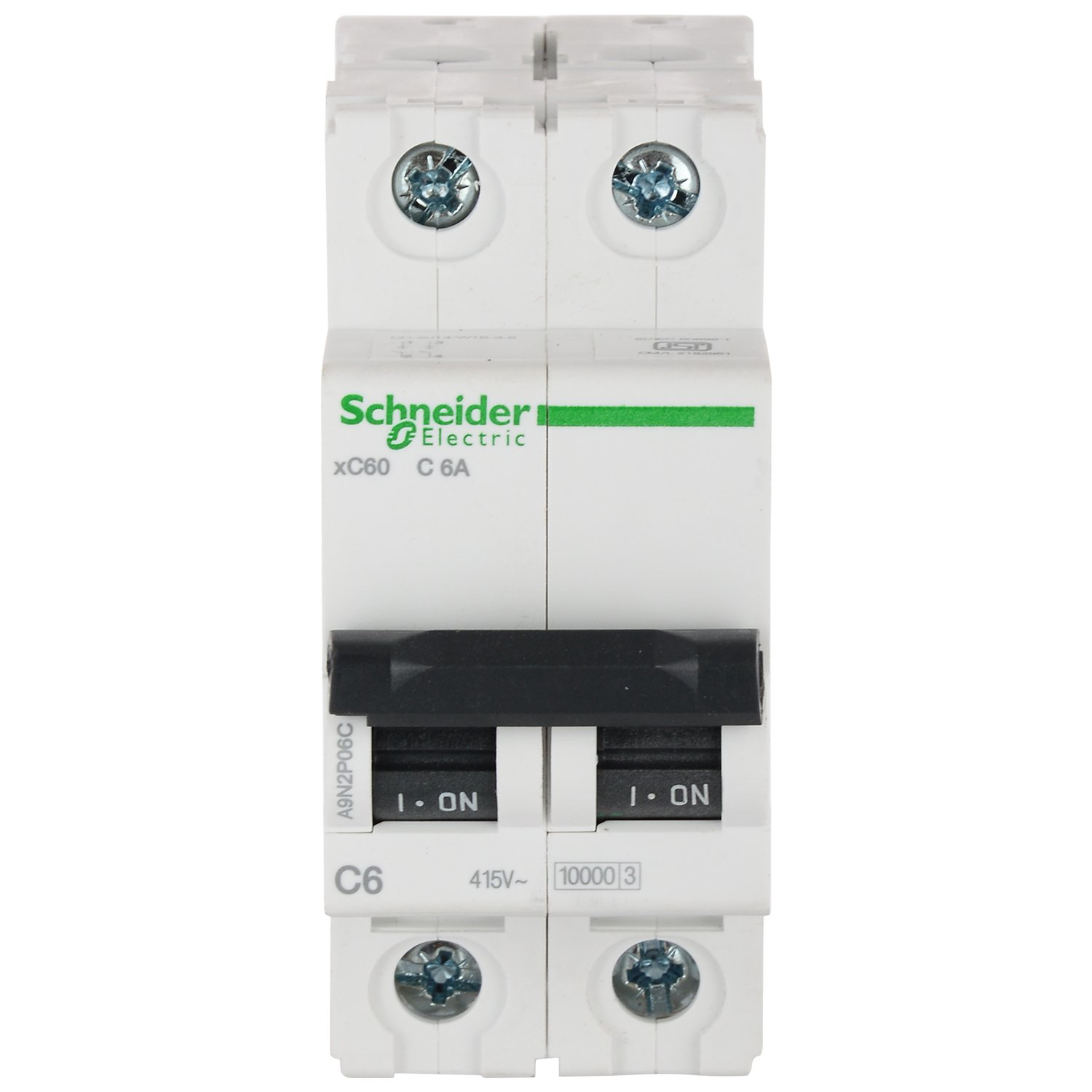
The MCB Schneider 6A Double Pole is a miniature circuit breaker (MCB) designed to protect electrical circuits from overloads and short circuits. With a current rating of 6 Amperes, this device is ideal for safeguarding low-power electrical systems. Its double-pole configuration ensures protection for both live and neutral lines, making it suitable for single-phase applications where enhanced safety is required.
Explore Projects Built with MCB Schneider 6A Double Pole
 Open Project in Cirkit Designer
 Open Project in Cirkit Designer
 Open Project in Cirkit Designer
 Open Project in Cirkit Designer
Explore Projects Built with MCB Schneider 6A Double Pole
Open Project in Cirkit DesignerOpen Project in Cirkit DesignerOpen Project in Cirkit DesignerOpen Project in Cirkit DesignerCommon Applications and Use Cases
- Residential and commercial electrical systems
- Protection of lighting circuits and small appliances
- Industrial control panels and distribution boards
- Backup protection for sensitive equipment
Technical Specifications
The following table outlines the key technical details of the MCB Schneider 6A Double Pole:
| Parameter | Specification |
|---|---|
| Rated Current | 6 Amperes |
| Number of Poles | 2 (Double Pole) |
| Rated Voltage | 230/400V AC |
| Breaking Capacity | 10 kA |
| Tripping Curve | Type C (moderate inrush current tolerance) |
| Operating Temperature | -5°C to +55°C |
| Mounting Type | DIN Rail (35mm standard) |
| Terminal Capacity | 1-25 mm² (cable cross-section) |
| Standards Compliance | IEC/EN 60898-1 |
Pin Configuration and Descriptions
The MCB Schneider 6A Double Pole has four connection terminals, as described below:
| Terminal | Description |
|---|---|
| L1 (Input) | Live input terminal for the first pole |
| N1 (Input) | Neutral input terminal for the second pole |
| L2 (Output) | Live output terminal for the first pole |
| N2 (Output) | Neutral output terminal for the second pole |
Usage Instructions
How to Use the Component in a Circuit
- Mounting the MCB: Securely install the MCB on a standard 35mm DIN rail in your distribution box or control panel.
- Wiring:
- Connect the live input wire to the L1 terminal and the neutral input wire to the N1 terminal.
- Connect the live output wire to the L2 terminal and the neutral output wire to the N2 terminal.
- Ensure all connections are tight and secure to prevent loose contacts.
- Power On: Once the wiring is complete, switch on the MCB by flipping the toggle to the "ON" position.
- Testing: Test the circuit by simulating an overload or short circuit to ensure the MCB trips as expected.
Important Considerations and Best Practices
- Cable Sizing: Use cables with appropriate cross-sectional areas (1-25 mm²) to handle the rated current without overheating.
- Load Balancing: Ensure the connected load does not exceed the 6A rating of the MCB.
- Tripping Curve: The Type C tripping curve is suitable for moderate inrush currents, such as those from motors or transformers. For higher inrush currents, consider a Type D MCB.
- Regular Maintenance: Periodically inspect the MCB for signs of wear, overheating, or loose connections.
Arduino UNO Integration
While the MCB Schneider 6A Double Pole is not directly connected to an Arduino UNO, it can be used to protect circuits powered by the Arduino. For example, you can use the MCB to safeguard the power supply feeding the Arduino and its peripherals.
Here is an example of how you might use the MCB in a circuit with an Arduino:
+-------------------+       +-------------------+
| Power Supply      |       | Arduino UNO       |
| (e.g., 12V DC)    |       |                   |
|                   |       |                   |
|  +----+           |       |                   |
|  | MCB |           -------> Arduino VIN       |
|  +----+           |       |                   |
|                   |       |                   |
+-------------------+       +-------------------+
Troubleshooting and FAQs
Common Issues and Solutions
MCB Does Not Trip During Overload:
- Cause: The connected load may not exceed the MCB's rated current (6A).
- Solution: Verify the load current using a multimeter. If the load is below 6A, the MCB will not trip.
MCB Trips Frequently:
- Cause: The connected load exceeds the MCB's rated current or there is a short circuit.
- Solution: Reduce the load or check for wiring faults and short circuits.
Loose Connections:
- Cause: Improperly tightened terminal screws.
- Solution: Ensure all terminal screws are securely tightened to prevent arcing or overheating.
MCB Does Not Turn On:
- Cause: Internal damage or a persistent fault in the circuit.
- Solution: Inspect the MCB for visible damage. If the issue persists, replace the MCB.
FAQs
Q1: Can this MCB be used for DC circuits?
A1: No, the MCB Schneider 6A Double Pole is designed for AC circuits with a rated voltage of 230/400V.
Q2: What is the purpose of the double-pole configuration?
A2: The double-pole configuration provides protection for both live and neutral lines, ensuring enhanced safety in single-phase systems.
Q3: How do I know if the MCB is faulty?
A3: If the MCB does not trip during a fault or cannot be switched on, it may be faulty. Replace it if necessary.
Q4: Can I use this MCB for motor protection?
A4: Yes, the Type C tripping curve allows for moderate inrush currents, making it suitable for small motors. However, ensure the motor's starting current does not exceed the MCB's capacity.