
How to Use STC 1000: Examples, Pinouts, and Specs
 Design with STC 1000 in Cirkit Designer
Introduction
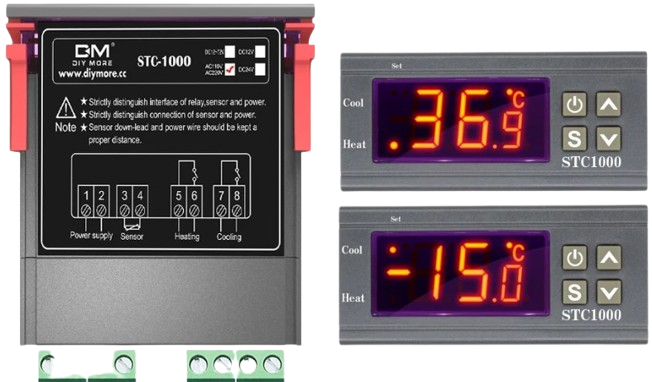
The STC 1000 is a versatile digital temperature controller manufactured by SMKN 1 CERME. It is widely used for regulating temperature in a variety of applications, including incubators, refrigeration systems, aquariums, and brewing setups. The device features a dual display for real-time temperature monitoring and setpoint configuration, offering precise control with adjustable parameters such as hysteresis, temperature calibration, and delay protection for compressors.
Explore Projects Built with STC 1000
 Open Project in Cirkit Designer
 Open Project in Cirkit Designer
 Open Project in Cirkit Designer
 Open Project in Cirkit Designer
Explore Projects Built with STC 1000
Open Project in Cirkit DesignerOpen Project in Cirkit DesignerOpen Project in Cirkit DesignerOpen Project in Cirkit DesignerCommon Applications
- Incubators for hatching eggs
- Refrigeration systems for food storage
- Aquariums to maintain water temperature
- Homebrewing for fermentation temperature control
- Greenhouses for climate regulation
Technical Specifications
The following table outlines the key technical details of the STC 1000:
| Parameter | Specification |
|---|---|
| Manufacturer | SMKN 1 CERME |
| Manufacturer Part ID | SMKN 1 CERME |
| Input Voltage | AC 110V-220V ±10% |
| Temperature Range | -50°C to 99°C (-58°F to 210°F) |
| Temperature Accuracy | ±1°C |
| Sensor Type | NTC (10kΩ) sensor, included |
| Relay Output (Heating) | 10A at 220V AC |
| Relay Output (Cooling) | 10A at 220V AC |
| Power Consumption | <3W |
| Operating Temperature | -10°C to 60°C |
| Storage Temperature | -20°C to 75°C |
| Dimensions | 75mm x 34.5mm x 85mm |
Pin Configuration and Descriptions
The STC 1000 has a total of 8 terminals for wiring. The pin configuration is as follows:
| Pin Number | Label | Description |
|---|---|---|
| 1 | Power (L) | Live wire input for AC power |
| 2 | Power (N) | Neutral wire input for AC power |
| 3 | Cooling (NO) | Normally open relay output for cooling devices |
| 4 | Cooling (COM) | Common terminal for cooling relay |
| 5 | Heating (NO) | Normally open relay output for heating devices |
| 6 | Heating (COM) | Common terminal for heating relay |
| 7 | Sensor Input 1 | Temperature sensor input (NTC sensor) |
| 8 | Sensor Input 2 | Temperature sensor input (NTC sensor) |
Usage Instructions
How to Use the STC 1000 in a Circuit
- Power Connection: Connect the live (L) and neutral (N) wires of the AC power supply to terminals 1 and 2, respectively.
- Sensor Connection: Attach the included NTC temperature sensor to terminals 7 and 8. Ensure the sensor is placed in the environment where temperature regulation is required.
- Relay Outputs:
- Connect the cooling device (e.g., a compressor) to terminals 3 (NO) and 4 (COM).
- Connect the heating device (e.g., a heater) to terminals 5 (NO) and 6 (COM).
- Configuration:
- Power on the device and use the front panel buttons to set the desired temperature, hysteresis, and delay time.
- Refer to the user manual for detailed instructions on parameter adjustment.
Important Considerations
- Ensure the total current of connected devices does not exceed the relay ratings (10A at 220V AC).
- Place the temperature sensor in a location free from direct heat or cold sources for accurate readings.
- Use proper insulation and secure connections to prevent electrical hazards.
- For refrigeration systems, configure an appropriate delay time to protect the compressor from frequent cycling.
Example Code for Arduino UNO Integration
The STC 1000 is typically a standalone device, but it can be monitored using an Arduino UNO by reading the temperature sensor. Below is an example code snippet for interfacing the NTC sensor with an Arduino:
// Example code for reading an NTC sensor with Arduino UNO
// Note: This assumes the NTC sensor is connected to an analog pin (e.g., A0).

const int sensorPin = A0;  // Analog pin connected to the NTC sensor
float resistance = 10000; // Resistance of the NTC sensor at 25°C (10kΩ)
float beta = 3950;        // Beta coefficient of the NTC sensor
float tempK, tempC;       // Variables for temperature in Kelvin and Celsius

void setup() {
  Serial.begin(9600); // Initialize serial communication
}

void loop() {
  int analogValue = analogRead(sensorPin); // Read the analog value
  float voltage = analogValue * (5.0 / 1023.0); // Convert to voltage
  float resistanceNTC = (5.0 - voltage) * resistance / voltage; // Calculate resistance

  // Calculate temperature in Kelvin using the Steinhart-Hart equation
  tempK = 1 / (1 / (25 + 273.15) + (1 / beta) * log(resistanceNTC / resistance));
  tempC = tempK - 273.15; // Convert Kelvin to Celsius

  Serial.print("Temperature: ");
  Serial.print(tempC);
  Serial.println(" °C");

  delay(1000); // Wait 1 second before the next reading
}
Troubleshooting and FAQs
Common Issues and Solutions
Display Shows "EE" or Error Code:
- Cause: Sensor is disconnected or damaged.
- Solution: Check the sensor wiring and ensure it is securely connected to terminals 7 and 8. Replace the sensor if necessary.
Temperature Readings Are Inaccurate:
- Cause: Sensor placement is incorrect or calibration is needed.
- Solution: Place the sensor in a stable environment away from direct heat or cold sources. Use the calibration function to adjust readings.
Relay Does Not Activate:
- Cause: Incorrect wiring or parameter settings.
- Solution: Verify the wiring of the heating and cooling devices. Check the setpoint and hysteresis values to ensure they are configured correctly.
Device Does Not Power On:
- Cause: Faulty power supply or internal damage.
- Solution: Check the AC power supply and connections to terminals 1 and 2. If the issue persists, consult a technician.
FAQs
Can I use the STC 1000 with DC-powered devices? No, the STC 1000 is designed for AC-powered devices only. Use a DC-AC relay module if DC devices need to be controlled.
What is the maximum cable length for the NTC sensor? The sensor cable can typically be extended up to 10 meters, but ensure proper shielding to avoid interference.
Can I use the STC 1000 for sub-zero temperature applications? Yes, the STC 1000 supports temperatures as low as -50°C, making it suitable for freezers and cold storage.
This concludes the documentation for the STC 1000. For further assistance, refer to the official user manual or contact the manufacturer.