
How to Use IR Flame Sensor Module: Examples, Pinouts, and Specs
 Design with IR Flame Sensor Module in Cirkit Designer
Introduction
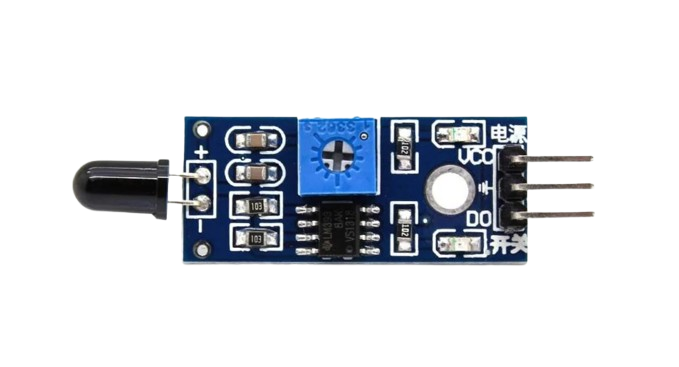
The IR Flame Sensor Module (Manufacturer: ZWET, Part ID: IRF) is a device designed to detect infrared (IR) radiation emitted by flames. It is commonly used in fire detection systems, safety applications, and flame monitoring in industrial environments. The module is capable of detecting flames or light sources within the wavelength range of 760 nm to 1100 nm. Its compact design and ease of integration make it suitable for a variety of projects, including Arduino-based systems.
Explore Projects Built with IR Flame Sensor Module
 Open Project in Cirkit Designer
 Open Project in Cirkit Designer
 Open Project in Cirkit Designer
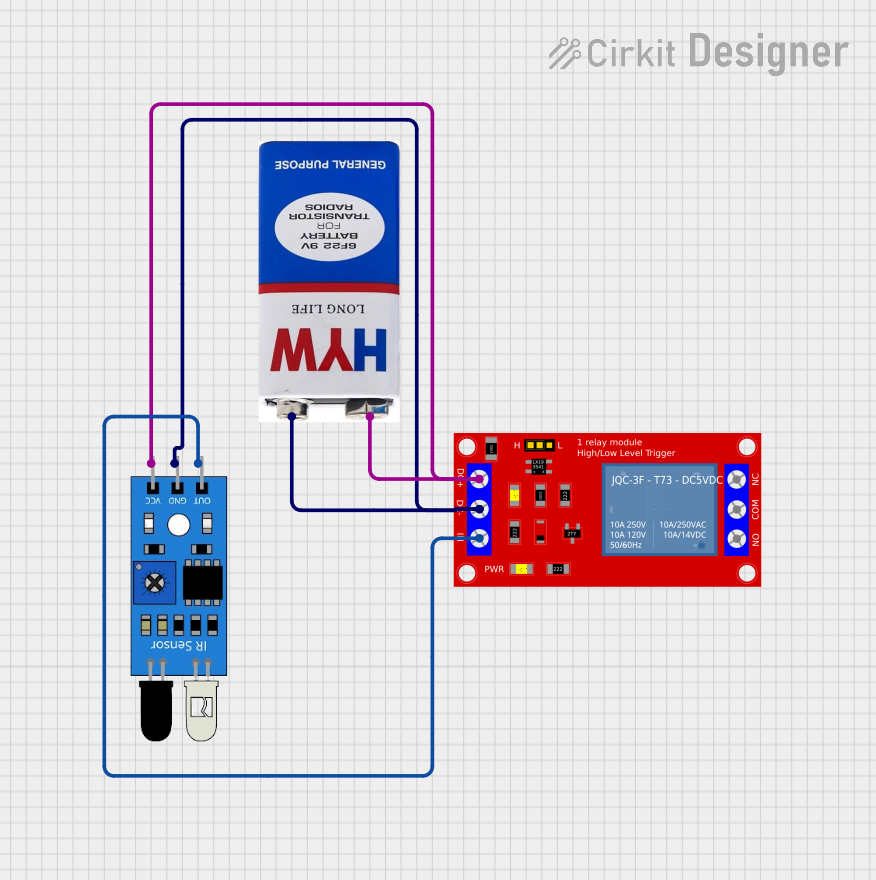 Open Project in Cirkit Designer
Explore Projects Built with IR Flame Sensor Module
Open Project in Cirkit DesignerOpen Project in Cirkit DesignerOpen Project in Cirkit DesignerOpen Project in Cirkit DesignerCommon Applications
- Fire detection and alarm systems
- Industrial flame monitoring
- Safety systems in kitchens and factories
- Robotics and automation for fire detection
- Educational projects and experiments
Technical Specifications
The following table outlines the key technical details of the IR Flame Sensor Module:
| Parameter | Specification |
|---|---|
| Operating Voltage | 3.3V to 5V DC |
| Detection Range | Up to 100 cm (depending on flame size) |
| Detection Angle | 60° |
| Wavelength Sensitivity | 760 nm to 1100 nm |
| Output Type | Digital (D0) and Analog (A0) |
| Operating Temperature | -25°C to 85°C |
| Dimensions | 32 mm x 14 mm x 8 mm |
Pin Configuration and Descriptions
The IR Flame Sensor Module has a 3-pin interface. The pin configuration is as follows:
| Pin | Name | Description |
|---|---|---|
| 1 | VCC | Power supply pin. Connect to 3.3V or 5V DC. |
| 2 | GND | Ground pin. Connect to the ground of the power supply. |
| 3 | OUT | Output pin. Provides a digital signal (HIGH or LOW) based on flame detection. |
Usage Instructions
How to Use the IR Flame Sensor Module in a Circuit
- Power the Module: Connect the
VCCpin to a 3.3V or 5V DC power source and theGNDpin to the ground. - Connect the Output: Use the
OUTpin to read the sensor's output. This pin provides a digital signal:- HIGH (1): No flame detected.
- LOW (0): Flame detected.
- Adjust Sensitivity: The module includes a potentiometer to adjust the sensitivity. Rotate the potentiometer clockwise to increase sensitivity and counterclockwise to decrease it.
- Optional Analog Output: Some versions of the module may include an analog output pin (A0) for more precise flame intensity readings.
Important Considerations and Best Practices
- Avoid Direct Sunlight: The sensor may give false readings if exposed to direct sunlight or other strong IR sources.
- Distance and Angle: Ensure the flame is within the detection range (up to 100 cm) and angle (60°) for accurate results.
- Power Supply: Use a stable power supply to avoid noise in the output signal.
- Testing Environment: Test the sensor in a controlled environment to calibrate sensitivity before deployment.
Example: Connecting to an Arduino UNO
Below is an example of how to connect and use the IR Flame Sensor Module with an Arduino UNO:
Circuit Diagram
- Connect
VCCto the 5V pin on the Arduino. - Connect
GNDto the GND pin on the Arduino. - Connect
OUTto digital pin 2 on the Arduino.
Arduino Code
// IR Flame Sensor Module Example Code
// Manufacturer: ZWET, Part ID: IRF

const int flameSensorPin = 2; // Digital pin connected to the OUT pin of the sensor
const int ledPin = 13;        // Built-in LED on Arduino for flame detection indication

void setup() {
  pinMode(flameSensorPin, INPUT); // Set flame sensor pin as input
  pinMode(ledPin, OUTPUT);        // Set LED pin as output
  Serial.begin(9600);             // Initialize serial communication for debugging
}

void loop() {
  int flameDetected = digitalRead(flameSensorPin); // Read the sensor output

  if (flameDetected == LOW) {
    // Flame detected (LOW signal from sensor)
    digitalWrite(ledPin, HIGH); // Turn on LED
    Serial.println("Flame detected!");
  } else {
    // No flame detected (HIGH signal from sensor)
    digitalWrite(ledPin, LOW);  // Turn off LED
    Serial.println("No flame detected.");
  }

  delay(500); // Wait for 500ms before the next reading
}
Troubleshooting and FAQs
Common Issues and Solutions
False Positives in Bright Environments
- Cause: Strong IR sources like sunlight or incandescent bulbs.
- Solution: Shield the sensor from direct light or use it in controlled lighting conditions.
Sensor Not Detecting Flames
- Cause: Flame is out of range or angle.
- Solution: Ensure the flame is within the 100 cm range and 60° detection angle.
Unstable Output Signal
- Cause: Noisy power supply or incorrect wiring.
- Solution: Use a stable power source and double-check all connections.
Sensitivity Adjustment Not Working
- Cause: Potentiometer is damaged or improperly adjusted.
- Solution: Replace the potentiometer or adjust it carefully while monitoring the output.
FAQs
Q1: Can the sensor detect flames through glass?
A1: No, the sensor cannot detect flames through glass as it blocks IR radiation.
Q2: What is the maximum detection distance?
A2: The sensor can detect flames up to 100 cm, depending on the flame size and intensity.
Q3: Can I use this sensor outdoors?
A3: Yes, but ensure it is protected from direct sunlight and environmental factors like rain or dust.
Q4: Is the sensor compatible with 3.3V microcontrollers?
A4: Yes, the sensor operates at both 3.3V and 5V, making it compatible with most microcontrollers.