
How to Use Engine with gearbox 6 VDC 200rpm up: Examples, Pinouts, and Specs
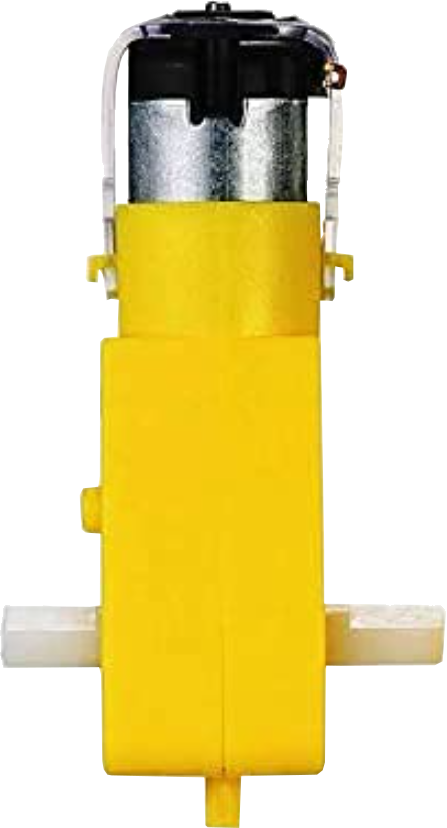
 Design with Engine with gearbox 6 VDC 200rpm up in Cirkit Designer
Introduction
The Engine with Gearbox 6 VDC 200rpm is a 6-volt direct current (VDC) motor integrated with a gearbox that reduces its speed to 200 revolutions per minute (rpm). This combination allows the motor to deliver higher torque, making it suitable for applications requiring precise control and significant mechanical power. The motor is widely used in robotics, automation systems, and small mechanical devices where controlled motion and torque are essential.
Explore Projects Built with Engine with gearbox 6 VDC 200rpm up
 Open Project in Cirkit Designer
 Open Project in Cirkit Designer
 Open Project in Cirkit Designer
 Open Project in Cirkit Designer
Explore Projects Built with Engine with gearbox 6 VDC 200rpm up
Open Project in Cirkit DesignerOpen Project in Cirkit DesignerOpen Project in Cirkit DesignerOpen Project in Cirkit DesignerCommon Applications
- Robotics: Driving wheels or actuators in robotic systems.
- Conveyor belts: Providing controlled motion for small-scale conveyor systems.
- Automated mechanisms: Used in vending machines, door openers, and similar devices.
- DIY projects: Ideal for hobbyists building motorized models or gadgets.
Technical Specifications
Below are the key technical details of the Engine with Gearbox 6 VDC 200rpm:
| Parameter | Value |
|---|---|
| Operating Voltage | 6 VDC |
| No-Load Speed | 200 rpm |
| Gearbox Ratio | Typically 1:30 (varies by model) |
| Stall Torque | ~2.5 kg·cm |
| No-Load Current | ~150 mA |
| Stall Current | ~1.2 A |
| Shaft Diameter | 6 mm |
| Shaft Length | 15 mm |
| Motor Dimensions | ~37 mm (diameter) x 70 mm (length) |
| Weight | ~150 g |
Pin Configuration and Descriptions
The motor typically has two terminals for electrical connections:
| Pin | Description |
|---|---|
| + | Positive terminal for 6 VDC input. |
| - | Negative terminal (ground). |
Usage Instructions
How to Use the Component in a Circuit
- Power Supply: Connect the motor to a 6 VDC power source. Ensure the power supply can provide sufficient current (at least 1.2 A for stall conditions).
- Polarity Control: Reversing the polarity of the connections will reverse the motor's rotation direction.
- Motor Driver: For precise control, use an H-bridge motor driver (e.g., L298N or L293D). This allows you to control the motor's speed and direction using a microcontroller like an Arduino.
- Mounting: Secure the motor using screws or clamps to prevent vibration during operation.
Important Considerations and Best Practices
- Avoid Overloading: Do not exceed the motor's stall torque, as this can damage the gearbox or motor windings.
- Heat Management: Prolonged operation at high loads may cause the motor to overheat. Allow cooling periods if necessary.
- Power Supply: Use a regulated power supply to avoid voltage spikes that could damage the motor.
- Noise Suppression: Add a capacitor (e.g., 0.1 µF) across the motor terminals to reduce electrical noise.
Example: Connecting to an Arduino UNO
Below is an example of controlling the motor using an Arduino UNO and an L298N motor driver:
// Define motor control pins
const int motorPin1 = 9; // IN1 on L298N
const int motorPin2 = 10; // IN2 on L298N
const int enablePin = 11; // ENA on L298N

void setup() {
  // Set motor pins as outputs
  pinMode(motorPin1, OUTPUT);
  pinMode(motorPin2, OUTPUT);
  pinMode(enablePin, OUTPUT);

  // Start motor at full speed in forward direction
  digitalWrite(motorPin1, HIGH); // Set IN1 high
  digitalWrite(motorPin2, LOW);  // Set IN2 low
  analogWrite(enablePin, 255);   // Set ENA to full speed (PWM value 255)
}

void loop() {
  // Motor runs continuously in the forward direction
  // Add your logic here to control motor speed or direction
}
Notes:
- Use a separate power supply for the motor driver to avoid overloading the Arduino's 5V regulator.
- Adjust the
analogWritevalue (0-255) to control the motor's speed.
Troubleshooting and FAQs
Common Issues
Motor Not Spinning:
- Check the power supply voltage and current rating.
- Verify the connections to the motor terminals.
- Ensure the motor driver is functioning correctly if used.
Motor Overheating:
- Reduce the load on the motor.
- Allow the motor to cool down between operations.
Noisy Operation:
- Add a capacitor across the motor terminals to suppress electrical noise.
- Check for loose mounting or misaligned gears.
Reversed Rotation:
- Swap the polarity of the motor terminals to correct the rotation direction.
FAQs
Q: Can I use a higher voltage to increase the motor's speed?
A: No, exceeding the rated 6 VDC can damage the motor and gearbox. Use a motor designed for higher voltages if needed.
Q: How do I calculate the torque required for my application?
A: Determine the load's weight and the radius of the shaft or wheel. Use the formula:
Torque (kg·cm) = Load (kg) × Radius (cm).
Q: Can I control this motor without a motor driver?
A: Yes, but only for basic on/off control using a switch or relay. For speed and direction control, a motor driver is recommended.
Q: Is this motor suitable for continuous operation?
A: Yes, but ensure the load is within the motor's rated torque and allow cooling periods to prevent overheating.