
How to Use BLE BT-09: Examples, Pinouts, and Specs
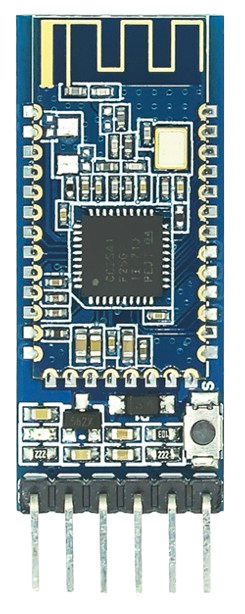
 Design with BLE BT-09 in Cirkit Designer
Introduction
The BLE BT-09 is a Bluetooth Low Energy (BLE) module designed for short-range wireless communication. It is widely used in Internet of Things (IoT) applications due to its low power consumption and reliable connectivity. The module enables seamless wireless communication between devices, making it ideal for smart home systems, wearable devices, health monitoring systems, and industrial automation.
Common applications of the BLE BT-09 include:
- Wireless data transmission in IoT devices
- Remote control and monitoring systems
- Smart home automation
- Wearable technology
- Health and fitness tracking devices
Explore Projects Built with BLE BT-09
 Open Project in Cirkit Designer
 Open Project in Cirkit Designer
 Open Project in Cirkit Designer
 Open Project in Cirkit Designer
Explore Projects Built with BLE BT-09
Open Project in Cirkit DesignerOpen Project in Cirkit DesignerOpen Project in Cirkit DesignerOpen Project in Cirkit DesignerTechnical Specifications
The BLE BT-09 module is compact and efficient, offering robust performance for BLE communication. Below are its key technical details:
General Specifications
| Parameter | Value |
|---|---|
| Bluetooth Version | BLE 4.2 |
| Operating Voltage | 3.3V - 5V |
| Operating Current | 8 mA (active), 1 µA (sleep) |
| Communication Range | Up to 30 meters (line of sight) |
| Data Rate | Up to 1 Mbps |
| Frequency Band | 2.4 GHz ISM band |
| Operating Temperature | -20°C to 70°C |
| Dimensions | 26 mm x 13 mm x 2.2 mm |
Pin Configuration
The BLE BT-09 module has 6 pins, as described in the table below:
| Pin Number | Pin Name | Description |
|---|---|---|
| 1 | VCC | Power supply input (3.3V - 5V) |
| 2 | GND | Ground connection |
| 3 | TXD | UART Transmit pin (connects to RX of microcontroller) |
| 4 | RXD | UART Receive pin (connects to TX of microcontroller) |
| 5 | EN | Enable pin (active HIGH, used to enable the module) |
| 6 | STATE | Status indicator pin (HIGH when connected) |
Usage Instructions
To use the BLE BT-09 module in a circuit, follow these steps:
- Power the Module: Connect the VCC pin to a 3.3V or 5V power source and the GND pin to ground.
- Connect UART Pins:
- Connect the TXD pin of the module to the RX pin of your microcontroller.
- Connect the RXD pin of the module to the TX pin of your microcontroller.
- Enable the Module: Pull the EN pin HIGH to activate the module.
- Pairing and Communication:
- Use a Bluetooth-enabled device (e.g., smartphone or computer) to scan for the BLE BT-09 module.
- Pair with the module using the default passkey (if required, typically "1234" or "0000").
- Use a serial communication app or software to send and receive data.
Example: Connecting BLE BT-09 to Arduino UNO
Below is an example of how to connect and use the BLE BT-09 module with an Arduino UNO:
Circuit Connections
- BLE BT-09 VCC → Arduino 5V
- BLE BT-09 GND → Arduino GND
- BLE BT-09 TXD → Arduino RX (Pin 0) (use a voltage divider if Arduino operates at 5V logic)
- BLE BT-09 RXD → Arduino TX (Pin 1)
Arduino Code
#include <SoftwareSerial.h>

// Define RX and TX pins for SoftwareSerial
SoftwareSerial BLE(10, 11); // RX = Pin 10, TX = Pin 11

void setup() {
  Serial.begin(9600); // Start Serial Monitor at 9600 baud
  BLE.begin(9600);    // Start BLE communication at 9600 baud

  Serial.println("BLE BT-09 Module Initialized");
  Serial.println("Send data via Serial Monitor to transmit over BLE");
}

void loop() {
  // Check if data is available from BLE module
  if (BLE.available()) {
    char data = BLE.read(); // Read data from BLE
    Serial.print("Received from BLE: ");
    Serial.println(data);   // Print received data to Serial Monitor
  }

  // Check if data is available from Serial Monitor
  if (Serial.available()) {
    char data = Serial.read(); // Read data from Serial Monitor
    BLE.write(data);           // Send data to BLE module
    Serial.print("Sent to BLE: ");
    Serial.println(data);      // Print sent data to Serial Monitor
  }
}
Important Considerations
- Ensure the BLE BT-09 module operates within its specified voltage range to avoid damage.
- Use a voltage divider or level shifter for the RXD pin if your microcontroller operates at 5V logic.
- Avoid connecting the module's TXD and RXD pins directly to the Arduino's hardware serial pins (0 and 1) if you need to use the Serial Monitor simultaneously. Use
SoftwareSerialfor alternative pins.
Troubleshooting and FAQs
Common Issues and Solutions
Module Not Powering On:
- Ensure the VCC and GND connections are secure.
- Verify the power supply voltage is within the 3.3V - 5V range.
Unable to Pair with Device:
- Check if the module is enabled (EN pin is HIGH).
- Ensure the device's Bluetooth is turned on and within range.
- Verify the default passkey (if required).
No Data Transmission:
- Confirm the TXD and RXD pins are correctly connected to the microcontroller.
- Check the baud rate settings in your code (default is 9600).
Intermittent Connection Drops:
- Ensure the module is within the specified communication range (up to 30 meters).
- Minimize interference from other 2.4 GHz devices.
FAQs
Q: Can the BLE BT-09 module be used with 5V logic microcontrollers?
A: Yes, but you must use a voltage divider or level shifter for the RXD pin to avoid damage.
Q: What is the default baud rate of the BLE BT-09 module?
A: The default baud rate is 9600.
Q: Can the BLE BT-09 module be used for audio transmission?
A: No, the BLE BT-09 is designed for data transmission and does not support audio streaming.
Q: How do I reset the module to factory settings?
A: Refer to the module's datasheet for specific AT commands to reset it to factory defaults.
By following this documentation, you can effectively integrate the BLE BT-09 module into your projects for reliable wireless communication.