
How to Use SO16: Examples, Pinouts, and Specs
 Design with SO16 in Cirkit Designer
Introduction
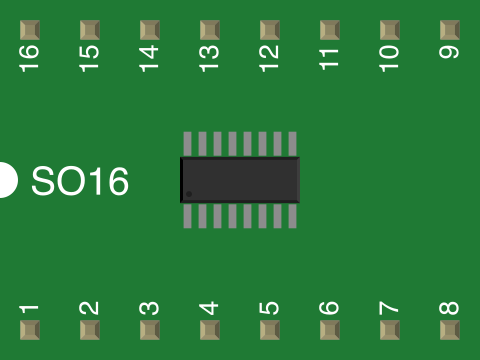
The SO16 (Small Outline 16-pin) package is a surface-mount technology (SMT) integrated circuit (IC) package. It features 16 pins arranged in a compact, rectangular layout, making it ideal for applications where space is limited. The SO16 package is widely used in modern electronics due to its small size, lightweight design, and compatibility with automated assembly processes.
Explore Projects Built with SO16
 Open Project in Cirkit Designer
 Open Project in Cirkit Designer
 Open Project in Cirkit Designer
 Open Project in Cirkit Designer
Explore Projects Built with SO16
Open Project in Cirkit DesignerOpen Project in Cirkit DesignerOpen Project in Cirkit DesignerOpen Project in Cirkit DesignerCommon Applications and Use Cases
- Microcontrollers and digital ICs
- Analog-to-digital converters (ADCs) and digital-to-analog converters (DACs)
- Operational amplifiers (Op-Amps)
- Memory ICs (e.g., EEPROM, Flash)
- Communication ICs (e.g., UART, SPI, I2C interfaces)
- Power management ICs
Technical Specifications
Key Technical Details
- Package Type: SO16 (Small Outline, 16 pins)
- Pin Pitch: 1.27 mm (distance between adjacent pins)
- Body Width: Typically 3.9 mm to 7.5 mm (varies by manufacturer)
- Body Length: Approximately 10 mm
- Height: 1.5 mm (maximum)
- Lead Finish: Tin or tin-lead (varies by manufacturer)
- Thermal Resistance: Typically 100°C/W (junction-to-ambient, varies by IC type)
- Mounting Type: Surface-mount technology (SMT)
- Operating Temperature Range: -40°C to +125°C (varies by IC type)
Pin Configuration and Descriptions
The pin configuration of an SO16 package depends on the specific IC housed within the package. Below is a generic example of a pinout for an SO16 operational amplifier (quad Op-Amp):
| Pin Number | Pin Name | Description |
|---|---|---|
| 1 | OUT1 | Output of Op-Amp 1 |
| 2 | IN1- | Inverting input of Op-Amp 1 |
| 3 | IN1+ | Non-inverting input of Op-Amp 1 |
| 4 | VCC- (GND) | Negative power supply or ground |
| 5 | IN2+ | Non-inverting input of Op-Amp 2 |
| 6 | IN2- | Inverting input of Op-Amp 2 |
| 7 | OUT2 | Output of Op-Amp 2 |
| 8 | NC (or VCC+) | No connection or positive power supply |
| 9 | OUT3 | Output of Op-Amp 3 |
| 10 | IN3- | Inverting input of Op-Amp 3 |
| 11 | IN3+ | Non-inverting input of Op-Amp 3 |
| 12 | VCC+ (or NC) | Positive power supply or no connection |
| 13 | IN4+ | Non-inverting input of Op-Amp 4 |
| 14 | IN4- | Inverting input of Op-Amp 4 |
| 15 | OUT4 | Output of Op-Amp 4 |
| 16 | VCC- (GND) | Negative power supply or ground |
Note: The actual pinout will vary depending on the IC type and manufacturer. Always refer to the datasheet of the specific IC for accurate pin descriptions.
Usage Instructions
How to Use the SO16 Package in a Circuit
- Soldering: The SO16 package is designed for surface-mount technology (SMT). Use a reflow soldering process or a soldering iron with a fine tip to attach the component to the PCB.
- PCB Design: Ensure the PCB layout matches the SO16 footprint, with a pin pitch of 1.27 mm. Use solder mask and pads to prevent solder bridging.
- Power Supply: Verify the operating voltage and current requirements of the IC housed in the SO16 package. Connect the power supply pins (e.g., VCC+ and GND) as specified in the datasheet.
- Signal Connections: Connect the input and output pins according to the circuit design. Use decoupling capacitors near the power supply pins to reduce noise.
- Testing: After assembly, test the circuit to ensure proper functionality. Use an oscilloscope or multimeter to verify signal integrity.
Important Considerations and Best Practices
- Thermal Management: Ensure adequate heat dissipation, especially for high-power ICs. Use thermal vias or copper planes on the PCB if necessary.
- Static Sensitivity: Handle the SO16 package with care to avoid electrostatic discharge (ESD) damage. Use an ESD-safe workstation.
- Component Orientation: Verify the orientation of the SO16 package before soldering. Look for the pin 1 indicator (e.g., a dot or notch) on the package.
Example: Connecting an SO16 IC to an Arduino UNO
Below is an example of interfacing an SO16 operational amplifier with an Arduino UNO to amplify an analog signal:
// Example: Using an SO16 Op-Amp to amplify an analog signal
// Connect the Op-Amp output to Arduino's analog input pin A0
// Ensure proper power supply connections to the Op-Amp (VCC+ and GND)

// Define the analog input pin
const int analogInputPin = A0;

void setup() {
  Serial.begin(9600); // Initialize serial communication at 9600 baud
}

void loop() {
  int sensorValue = analogRead(analogInputPin); // Read the analog signal
  float voltage = sensorValue * (5.0 / 1023.0); // Convert to voltage
  Serial.print("Voltage: ");
  Serial.println(voltage); // Print the voltage to the Serial Monitor
  delay(500); // Wait for 500 ms before the next reading
}
Note: Ensure the Op-Amp is configured correctly (e.g., gain settings) to amplify the input signal within the Arduino's 0-5V ADC range.
Troubleshooting and FAQs
Common Issues Users Might Face
- Soldering Defects: Cold solder joints or solder bridges can cause poor connections or short circuits.
- Solution: Inspect the solder joints under a magnifying glass and rework if necessary.
- Incorrect Pin Connections: Miswiring the pins can damage the IC or cause the circuit to malfunction.
- Solution: Double-check the pinout and connections against the datasheet.
- Overheating: Excessive heat during soldering or operation can damage the SO16 package.
- Solution: Use proper soldering techniques and ensure adequate thermal management.
- Signal Noise: High-frequency noise can interfere with the IC's performance.
- Solution: Use decoupling capacitors and proper grounding techniques.
FAQs
Q1: Can I use the SO16 package for through-hole mounting?
A1: No, the SO16 package is designed specifically for surface-mount technology (SMT) and is not suitable for through-hole mounting.
Q2: How do I identify pin 1 on the SO16 package?
A2: Pin 1 is typically marked with a dot, notch, or chamfer on the package. Refer to the datasheet for details.
Q3: What tools are recommended for soldering an SO16 package?
A3: Use a fine-tip soldering iron, solder paste, and tweezers for manual soldering. For automated assembly, use a reflow soldering process.
Q4: Can I replace an SO16 IC with a different package type?
A4: Only if the replacement IC has the same functionality and pinout. Ensure the PCB layout matches the new package type.