
How to Use ENS 160 Sensor: Examples, Pinouts, and Specs
 Design with ENS 160 Sensor in Cirkit Designer
Introduction
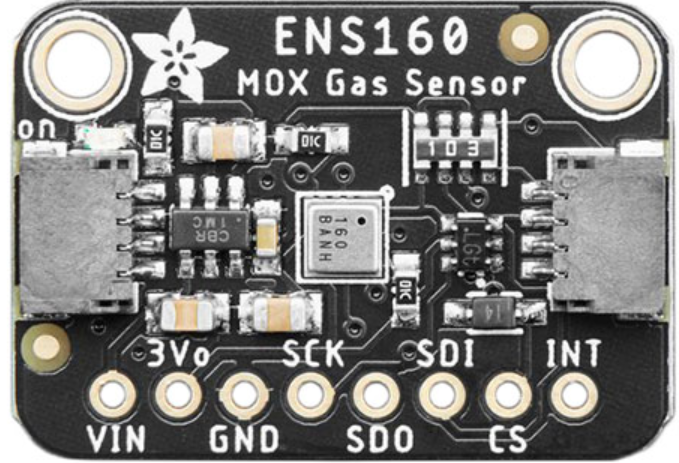
The ENS160 Sensor by Adafruit is a high-performance MOX (Metal Oxide) gas sensor designed to detect a wide range of gases, including volatile organic compounds (VOCs) and other air quality indicators. This sensor is equipped with advanced algorithms to provide accurate air quality measurements, making it ideal for applications such as environmental monitoring, HVAC systems, smart home devices, and indoor air quality management.
The ENS160 is particularly well-suited for detecting harmful gases and monitoring air quality in real-time, enabling users to maintain healthier environments. Its compact design and I²C/SPI communication interfaces make it easy to integrate into various projects and systems.
Explore Projects Built with ENS 160 Sensor
 Open Project in Cirkit Designer
 Open Project in Cirkit Designer
 Open Project in Cirkit Designer
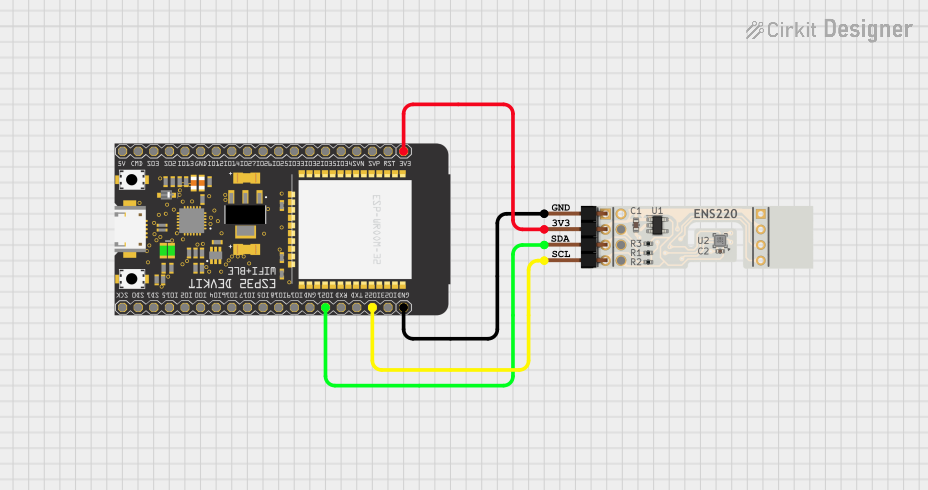 Open Project in Cirkit Designer
Explore Projects Built with ENS 160 Sensor
Open Project in Cirkit DesignerOpen Project in Cirkit DesignerOpen Project in Cirkit DesignerOpen Project in Cirkit DesignerTechnical Specifications
Below are the key technical details of the Adafruit ENS160 MOX Gas Sensor:
| Parameter | Value |
|---|---|
| Manufacturer | Adafruit |
| Part ID | Adafruit ENS160 MOX Gas Sensor |
| Operating Voltage | 3.3V to 5V DC |
| Communication Interfaces | I²C, SPI |
| Operating Temperature Range | -40°C to +85°C |
| Gas Detection | VOCs, CO2 equivalents, and air quality |
| Power Consumption | Low power consumption |
| Dimensions | Compact breakout board (approx. 20mm x 20mm) |
Pin Configuration and Descriptions
The ENS160 sensor breakout board has the following pin configuration:
| Pin Name | Description |
|---|---|
| VIN | Power input (3.3V to 5V DC) |
| GND | Ground connection |
| SDA | I²C data line (used for communication with microcontrollers) |
| SCL | I²C clock line (used for communication with microcontrollers) |
| CS | Chip Select (used for SPI communication; connect to GND for I²C mode) |
| SDO | SPI Data Out (used for SPI communication; leave unconnected for I²C mode) |
| INT | Interrupt pin (optional, used for event signaling) |
| RST | Reset pin (optional, used to reset the sensor) |
Usage Instructions
How to Use the ENS160 Sensor in a Circuit
- Power the Sensor: Connect the VIN pin to a 3.3V or 5V power source and the GND pin to ground.
- Choose Communication Mode:
- For I²C: Connect the SDA and SCL pins to the corresponding I²C pins on your microcontroller. Ensure the CS pin is connected to GND.
- For SPI: Connect the CS, SDO, and other SPI pins to your microcontroller as per the SPI protocol.
- Install Required Libraries: If using an Arduino, install the Adafruit ENS160 library from the Arduino Library Manager.
- Write Code: Use the provided library functions to initialize the sensor, read air quality data, and process the results.
Important Considerations and Best Practices
- Power Supply: Ensure a stable power supply to avoid inaccurate readings.
- Warm-Up Time: Allow the sensor to warm up for a few seconds after powering it on for optimal performance.
- Placement: Place the sensor in an area with good airflow for accurate air quality measurements.
- Avoid Contaminants: Keep the sensor away from liquids, dust, and other contaminants that could damage it.
Example Code for Arduino UNO
Below is an example of how to use the ENS160 sensor with an Arduino UNO via I²C:
#include <Wire.h>
#include <Adafruit_ENS160.h>

// Create an instance of the ENS160 sensor
Adafruit_ENS160 ens160;

void setup() {
  Serial.begin(115200); // Initialize serial communication for debugging
  while (!Serial) delay(10); // Wait for Serial to initialize

  Serial.println("Adafruit ENS160 Test");

  // Initialize I²C communication and the ENS160 sensor
  if (!ens160.begin()) {
    Serial.println("Failed to find ENS160 sensor! Check connections.");
    while (1) delay(10); // Halt if sensor is not detected
  }

  Serial.println("ENS160 sensor initialized successfully!");
}

void loop() {
  // Read air quality data from the sensor
  ens160.readData();

  // Print air quality index (AQI) to the Serial Monitor
  Serial.print("Air Quality Index (AQI): ");
  Serial.println(ens160.getAQI());

  // Print equivalent CO2 (eCO2) levels
  Serial.print("Equivalent CO2 (eCO2): ");
  Serial.println(ens160.getECO2());

  // Print total VOCs (TVOC) levels
  Serial.print("Total VOCs (TVOC): ");
  Serial.println(ens160.getTVOC());

  delay(1000); // Wait 1 second before the next reading
}
Troubleshooting and FAQs
Common Issues and Solutions
Sensor Not Detected:
- Ensure the VIN and GND pins are properly connected to the power supply.
- Verify that the SDA and SCL pins are correctly connected to the microcontroller.
- Check that the CS pin is grounded for I²C mode.
Inaccurate Readings:
- Allow the sensor to warm up for a few seconds after powering it on.
- Ensure the sensor is placed in an area with good airflow.
- Avoid exposing the sensor to extreme temperatures or humidity.
Library Errors:
- Ensure the Adafruit ENS160 library is installed and up to date.
- Verify that the correct I²C address is being used (default: 0x53).
FAQs
Q: Can the ENS160 detect specific gases?
A: The ENS160 is optimized for detecting VOCs and providing air quality indices. It does not provide specific gas concentrations but offers equivalent CO2 (eCO2) and total VOC (TVOC) levels.
Q: Can I use the ENS160 with a 5V microcontroller?
A: Yes, the ENS160 breakout board includes level-shifting circuitry, making it compatible with both 3.3V and 5V systems.
Q: How often should I calibrate the sensor?
A: The ENS160 is factory-calibrated and does not require user calibration. However, ensure proper placement and avoid contaminants for consistent performance.
Q: What is the typical response time of the sensor?
A: The ENS160 has a fast response time, typically within a few seconds, depending on the gas concentration and environmental conditions.