
How to Use Dfplayer mini: Examples, Pinouts, and Specs
 Design with Dfplayer mini in Cirkit Designer
Introduction
The DFPlayer Mini is a compact MP3 player module designed for standalone audio playback or integration into microcontroller-based projects. Manufactured by ESP32, this module can play audio files directly from a micro SD card and features a built-in amplifier for driving small speakers. It supports various audio formats, including MP3, WAV, and WMA, making it a versatile choice for audio playback applications.
Explore Projects Built with Dfplayer mini
 Open Project in Cirkit Designer
 Open Project in Cirkit Designer
 Open Project in Cirkit Designer
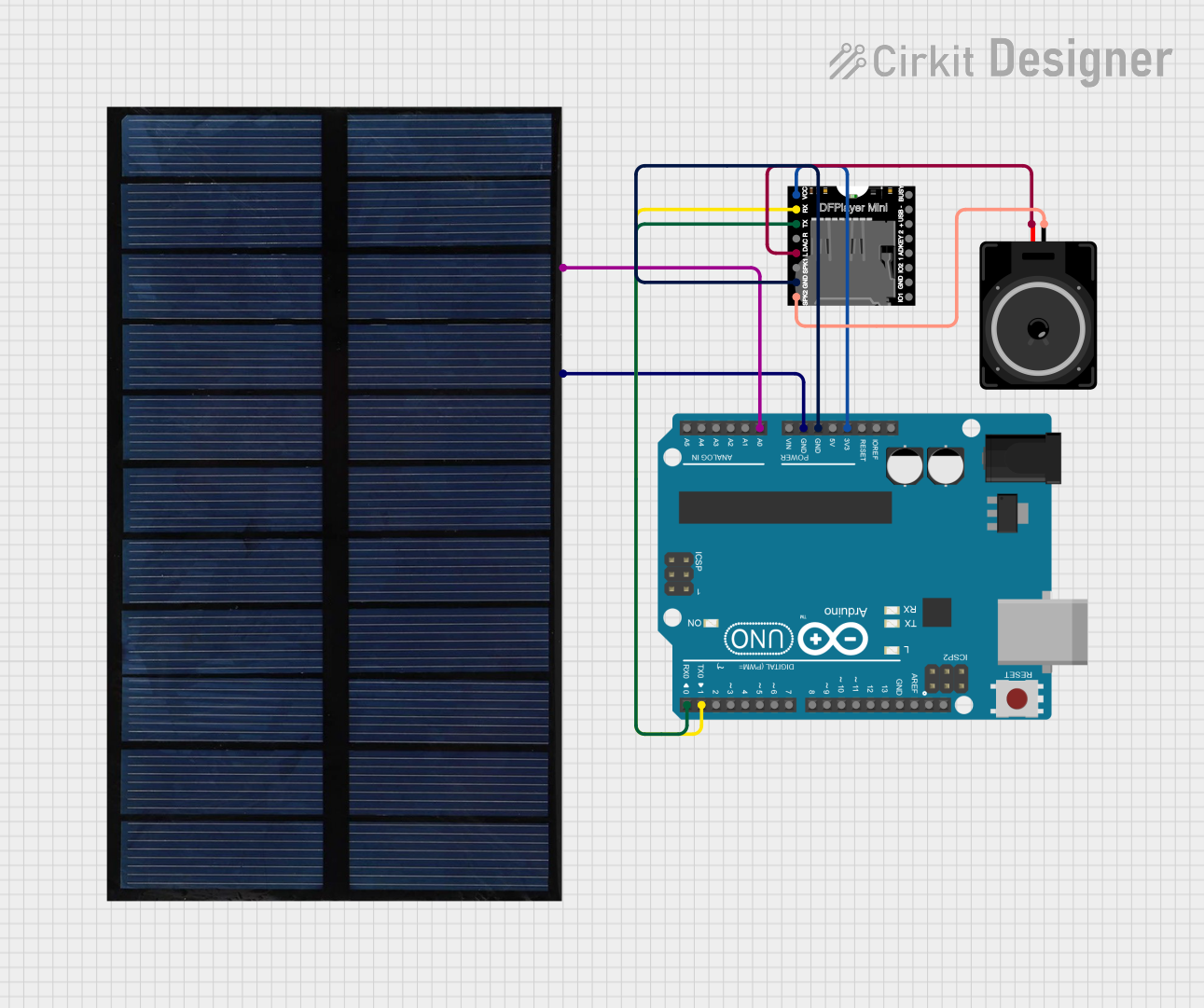 Open Project in Cirkit Designer
Explore Projects Built with Dfplayer mini
Open Project in Cirkit DesignerOpen Project in Cirkit DesignerOpen Project in Cirkit DesignerOpen Project in Cirkit DesignerCommon Applications
- DIY audio projects
- Voice prompts and notifications
- Interactive exhibits and kiosks
- Alarm systems with audio alerts
- Embedded systems requiring sound output
Technical Specifications
The DFPlayer Mini is a feature-rich module with the following key specifications:
| Parameter | Value |
|---|---|
| Operating Voltage | 3.2V - 5.0V |
| Operating Current | 20mA - 30mA (idle), up to 100mA (playback) |
| Audio Formats Supported | MP3, WAV, WMA |
| Storage Media | Micro SD card (up to 32GB, FAT16/FAT32) |
| Communication Interface | UART (9600 bps default) |
| Output Modes | DAC (headphone/speaker), PWM |
| Built-in Amplifier | 3W mono amplifier |
| Dimensions | 22mm x 30mm |
Pin Configuration
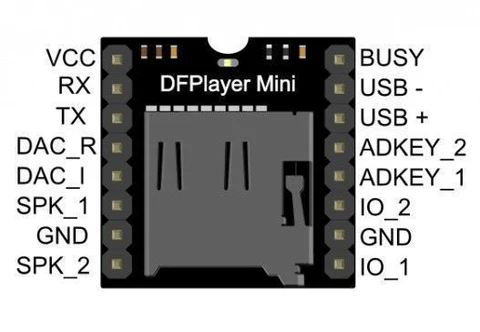
The DFPlayer Mini has 16 pins, but only a subset is commonly used. Below is the pin configuration:
| Pin | Name | Description |
|---|---|---|
| 1 | VCC | Power supply input (3.2V - 5.0V) |
| 2 | GND | Ground |
| 3 | RX | UART receive pin (connect to TX of microcontroller) |
| 4 | TX | UART transmit pin (connect to RX of microcontroller) |
| 5 | SPK_1 | Speaker output (+) for mono speaker |
| 6 | SPK_2 | Speaker output (-) for mono speaker |
| 7 | DAC_R | Right channel audio output (for external amplifier or headphones) |
| 8 | DAC_L | Left channel audio output (for external amplifier or headphones) |
| 9-16 | Other Pins | Reserved for advanced features (not commonly used in basic applications) |
Usage Instructions
Connecting the DFPlayer Mini
To use the DFPlayer Mini in a circuit, follow these steps:
- Power Supply: Connect the
VCCpin to a 3.3V or 5V power source and theGNDpin to ground. - Speaker Connection: For a mono speaker, connect the speaker terminals to
SPK_1andSPK_2. For stereo output, useDAC_LandDAC_Rwith an external amplifier. - Microcontroller Interface: Connect the
RXpin of the DFPlayer Mini to theTXpin of the microcontroller and theTXpin of the DFPlayer Mini to theRXpin of the microcontroller. - Micro SD Card: Format the micro SD card as FAT16 or FAT32 and load audio files into the root directory. Insert the card into the DFPlayer Mini.
Important Considerations
- Ensure the micro SD card is properly formatted and contains supported audio files.
- Use a decoupling capacitor (e.g., 100µF) across the power supply pins to reduce noise.
- Avoid exceeding the maximum power rating of the built-in amplifier when connecting speakers.
- Use a logic level shifter if interfacing with a 3.3V microcontroller to avoid damaging the module.
Example Code for Arduino UNO
Below is an example of how to control the DFPlayer Mini using an Arduino UNO:
#include "SoftwareSerial.h"

// Define RX and TX pins for SoftwareSerial
SoftwareSerial mySerial(10, 11); // RX = Pin 10, TX = Pin 11

void setup() {
  mySerial.begin(9600); // Initialize SoftwareSerial at 9600 bps
  Serial.begin(9600);   // Initialize Serial Monitor for debugging

  // Send initialization command to DFPlayer Mini
  mySerial.write(0x7E); // Start byte
  mySerial.write(0xFF); // Version
  mySerial.write(0x06); // Length
  mySerial.write(0x09); // Command: Play track 1
  mySerial.write(0x00); // Feedback
  mySerial.write(0x00); // Parameter 1
  mySerial.write(0x01); // Parameter 2 (track number)
  mySerial.write(0xEF); // End byte

  Serial.println("DFPlayer Mini initialized and playing track 1.");
}

void loop() {
  // Add code here to control playback, volume, etc.
}
Notes on the Code
- The
SoftwareSeriallibrary is used to communicate with the DFPlayer Mini. - Replace
10and11with the desired pins forRXandTXon your Arduino UNO. - Ensure the audio file is named correctly (e.g.,
0001.mp3) and placed in the root directory of the micro SD card.
Troubleshooting and FAQs
Common Issues
No Sound Output
- Ensure the speaker is properly connected to
SPK_1andSPK_2. - Verify that the audio file format is supported (MP3, WAV, or WMA).
- Check the micro SD card for proper formatting (FAT16/FAT32).
- Ensure the speaker is properly connected to
Module Not Responding
- Confirm the
RXandTXconnections between the DFPlayer Mini and the microcontroller. - Ensure the baud rate is set to 9600 bps in the code.
- Check the power supply voltage (3.2V - 5.0V).
- Confirm the
Distorted Audio
- Reduce the volume level in the code or use a lower-power speaker.
- Add a decoupling capacitor across the power supply pins to minimize noise.
FAQs
Q: Can I use the DFPlayer Mini without a microcontroller?
A: Yes, the DFPlayer Mini can operate in standalone mode by connecting buttons to specific pins for basic playback control.
Q: What is the maximum storage capacity supported?
A: The DFPlayer Mini supports micro SD cards up to 32GB formatted as FAT16 or FAT32.
Q: Can I control the volume programmatically?
A: Yes, the volume can be adjusted using UART commands from the microcontroller.
Q: Is an external amplifier required?
A: No, the DFPlayer Mini has a built-in 3W mono amplifier, but you can use an external amplifier for higher-quality audio or stereo output.
By following this documentation, you can effectively integrate the DFPlayer Mini into your projects and troubleshoot common issues.