
How to Use arduino nano: Examples, Pinouts, and Specs
 Design with arduino nano in Cirkit Designer
Introduction
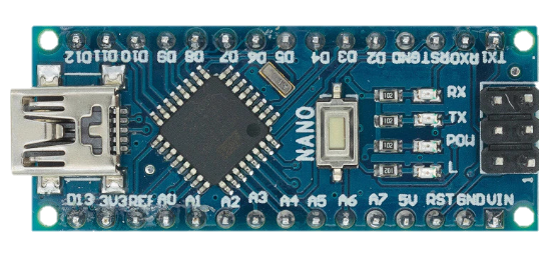
The Arduino Nano is a compact microcontroller board developed by Arduino, based on the ATmega328P microcontroller. It is designed for easy integration into electronic projects, offering a small form factor while maintaining powerful functionality. The Nano is equipped with digital and analog input/output pins, USB connectivity for programming and communication, and a wide range of features that make it ideal for prototyping and embedded systems.
Explore Projects Built with arduino nano
 Open Project in Cirkit Designer
 Open Project in Cirkit Designer
 Open Project in Cirkit Designer
 Open Project in Cirkit Designer
Explore Projects Built with arduino nano
Open Project in Cirkit DesignerOpen Project in Cirkit DesignerOpen Project in Cirkit DesignerOpen Project in Cirkit DesignerCommon Applications and Use Cases
- DIY electronics and prototyping
- Robotics and automation systems
- IoT (Internet of Things) devices
- Sensor data acquisition and processing
- Wearable technology
- Educational projects and learning platforms
Technical Specifications
The Arduino Nano is a versatile board with the following key technical details:
| Specification | Details |
|---|---|
| Microcontroller | ATmega328P |
| Operating Voltage | 5V |
| Input Voltage (VIN) | 7-12V |
| Digital I/O Pins | 14 (6 PWM outputs) |
| Analog Input Pins | 8 |
| DC Current per I/O Pin | 40 mA |
| Flash Memory | 32 KB (2 KB used by bootloader) |
| SRAM | 2 KB |
| EEPROM | 1 KB |
| Clock Speed | 16 MHz |
| USB Connectivity | Mini-B USB |
| Dimensions | 18 x 45 mm |
Pin Configuration and Descriptions
The Arduino Nano has a total of 30 pins, including power, digital, and analog pins. Below is a detailed pinout description:
Power Pins
| Pin | Name | Description |
|---|---|---|
| 1 | VIN | Input voltage to the board when using an external power source (7-12V). |
| 2 | 5V | Regulated 5V output from the onboard voltage regulator. |
| 3 | 3.3V | Regulated 3.3V output (maximum current: 50 mA). |
| 4 | GND | Ground pins (multiple GND pins available). |
| 5 | RESET | Resets the microcontroller when pulled LOW. |
Digital Pins
| Pin | Name | Description |
|---|---|---|
| D0-D13 | Digital I/O | General-purpose digital input/output pins. Pins D3, D5, D6, D9, D10, and D11 support PWM. |
Analog Pins
| Pin | Name | Description |
|---|---|---|
| A0-A7 | Analog Input | Used for reading analog signals (0-5V). Can also be used as digital I/O pins. |
Communication Pins
| Pin | Name | Description |
|---|---|---|
| D0, D1 | RX, TX | UART communication pins for serial communication. |
| D10-D13 | SPI | SPI communication pins (SS, MOSI, MISO, SCK). |
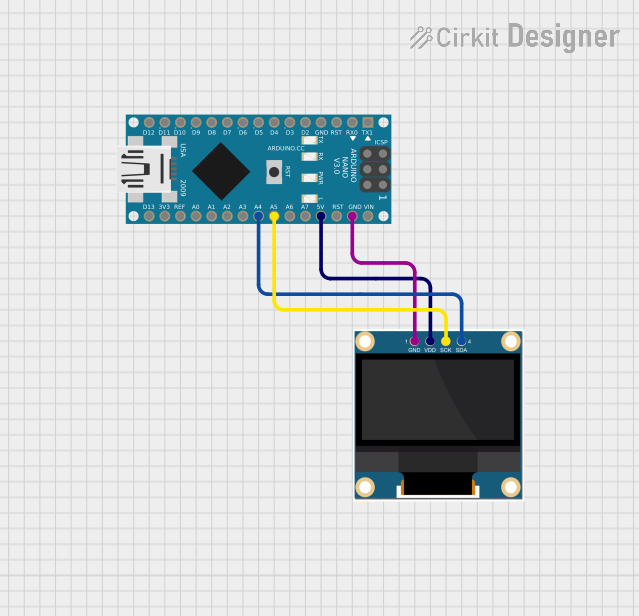
| A4, A5 | I2C | I2C communication pins (SDA, SCL). |
Usage Instructions
How to Use the Arduino Nano in a Circuit
Powering the Board:
- Connect the Nano to your computer via a Mini-B USB cable for programming and power.
- Alternatively, supply power through the VIN pin (7-12V) or the 5V pin (regulated 5V).
Programming the Board:
- Install the Arduino IDE from the official Arduino website.
- Select "Arduino Nano" as the board type and choose the correct processor (ATmega328P).
- Connect the Nano to your computer and upload your code via the USB cable.
Connecting Components:
- Use the digital pins (D0-D13) for digital input/output operations.
- Use the analog pins (A0-A7) for reading analog signals or as additional digital I/O pins.
- For communication, use the UART (D0, D1), SPI (D10-D13), or I2C (A4, A5) interfaces.
Important Considerations and Best Practices
- Avoid exceeding the maximum current rating of 40 mA per I/O pin to prevent damage.
- Use pull-up or pull-down resistors for stable digital input signals.
- Ensure proper grounding when connecting external components to avoid noise or instability.
- When using the Nano with motors or high-power devices, use external power supplies and isolation circuits.
Example Code for Arduino Nano with an LED
The following example demonstrates how to blink an LED connected to pin D13:
// Blink an LED connected to pin D13
// This example toggles the LED ON and OFF every second.

void setup() {
  pinMode(13, OUTPUT); // Set pin D13 as an output
}

void loop() {
  digitalWrite(13, HIGH); // Turn the LED ON
  delay(1000);            // Wait for 1 second
  digitalWrite(13, LOW);  // Turn the LED OFF
  delay(1000);            // Wait for 1 second
}
Troubleshooting and FAQs
Common Issues and Solutions
The Arduino Nano is not detected by the computer:
- Ensure the USB cable is functional and supports data transfer.
- Install the correct USB driver for the Nano (CH340 driver for some clones).
Code upload fails with an error:
- Verify that the correct board and processor are selected in the Arduino IDE.
- Check the COM port in the IDE and ensure it matches the Nano's port.
The board resets unexpectedly:
- Ensure the power supply is stable and within the recommended voltage range.
- Avoid drawing excessive current from the I/O pins.
Analog readings are unstable:
- Use proper grounding and shielding for analog sensors.
- Add decoupling capacitors near the sensor connections.
FAQs
Q: Can the Arduino Nano run on 3.3V?
A: While the Nano has a 3.3V output pin, the board itself is designed to operate at 5V. Running it at 3.3V is not recommended as it may cause instability.
Q: How do I reset the Arduino Nano?
A: You can reset the Nano by pressing the onboard reset button or pulling the RESET pin LOW momentarily.
Q: Can I use the Arduino Nano for battery-powered projects?
A: Yes, the Nano can be powered using batteries via the VIN pin (7-12V) or the 5V pin (regulated). Ensure the battery voltage matches the input requirements.
Q: What is the difference between the Arduino Nano and Arduino Uno?
A: The Nano is smaller and more compact than the Uno, making it ideal for space-constrained projects. Both use the same ATmega328P microcontroller and have similar functionality.