
Cirkit Designer LogoCirkit DesignerYour all-in-one circuit design IDE Launch Cirkit Designer App

How to Use GNSS//2: Examples, Pinouts, and Specs

Image of GNSS//2Design with GNSS//2 in Cirkit Designer

Introduction

The GNSS//2, manufactured by Uno (Part ID: Uno), is a high-performance Global Navigation Satellite System (GNSS) receiver. It is designed to provide accurate positioning and timing information by receiving signals from multiple satellite constellations, such as GPS, GLONASS, Galileo, and BeiDou. This compact and versatile module is ideal for applications requiring precise location tracking and synchronization.

Explore Projects Built with GNSS//2

Use Cirkit Designer to design, explore, and prototype these projects online. Some projects support real-time simulation. Click "Open Project" to start designing instantly!
Image of Satellite Compass and Network-Integrated GPS Data Processing System: A project utilizing GNSS//2 in a practical application

Satellite Compass and Network-Integrated GPS Data Processing System

This circuit comprises a satellite compass, a mini PC, two GPS antennas, power supplies, a network switch, media converters, and an atomic rubidium clock. The satellite compass is powered by a triple output DC power supply and interfaces with an RS232 splitter for 1PPS signals. The mini PCs are connected to the USRP B200 devices via USB for data and power, and to media converters via Ethernet, which in turn connect to a network switch using fiber optic links. The antennas are connected to the USRP B200s through RF directional couplers, and the atomic clock provides a 1PPS input to the RS232 splitter.

Open Project in Cirkit Designer
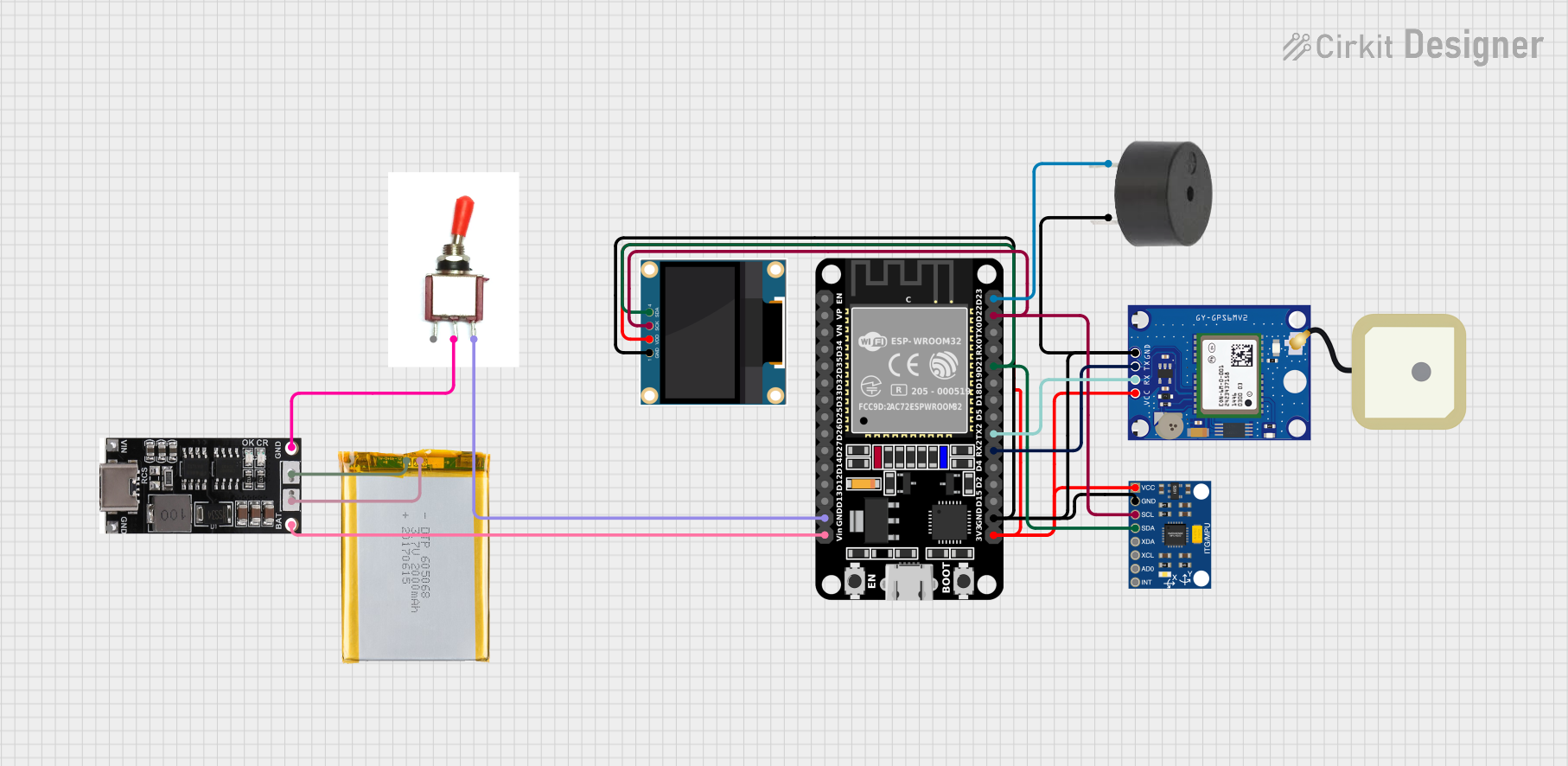
Image of ESP32-Based GPS Tracker with OLED Display and Firebase Integration: A project utilizing GNSS//2 in a practical application
ESP32-Based GPS Tracker with OLED Display and Firebase Integration

This circuit is a GPS tracking system that uses an ESP32 microcontroller to read location data from a NEO-6M GPS module and display information on a 0.96" OLED screen. The system is powered by a 2000mAh battery with a lithium-ion charger, and it uploads the GPS data to Firebase via WiFi. Additional components include an MPU6050 accelerometer/gyroscope for motion sensing and a buzzer for alerts.

Open Project in Cirkit Designer

Common Applications and Use Cases

Technical Specifications

The GNSS//2 module is engineered for reliability and precision. Below are its key technical specifications:

Parameter Specification
Operating Voltage 3.3V to 5.0V
Current Consumption 25mA (typical)
Positioning Accuracy ±2.5 meters (open sky conditions)
Time to First Fix (TTFF) Cold Start: < 30 seconds
Satellite Systems GPS, GLONASS, Galileo, BeiDou
Communication Interface UART (default), I2C
Baud Rate (UART) 9600 bps (default, configurable)
Operating Temperature -40°C to +85°C
Dimensions 25mm x 25mm x 5mm

Pin Configuration and Descriptions

The GNSS//2 module has a simple pinout for easy integration into your projects. Below is the pin configuration:

Pin Number Pin Name Description
1 VCC Power supply input (3.3V to 5.0V)
2 GND Ground
3 TX UART Transmit (data output)
4 RX UART Receive (data input)
5 PPS Pulse Per Second output for timing synchronization
6 SDA I2C Data Line (optional)
7 SCL I2C Clock Line (optional)
8 EN Enable pin (active high, connect to VCC to enable)

Usage Instructions

How to Use the GNSS//2 in a Circuit

  1. Power Supply: Connect the VCC pin to a 3.3V or 5.0V power source and the GND pin to ground.
  2. Communication Interface:
    • For UART communication, connect the TX pin of the GNSS//2 to the RX pin of your microcontroller and the RX pin of the GNSS//2 to the TX pin of your microcontroller.
    • For I2C communication, connect the SDA and SCL pins to the corresponding I2C lines of your microcontroller.
  3. Enable the Module: Ensure the EN pin is connected to VCC to activate the module.
  4. Antenna Connection: Attach an external GNSS antenna to the module's antenna port for optimal signal reception.
  5. Data Parsing: Use a microcontroller or computer to read and parse the NMEA sentences output by the module.

Important Considerations and Best Practices

Example: Connecting GNSS//2 to an Arduino UNO

Below is an example of how to interface the GNSS//2 module with an Arduino UNO using UART communication:

Circuit Connections

Arduino Code

#include <SoftwareSerial.h>

// Define RX and TX pins for SoftwareSerial
SoftwareSerial GNSS(10, 11); // RX = Pin 10, TX = Pin 11

void setup() {
  Serial.begin(9600); // Initialize Serial Monitor at 9600 bps
  GNSS.begin(9600);   // Initialize GNSS module at 9600 bps

  Serial.println("GNSS//2 Module Initialized");
}

void loop() {
  // Check if data is available from the GNSS module
  if (GNSS.available()) {
    // Read data from GNSS module and send it to Serial Monitor
    while (GNSS.available()) {
      char c = GNSS.read();
      Serial.print(c);
    }
  }
}

Troubleshooting and FAQs

Common Issues and Solutions

  1. No Data Output from the Module

    • Cause: Incorrect wiring or baud rate mismatch.
    • Solution: Double-check the connections and ensure the baud rate is set to 9600 bps.
  2. Poor Signal Reception

    • Cause: Antenna placement or obstructions.
    • Solution: Place the antenna in an open area with a clear view of the sky.
  3. Module Not Powering On

    • Cause: Insufficient or unstable power supply.
    • Solution: Verify the power source and ensure the EN pin is connected to VCC.
  4. PPS Signal Not Detected

    • Cause: PPS pin not connected or module not locked onto satellites.
    • Solution: Ensure the module has a satellite fix and the PPS pin is properly connected.

FAQs