
How to Use 21 PIN: Examples, Pinouts, and Specs
 Design with 21 PIN in Cirkit Designer
Introduction
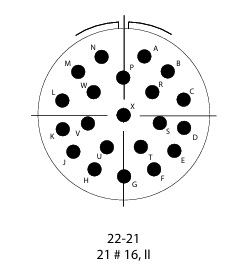
The 21-pin connector is a versatile electronic component designed to facilitate the interfacing of various devices and modules in a circuit. It provides a reliable means of establishing electrical connections between components, ensuring efficient signal transmission and power delivery. This connector is commonly used in applications such as audio-visual equipment, microcontroller projects, industrial automation, and custom PCB designs.
Explore Projects Built with 21 PIN
 Open Project in Cirkit Designer
 Open Project in Cirkit Designer
 Open Project in Cirkit Designer
 Open Project in Cirkit Designer
Explore Projects Built with 21 PIN
Open Project in Cirkit DesignerOpen Project in Cirkit DesignerOpen Project in Cirkit DesignerOpen Project in Cirkit DesignerCommon Applications:
- Audio-visual systems (e.g., SCART connectors in older TVs)
- Microcontroller and development board interfacing
- Industrial control systems
- Custom PCB-to-PCB connections
- Robotics and IoT projects
Technical Specifications
The 21-pin connector is available in various configurations, but the following specifications are typical for standard models:
| Parameter | Value |
|---|---|
| Number of Pins | 21 |
| Pin Pitch | 2.54 mm (standard) |
| Voltage Rating | 30V DC |
| Current Rating | 1A per pin |
| Operating Temperature | -40°C to +85°C |
| Contact Resistance | ≤ 20 mΩ |
| Insulation Resistance | ≥ 1000 MΩ |
| Connector Type | Male/Female |
| Mounting Style | Through-hole or Surface Mount |
| Material | Plastic housing, gold-plated pins |
Pin Configuration and Descriptions
The pin configuration of a 21-pin connector can vary depending on the application. Below is a generic pinout for a 21-pin connector used in general-purpose interfacing:
| Pin Number | Description |
|---|---|
| 1 | Ground (GND) |
| 2 | Power Supply (VCC) |
| 3-8 | Data Lines (D0-D5) |
| 9-14 | Control Signals (C0-C5) |
| 15-20 | Auxiliary Signals (A0-A5) |
| 21 | Shield or Chassis Ground |
Note: Always refer to the specific datasheet or documentation for the exact pinout of your 21-pin connector, as it may vary depending on the manufacturer or intended use.
Usage Instructions
How to Use the 21-Pin Connector in a Circuit
- Identify the Pinout: Refer to the datasheet or pin configuration table to understand the function of each pin.
- Soldering: If using a through-hole connector, solder the pins to the PCB carefully to avoid short circuits. For surface-mount connectors, use a reflow soldering process.
- Cable Assembly: For cable connectors, crimp or solder the wires to the corresponding pins, ensuring proper insulation.
- Connection: Align the male and female connectors properly to avoid bending or damaging the pins.
- Testing: Verify the connections using a multimeter to ensure continuity and correct wiring.
Important Considerations and Best Practices
- Avoid Overloading: Do not exceed the voltage and current ratings of the connector to prevent damage.
- Proper Alignment: Ensure the connectors are properly aligned before mating to avoid pin damage.
- Environmental Protection: Use connectors with appropriate IP ratings if operating in harsh environments.
- Strain Relief: Use strain relief mechanisms to prevent stress on the wires or solder joints.
- Cleaning: Keep the connector contacts clean to maintain good electrical conductivity.
Example: Connecting a 21-Pin Connector to an Arduino UNO
Below is an example of how to use a 21-pin connector to interface an Arduino UNO with external components:
// Example: Reading data from a 21-pin connector using Arduino UNO
// Pin 3-8 (D0-D5) are connected to Arduino digital pins 2-7
// Pin 1 (GND) is connected to Arduino GND
// Pin 2 (VCC) is connected to Arduino 5V

void setup() {
  // Initialize pins 2-7 as inputs
  for (int pin = 2; pin <= 7; pin++) {
    pinMode(pin, INPUT);
  }
  Serial.begin(9600); // Start serial communication
}

void loop() {
  // Read data from pins 2-7 and print to Serial Monitor
  Serial.print("Data: ");
  for (int pin = 2; pin <= 7; pin++) {
    int value = digitalRead(pin);
    Serial.print(value);
    Serial.print(" ");
  }
  Serial.println(); // New line
  delay(500); // Wait for 500ms
}
Note: Ensure the external components connected to the 21-pin connector are compatible with the Arduino's voltage levels.
Troubleshooting and FAQs
Common Issues
Loose Connections:
- Cause: Improper mating of male and female connectors.
- Solution: Ensure the connectors are fully seated and aligned.
Signal Interference:
- Cause: Crosstalk between adjacent pins.
- Solution: Use shielded cables or connectors with better isolation.
Damaged Pins:
- Cause: Misalignment or excessive force during connection.
- Solution: Replace the damaged connector and handle with care.
No Signal Transmission:
- Cause: Incorrect wiring or broken solder joints.
- Solution: Verify the wiring and re-solder any broken connections.
FAQs
Q1: Can I use the 21-pin connector for high-speed data transmission?
A1: Yes, but ensure the connector is designed for high-speed applications and use shielded cables to minimize interference.
Q2: How do I prevent corrosion on the pins?
A2: Use connectors with gold-plated pins and store them in a dry environment.
Q3: Can I use the 21-pin connector for power delivery?
A3: Yes, but ensure the current does not exceed the 1A per pin rating. For higher currents, use multiple pins in parallel.
Q4: Are all 21-pin connectors standardized?
A4: No, the pinout and specifications may vary depending on the manufacturer and application. Always refer to the specific datasheet.
By following this documentation, you can effectively use the 21-pin connector in your projects while avoiding common pitfalls.