
How to Use SSR DC - DC: Examples, Pinouts, and Specs
 Design with SSR DC - DC in Cirkit Designer
Introduction
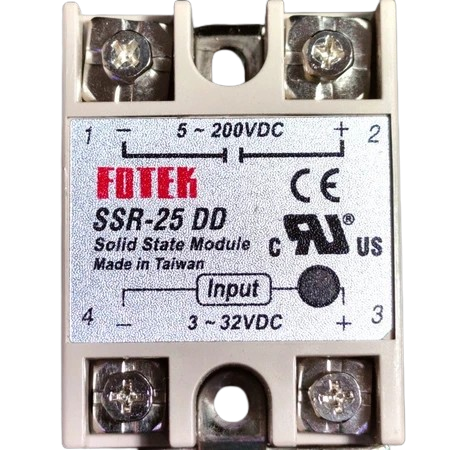
The Fotek SSR DC-DC is a Solid State Relay (SSR) designed specifically for DC applications. It enables the control of high-voltage DC loads using low-voltage control signals. Unlike traditional mechanical relays, the SSR DC-DC offers fast switching, high reliability, and no mechanical wear, making it ideal for applications requiring frequent switching or high durability.
Explore Projects Built with SSR DC - DC
 Open Project in Cirkit Designer
 Open Project in Cirkit Designer
 Open Project in Cirkit Designer
 Open Project in Cirkit Designer
Explore Projects Built with SSR DC - DC
Open Project in Cirkit DesignerOpen Project in Cirkit DesignerOpen Project in Cirkit DesignerOpen Project in Cirkit DesignerCommon Applications and Use Cases
- Industrial automation systems
- Motor control in DC circuits
- Battery management systems
- Solar power systems
- LED lighting control
- Robotics and mechatronics
Technical Specifications
The Fotek SSR DC-DC is engineered to handle a wide range of DC control and load requirements. Below are the key technical details:
General Specifications
| Parameter | Value |
|---|---|
| Manufacturer | Fotek |
| Part ID | Not specified |
| Type | Solid State Relay (SSR) |
| Control Voltage Range | 3-32 VDC |
| Load Voltage Range | 5-200 VDC |
| Maximum Load Current | 40 A |
| Switching Speed | ≤ 10 ms |
| Isolation Voltage | ≥ 2500 V |
| Operating Temperature | -30°C to +80°C |
| Storage Temperature | -30°C to +100°C |
| Mounting Type | Panel Mount |
Pin Configuration and Descriptions
The SSR DC-DC typically has four terminals, as described below:
| Pin Number | Label | Description |
|---|---|---|
| 1 | Input (+) | Positive control signal input (3-32 VDC) |
| 2 | Input (-) | Negative control signal input (ground) |
| 3 | Load (+) | Positive terminal for the DC load |
| 4 | Load (-) | Negative terminal for the DC load (ground side) |
Usage Instructions
How to Use the SSR DC-DC in a Circuit
Control Signal Connection:
- Connect the positive control signal to the
Input (+)terminal. - Connect the ground of the control signal to the
Input (-)terminal. - Ensure the control voltage is within the specified range (3-32 VDC).
- Connect the positive control signal to the
Load Connection:
- Connect the positive side of the DC load to the
Load (+)terminal. - Connect the negative side of the DC load to the
Load (-)terminal.
- Connect the positive side of the DC load to the
Power Supply:
- Ensure the load voltage and current do not exceed the SSR's maximum ratings (5-200 VDC, 40 A).
Mounting:
- Secure the SSR to a heat sink or panel to ensure proper heat dissipation, especially for high-current applications.
Testing:
- Apply the control signal and verify that the load is switched on/off as expected.
Important Considerations and Best Practices
- Heat Dissipation: Use a heat sink or cooling fan for high-current applications to prevent overheating.
- Isolation: Ensure proper electrical isolation between the control and load circuits.
- Polarity: Observe correct polarity for both control and load connections to avoid damage.
- Surge Protection: Use a diode or TVS (Transient Voltage Suppressor) across the load terminals to protect against voltage spikes.
- Avoid Overloading: Do not exceed the maximum load current or voltage ratings.
Example: Connecting to an Arduino UNO
The SSR DC-DC can be controlled using an Arduino UNO. Below is an example circuit and code:
Circuit Diagram
- Connect the Arduino's digital output pin (e.g., pin 9) to the
Input (+)terminal of the SSR. - Connect the Arduino's ground (GND) to the
Input (-)terminal of the SSR. - Connect the DC load to the
Load (+)andLoad (-)terminals of the SSR.
Arduino Code
// Example code to control a Fotek SSR DC-DC with an Arduino UNO
// This code toggles the SSR on and off every second.

#define SSR_PIN 9  // Define the digital pin connected to the SSR

void setup() {
  pinMode(SSR_PIN, OUTPUT);  // Set the SSR pin as an output
}

void loop() {
  digitalWrite(SSR_PIN, HIGH);  // Turn the SSR on
  delay(1000);                  // Wait for 1 second
  digitalWrite(SSR_PIN, LOW);   // Turn the SSR off
  delay(1000);                  // Wait for 1 second
}
Troubleshooting and FAQs
Common Issues and Solutions
| Issue | Possible Cause | Solution |
|---|---|---|
| SSR does not switch the load | Incorrect control voltage | Verify the control voltage is 3-32 VDC. |
| Incorrect polarity | Check the polarity of control and load. | |
| Faulty SSR | Test with a multimeter or replace the SSR. | |
| Load remains on/off unexpectedly | Overvoltage or current surge | Add a diode or TVS for surge protection. |
| Heat dissipation issues | Use a heat sink or cooling fan. | |
| SSR overheats | Exceeding maximum load current | Reduce the load current or use a higher- |
| rated SSR. |
FAQs
Can the SSR DC-DC be used for AC loads?
- No, this SSR is specifically designed for DC applications. For AC loads, use an AC-AC SSR.
What happens if I reverse the polarity of the control signal?
- The SSR will not function. Always ensure correct polarity to avoid damage.
Do I need an external resistor for the control signal?
- No, the SSR has an internal resistor to limit the control current.
Can I use the SSR without a heat sink?
- For low-current applications, a heat sink may not be necessary. However, for high-current loads, a heat sink is essential to prevent overheating.
By following this documentation, you can effectively integrate the Fotek SSR DC-DC into your projects for reliable and efficient DC load control.