
Cirkit Designer Logo
Cirkit Designer
Your all-in-one circuit design IDE
Home / 
Component Documentation

How to Use GY‑MS5837: Examples, Pinouts, and Specs
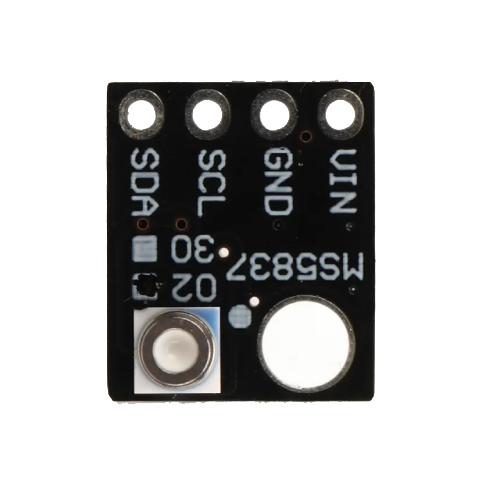

Image of GY‑MS5837
Cirkit Designer LogoDesign with GY‑MS5837 in Cirkit Designer

Introduction

The GY‑MS5837 is a high-resolution pressure sensor module designed for precise measurement of atmospheric pressure and depth. Manufactured by GY‑MS5837, this sensor features a digital output and is capable of measuring both pressure and temperature. Its compact size and high accuracy make it ideal for a wide range of applications, including weather stations, underwater exploration, and altitude measurement in drones or other devices.

Explore Projects Built with GY‑MS5837

Use Cirkit Designer to design, explore, and prototype these projects online. Some projects support real-time simulation. Click "Open Project" to start designing instantly!
Arduino Mega 2560 Based Security System with Fingerprint Authentication and SMS Alerts
Image of Door security system: A project utilizing GY‑MS5837 in a practical application
This circuit features an Arduino Mega 2560 microcontroller interfaced with a SIM800L GSM module, two fingerprint scanners, an I2C LCD display, an IR sensor, and a piezo buzzer. Power management is handled by a PowerBoost 1000 Basic Pad USB, a TP4056 charging module, and a Li-ion 18650 battery, with an option to use a Mini AC-DC 110V-230V to 5V 700mA module for direct power supply. The primary functionality appears to be a security system with GSM communication capabilities, biometric access control, and visual/audible feedback.
Cirkit Designer LogoOpen Project in Cirkit Designer
Cellular-Enabled IoT Device with Real-Time Clock and Power Management
Image of LRCM PHASE 2 BASIC: A project utilizing GY‑MS5837 in a practical application
This circuit features a LilyGo-SIM7000G module for cellular communication and GPS functionality, interfaced with an RTC DS3231 for real-time clock capabilities. It includes voltage sensing through two voltage sensor modules, and uses an 8-channel opto-coupler for isolating different parts of the circuit. Power management is handled by a buck converter connected to a DC power source and batteries, with a fuse for protection and a rocker switch for on/off control. Additionally, there's an LED for indication purposes.
Cirkit Designer LogoOpen Project in Cirkit Designer
Battery-Powered Emergency Alert System with NUCLEO-F072RB, SIM800L, and GPS NEO 6M
Image of women safety: A project utilizing GY‑MS5837 in a practical application
This circuit is an emergency alert system that uses a NUCLEO-F072RB microcontroller to send SMS alerts and make calls via a SIM800L GSM module, while obtaining location data from a GPS NEO 6M module. The system is powered by a Li-ion battery and includes a TP4056 module for battery charging and protection, with a rocker switch to control power to the microcontroller.
Cirkit Designer LogoOpen Project in Cirkit Designer
Solar-Powered GSM/GPRS+GPS Tracker with Seeeduino XIAO
Image of SOS System : A project utilizing GY‑MS5837 in a practical application
This circuit features an Ai Thinker A9G development board for GSM/GPRS and GPS/BDS connectivity, interfaced with a Seeeduino XIAO microcontroller for control and data processing. A solar cell, coupled with a TP4056 charging module, charges a 3.3V battery, which powers the system through a 3.3V regulator ensuring stable operation. The circuit likely serves for remote data communication and location tracking, with the capability to be powered by renewable energy and interfaced with additional sensors or input devices via the Seeeduino XIAO.
Cirkit Designer LogoOpen Project in Cirkit Designer

Explore Projects Built with GY‑MS5837

Use Cirkit Designer to design, explore, and prototype these projects online. Some projects support real-time simulation. Click "Open Project" to start designing instantly!
Image of Door security system: A project utilizing GY‑MS5837 in a practical application
Arduino Mega 2560 Based Security System with Fingerprint Authentication and SMS Alerts
This circuit features an Arduino Mega 2560 microcontroller interfaced with a SIM800L GSM module, two fingerprint scanners, an I2C LCD display, an IR sensor, and a piezo buzzer. Power management is handled by a PowerBoost 1000 Basic Pad USB, a TP4056 charging module, and a Li-ion 18650 battery, with an option to use a Mini AC-DC 110V-230V to 5V 700mA module for direct power supply. The primary functionality appears to be a security system with GSM communication capabilities, biometric access control, and visual/audible feedback.
Cirkit Designer LogoOpen Project in Cirkit Designer
Image of LRCM PHASE 2 BASIC: A project utilizing GY‑MS5837 in a practical application
Cellular-Enabled IoT Device with Real-Time Clock and Power Management
This circuit features a LilyGo-SIM7000G module for cellular communication and GPS functionality, interfaced with an RTC DS3231 for real-time clock capabilities. It includes voltage sensing through two voltage sensor modules, and uses an 8-channel opto-coupler for isolating different parts of the circuit. Power management is handled by a buck converter connected to a DC power source and batteries, with a fuse for protection and a rocker switch for on/off control. Additionally, there's an LED for indication purposes.
Cirkit Designer LogoOpen Project in Cirkit Designer
Image of women safety: A project utilizing GY‑MS5837 in a practical application
Battery-Powered Emergency Alert System with NUCLEO-F072RB, SIM800L, and GPS NEO 6M
This circuit is an emergency alert system that uses a NUCLEO-F072RB microcontroller to send SMS alerts and make calls via a SIM800L GSM module, while obtaining location data from a GPS NEO 6M module. The system is powered by a Li-ion battery and includes a TP4056 module for battery charging and protection, with a rocker switch to control power to the microcontroller.
Cirkit Designer LogoOpen Project in Cirkit Designer
Image of SOS System : A project utilizing GY‑MS5837 in a practical application
Solar-Powered GSM/GPRS+GPS Tracker with Seeeduino XIAO
This circuit features an Ai Thinker A9G development board for GSM/GPRS and GPS/BDS connectivity, interfaced with a Seeeduino XIAO microcontroller for control and data processing. A solar cell, coupled with a TP4056 charging module, charges a 3.3V battery, which powers the system through a 3.3V regulator ensuring stable operation. The circuit likely serves for remote data communication and location tracking, with the capability to be powered by renewable energy and interfaced with additional sensors or input devices via the Seeeduino XIAO.
Cirkit Designer LogoOpen Project in Cirkit Designer

Common Applications

  • Weather monitoring systems
  • Underwater depth measurement for diving or robotics
  • Altitude measurement in drones and aircraft
  • Barometric pressure sensing for environmental studies
  • Industrial process monitoring

Technical Specifications

The GY‑MS5837 module is based on the MS5837 sensor and provides the following key specifications:

Parameter Value
Operating Voltage 3.3V to 5V
Pressure Range 0 to 30 bar (0 to 3000 kPa)
Temperature Range -40°C to +85°C
Pressure Resolution 0.2 mbar
Temperature Resolution 0.01°C
Communication Interface I²C
I²C Address 0x76 (default)
Dimensions 13mm x 10mm x 3mm

Pin Configuration

The GY‑MS5837 module has a 4-pin interface for easy integration into circuits. The pinout is as follows:

Pin Name Description
1 VCC Power supply input (3.3V to 5V)
2 GND Ground
3 SCL I²C clock line
4 SDA I²C data line

Usage Instructions

Connecting the GY‑MS5837 to a Circuit

  1. Power Supply: Connect the VCC pin to a 3.3V or 5V power source and the GND pin to ground.
  2. I²C Communication: Connect the SCL and SDA pins to the corresponding I²C pins on your microcontroller (e.g., Arduino UNO).
  3. Pull-Up Resistors: Ensure that the I²C lines (SCL and SDA) have pull-up resistors (typically 4.7kΩ) if not already present on the module.

Example: Using GY‑MS5837 with Arduino UNO

Below is an example Arduino sketch to read pressure and temperature data from the GY‑MS5837 sensor:

#include <Wire.h>
#include <MS5837.h> // Include the MS5837 library

MS5837 sensor; // Create an instance of the MS5837 class

void setup() {
  Serial.begin(9600); // Initialize serial communication
  Wire.begin();       // Initialize I²C communication

  if (!sensor.init()) {
    // Check if the sensor initializes successfully
    Serial.println("Sensor initialization failed!");
    while (1); // Halt execution if initialization fails
  }

  sensor.setModel(MS5837::MS5837_30BA); // Set the sensor model
  sensor.setFluidDensity(997);         // Set fluid density (997 kg/m³ for water)
}

void loop() {
  sensor.read(); // Read pressure and temperature data

  // Print pressure in mbar
  Serial.print("Pressure (mbar): ");
  Serial.println(sensor.pressure());

  // Print temperature in Celsius
  Serial.print("Temperature (°C): ");
  Serial.println(sensor.temperature());

  delay(1000); // Wait 1 second before the next reading
}

Important Considerations

  • Power Supply: Ensure the module is powered within the specified voltage range (3.3V to 5V).
  • I²C Address: The default I²C address is 0x76. If multiple devices are connected to the same I²C bus, ensure there are no address conflicts.
  • Environmental Conditions: Avoid exposing the sensor to extreme conditions beyond its operating range to prevent damage.

Troubleshooting and FAQs

Common Issues

  1. No Data Output:

    • Ensure the sensor is properly connected to the microcontroller.
    • Verify that the I²C pull-up resistors are in place.
    • Check the I²C address (default is 0x76) and ensure it matches the code.
  2. Incorrect Readings:

    • Confirm that the sensor is operating within its specified temperature and pressure range.
    • Check for loose or faulty connections in the circuit.
  3. Initialization Fails:

    • Ensure the MS5837 library is correctly installed in the Arduino IDE.
    • Verify that the sensor is receiving power and that the I²C lines are functioning.

FAQs

Q: Can the GY‑MS5837 be used underwater?
A: Yes, the GY‑MS5837 is designed for underwater applications and can measure depth up to 30 bar (approximately 300 meters underwater).

Q: What is the accuracy of the pressure readings?
A: The sensor provides a pressure resolution of 0.2 mbar, making it highly accurate for most applications.

Q: Can I use the GY‑MS5837 with a 5V microcontroller?
A: Yes, the module supports a power supply range of 3.3V to 5V, making it compatible with both 3.3V and 5V systems.

Q: Do I need to calibrate the sensor?
A: The sensor is factory-calibrated, so no additional calibration is required for standard use. However, you may need to adjust for specific environmental conditions or fluid densities.


