
How to Use Kipas DC Keong: Examples, Pinouts, and Specs
 Design with Kipas DC Keong in Cirkit Designer
Introduction
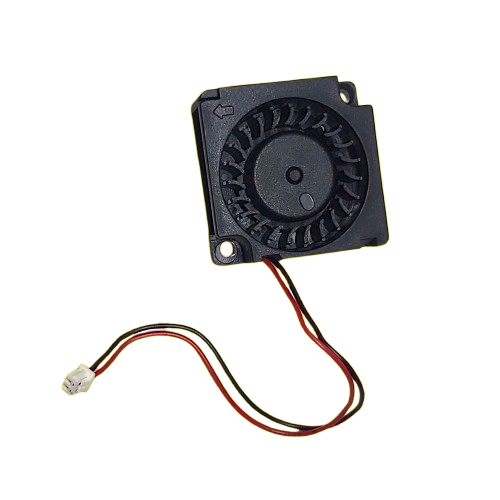
The Kipas DC Keong is a compact and efficient DC fan with a spiral or coiled design, manufactured by Arduino and Raspberry. It is specifically engineered for cooling applications in electronic devices, offering reliable airflow in a small form factor. Its unique design ensures optimal heat dissipation, making it an essential component for maintaining the performance and longevity of electronic systems.
Explore Projects Built with Kipas DC Keong
 Open Project in Cirkit Designer
 Open Project in Cirkit Designer
 Open Project in Cirkit Designer
 Open Project in Cirkit Designer
Explore Projects Built with Kipas DC Keong
Open Project in Cirkit DesignerOpen Project in Cirkit DesignerOpen Project in Cirkit DesignerOpen Project in Cirkit DesignerCommon Applications and Use Cases
- Cooling microcontrollers, processors, and power electronics
- Ventilation in compact electronic enclosures
- Heat management in robotics and IoT devices
- General-purpose cooling for small-scale projects
Technical Specifications
Below are the key technical details for the Kipas DC Keong:
| Parameter | Value |
|---|---|
| Manufacturer | Arduino, Raspberry |
| Part ID | kipas dc |
| Operating Voltage | 5V DC or 12V DC (model-specific) |
| Operating Current | 0.1A to 0.3A |
| Power Consumption | 0.5W to 3.6W |
| Airflow | 5 CFM to 15 CFM |
| Noise Level | ≤ 30 dBA |
| Dimensions | 40mm x 40mm x 20mm |
| Connector Type | 2-pin or 3-pin JST |
| Lifespan | 30,000 hours (typical) |
Pin Configuration and Descriptions
The Kipas DC Keong typically comes with a 2-pin or 3-pin connector. Below is the pin configuration:
2-Pin Connector
| Pin | Name | Description |
|---|---|---|
| 1 | VCC | Positive power supply (5V/12V) |
| 2 | GND | Ground connection |
3-Pin Connector
| Pin | Name | Description |
|---|---|---|
| 1 | VCC | Positive power supply (5V/12V) |
| 2 | GND | Ground connection |
| 3 | PWM | Pulse-width modulation input for speed control |
Usage Instructions
How to Use the Component in a Circuit
- Power Connection: Connect the VCC pin to a 5V or 12V DC power source, depending on the fan model. Connect the GND pin to the ground of the circuit.
- Speed Control (Optional): If using a 3-pin model, connect the PWM pin to a microcontroller (e.g., Arduino UNO) to control the fan speed via pulse-width modulation.
- Mounting: Secure the fan in the desired location using screws or adhesive mounts, ensuring proper airflow direction.
Important Considerations and Best Practices
- Voltage Compatibility: Ensure the power supply matches the fan's rated voltage (5V or 12V).
- Airflow Direction: Check the airflow direction indicated on the fan housing to ensure proper cooling.
- PWM Signal: For speed control, use a PWM signal with a frequency between 20 kHz and 25 kHz for optimal performance.
- Noise Reduction: Use rubber mounts or grommets to minimize vibration and noise.
- Heat Dissipation: Avoid obstructing the fan's intake or exhaust to maintain efficient airflow.
Example: Connecting to an Arduino UNO
Below is an example of how to control the Kipas DC Keong using an Arduino UNO and PWM for speed control:
// Define the PWM pin connected to the fan's PWM input
const int fanPWMPin = 9;

void setup() {
  // Set the PWM pin as an output
  pinMode(fanPWMPin, OUTPUT);
}

void loop() {
  // Set fan speed to 50% (128 out of 255)
  analogWrite(fanPWMPin, 128);
  delay(5000); // Run at 50% speed for 5 seconds

  // Set fan speed to 100% (255 out of 255)
  analogWrite(fanPWMPin, 255);
  delay(5000); // Run at full speed for 5 seconds

  // Turn off the fan (0 out of 255)
  analogWrite(fanPWMPin, 0);
  delay(5000); // Fan off for 5 seconds
}
Troubleshooting and FAQs
Common Issues and Solutions
Fan Does Not Spin
- Cause: Incorrect power supply voltage.
- Solution: Verify that the power supply matches the fan's rated voltage (5V or 12V).
Excessive Noise or Vibration
- Cause: Loose mounting or obstructed airflow.
- Solution: Secure the fan properly and ensure there are no obstructions.
Fan Speed Not Controllable
- Cause: PWM signal not configured correctly.
- Solution: Ensure the PWM frequency is between 20 kHz and 25 kHz, and check the connection to the PWM pin.
Overheating of Components
- Cause: Insufficient airflow or incorrect fan placement.
- Solution: Reposition the fan to improve airflow and ensure proper cooling.
FAQs
Q: Can I use the Kipas DC Keong with a 3.3V power supply?
A: No, the fan is designed for 5V or 12V operation. Using a 3.3V supply may result in insufficient performance or failure to operate.
Q: How do I determine the airflow direction?
A: The airflow direction is typically indicated by an arrow on the fan housing.
Q: Can I use the fan without a PWM signal?
A: Yes, the fan will operate at full speed when the PWM pin is left unconnected or set to a constant HIGH signal.
Q: What is the typical lifespan of the Kipas DC Keong?
A: The fan has a typical lifespan of 30,000 hours under normal operating conditions.