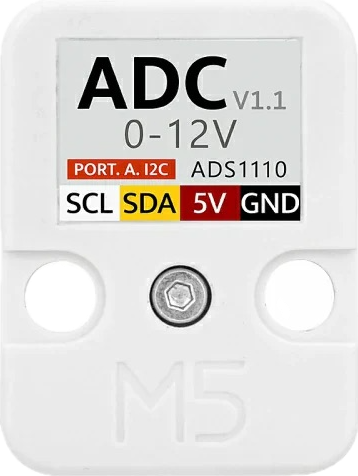
The M5_ADS1100 is a high-precision, 16-bit analog-to-digital converter (ADC) that communicates via the I2C protocol. It is designed for low-power applications, making it an excellent choice for battery-powered devices. The M5_ADS1100 is capable of converting analog signals into precise digital values, which makes it ideal for interfacing with sensors and other analog devices.
Explore Projects Built with M5_ADS1100
Use Cirkit Designer to design, explore, and prototype these projects online. Some projects support real-time simulation. Click "Open Project" to start designing instantly!
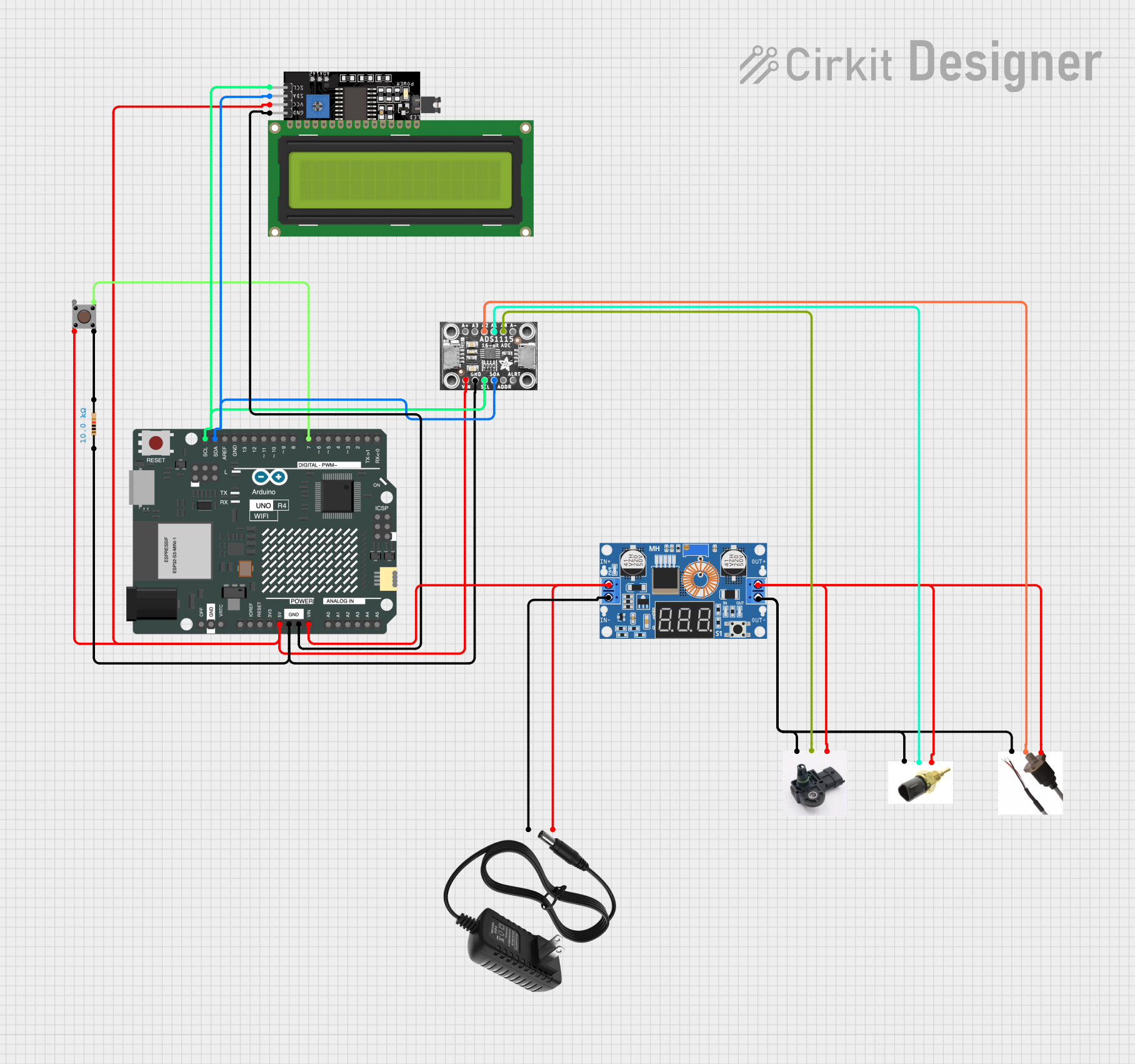
This circuit features an Arduino UNO R4 WiFi microcontroller interfacing with a 4-channel ADC to read from various sensors and display data on an I2C LCD screen. A pushbutton provides user input, and a DC-DC buck converter regulates the power supply from a 12V source.
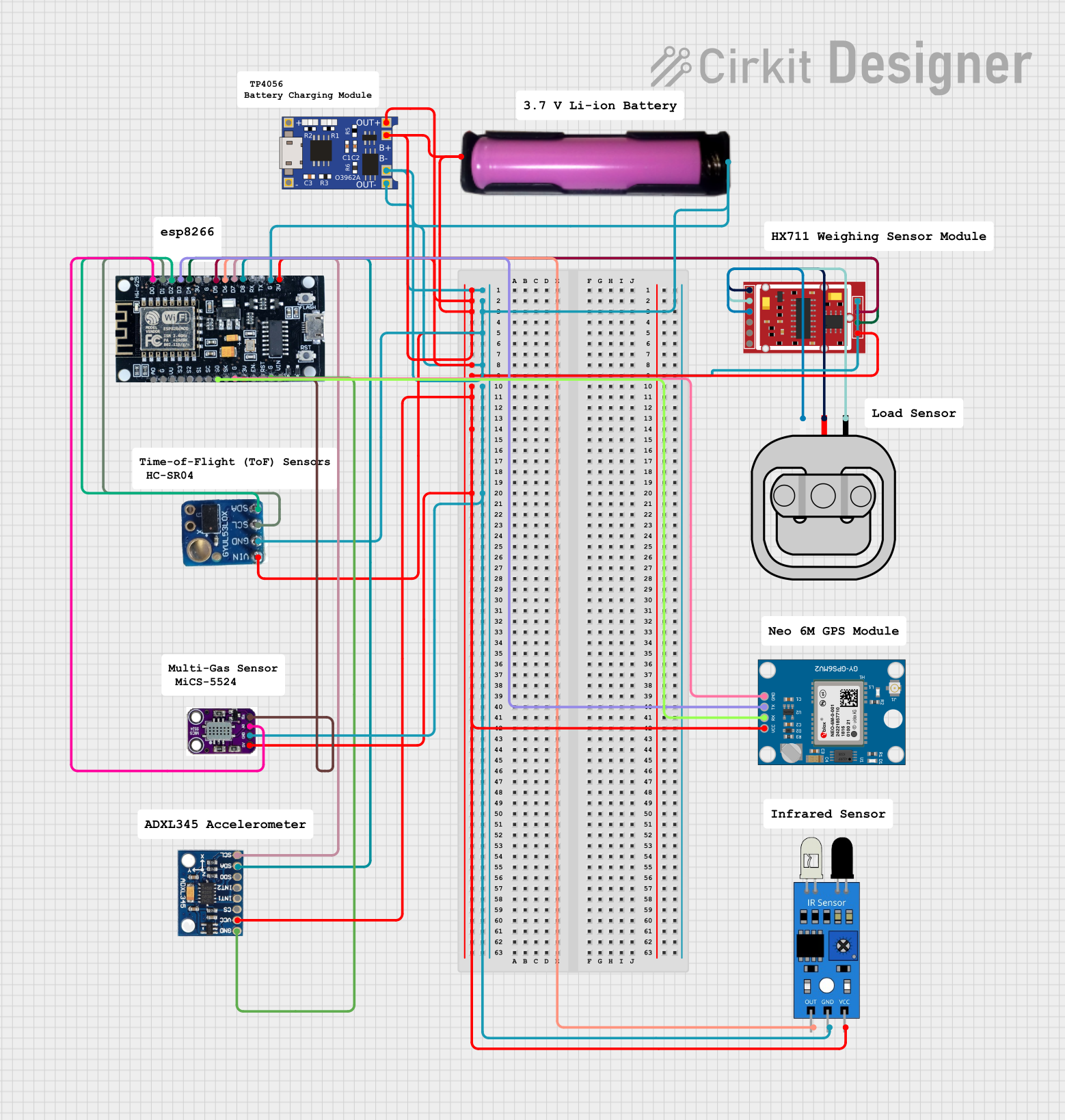
This circuit is a multi-sensor data acquisition system powered by a 18650 battery and managed by an ESP8266 microcontroller. It includes a load sensor interfaced with an HX711 module for weight measurement, an IR sensor, an ADXL345 accelerometer, a VL53L0X distance sensor, and a Neo 6M GPS module for location tracking. The system is designed for wireless data transmission and is supported by a TP4056 module for battery charging.
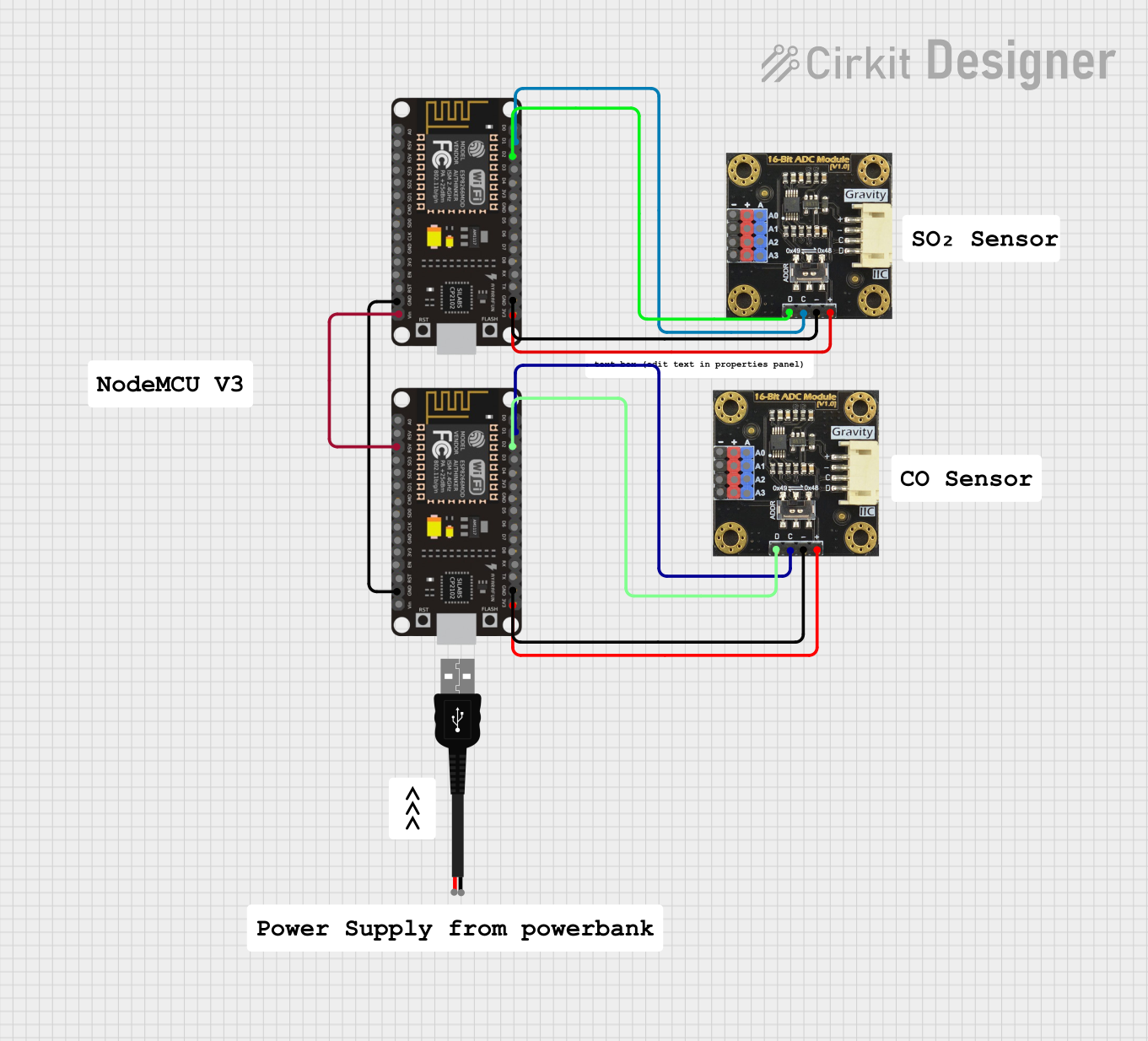
This circuit features two ESP8266 NodeMCU microcontrollers, each interfaced with a Gravity I2C ADS1115 16-Bit ADC module for analog-to-digital conversion. The microcontrollers communicate with the ADC modules via I2C protocol, with one set of connections for each microcontroller-ADC pair, and are powered through a common 3.3V and ground connection.
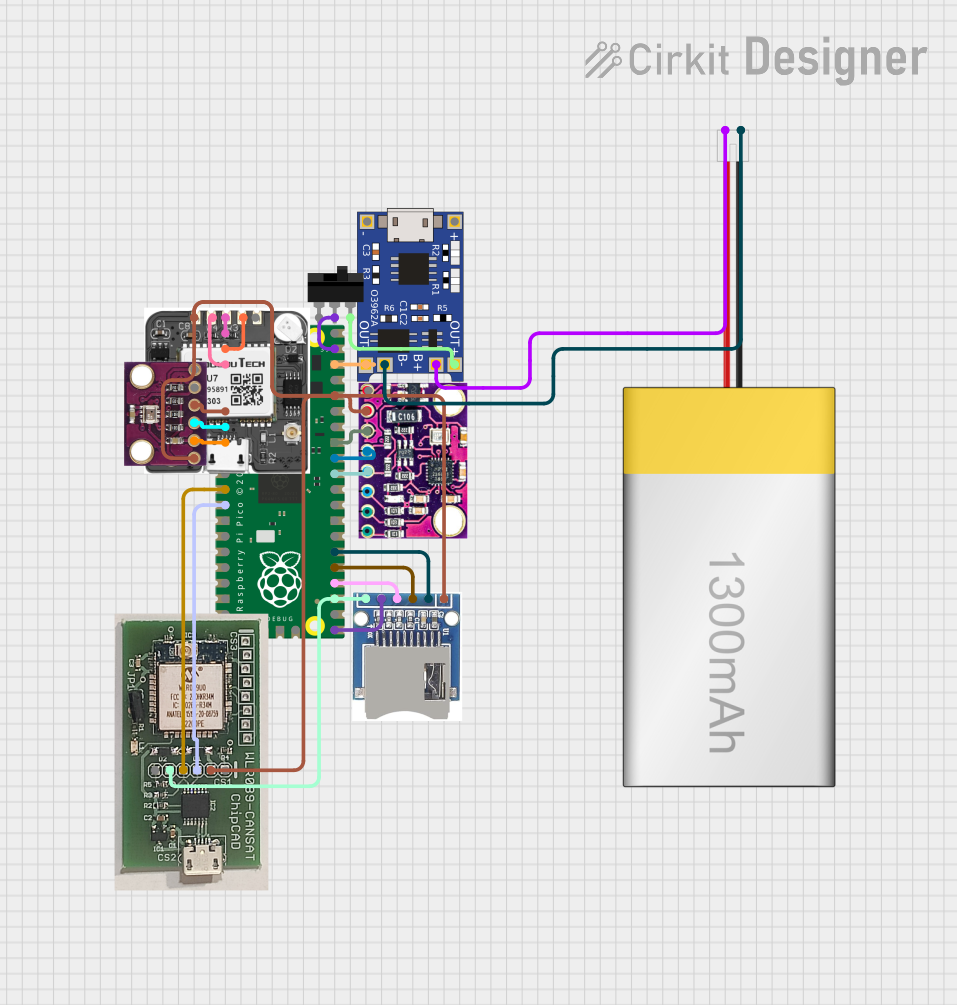
This circuit is a data acquisition and communication system powered by a LiPoly battery and managed by a Raspberry Pi Pico. It includes sensors (BMP280, MPU9250) for environmental data, a GPS module for location tracking, an SD card for data storage, and a WLR089-CanSAT for wireless communication. The TP4056 module handles battery charging, and a toggle switch controls power distribution.
Sensor data acquisition (e.g., temperature, pressure, light sensors)
Battery monitoring systems
Portable medical devices
Industrial process control
Data logging systems
Technical Specifications
The M5_ADS1100 offers the following key technical features:
Parameter
Value
Resolution
16-bit
Input Voltage Range
0V to VDD
Supply Voltage (VDD)
2.7V to 5.5V
Power Consumption
90 µA (typical)
I2C Address
Configurable (default: 0x48)
Data Rate
8 SPS to 128 SPS
Operating Temperature
-40°C to +125°C
Communication Protocol
I2C
Pin Configuration and Descriptions
The M5_ADS1100 is typically available in an 8-pin package. Below is the pinout and description:
Pin
Name
Description
1
VDD
Power supply (2.7V to 5.5V)
2
GND
Ground
3
SCL
I2C clock line
4
SDA
I2C data line
5
A0
Address selection bit 0
6
A1
Address selection bit 1
7
NC
No connection (leave unconnected)
8
NC
No connection (leave unconnected)
Usage Instructions
How to Use the M5_ADS1100 in a Circuit
Power Supply: Connect the VDD pin to a stable power source (2.7V to 5.5V) and the GND pin to ground.
I2C Communication: Connect the SCL and SDA pins to the corresponding I2C lines of your microcontroller. Use pull-up resistors (typically 4.7kΩ) on both lines.
Address Configuration: Use the A0 and A1 pins to set the I2C address. These pins can be connected to VDD or GND to configure the address.
Analog Input: Connect the analog signal to be measured to the input pin of the ADC (refer to the datasheet for specific input pin details).
Important Considerations and Best Practices
Input Voltage Range: Ensure the input signal does not exceed the supply voltage (VDD). Use a voltage divider or buffer circuit if necessary.
I2C Pull-Up Resistors: Always include pull-up resistors on the SCL and SDA lines to ensure proper I2C communication.
Bypass Capacitor: Place a 0.1µF ceramic capacitor close to the VDD pin to filter out noise.
Data Rate: Choose an appropriate data rate (8 SPS to 128 SPS) based on your application's requirements for speed and resolution.
Example Code for Arduino UNO
Below is an example of how to interface the M5_ADS1100 with an Arduino UNO using the Wire library:
#include <Wire.h>

#define ADS1100_ADDRESS 0x48  // Default I2C address of the M5_ADS1100

void setup() {
  Wire.begin();  // Initialize I2C communication
  Serial.begin(9600);  // Initialize serial communication for debugging

  // Configure the ADS1100 (e.g., set data rate and gain)
  Wire.beginTransmission(ADS1100_ADDRESS);
  Wire.write(0x8C);  // Configuration byte: 16-bit, 128 SPS, gain = 1
  Wire.endTransmission();
}

void loop() {
  int16_t adcValue = readADS1100();  // Read ADC value
  float voltage = (adcValue * 5.0) / 32768.0;  // Convert to voltage (assuming VDD = 5V)

  Serial.print("ADC Value: ");
  Serial.print(adcValue);
  Serial.print(" | Voltage: ");
  Serial.println(voltage, 3);  // Print voltage with 3 decimal places

  delay(1000);  // Wait 1 second before the next reading
}

int16_t readADS1100() {
  Wire.requestFrom(ADS1100_ADDRESS, 2);  // Request 2 bytes from the ADC
  while (Wire.available() < 2);  // Wait for data to be available

  uint8_t msb = Wire.read();  // Most significant byte
  uint8_t lsb = Wire.read();  // Least significant byte

  // Combine the two bytes into a 16-bit value
  return (int16_t)((msb << 8) | lsb);
}
Troubleshooting and FAQs
Common Issues and Solutions
No I2C Communication:
Ensure the SCL and SDA lines have proper pull-up resistors (4.7kΩ recommended).
Verify the I2C address matches the configuration of the A0 and A1 pins.
Check the wiring for loose or incorrect connections.
Incorrect ADC Readings:
Ensure the input voltage is within the specified range (0V to VDD).
Verify the configuration byte sent to the ADS1100 matches your desired settings.
Check for noise or interference on the analog input signal.
Device Not Detected:
Use an I2C scanner sketch to confirm the device's address.
Ensure the power supply voltage is within the specified range (2.7V to 5.5V).
FAQs
Q: Can the M5_ADS1100 measure negative voltages?
A: No, the M5_ADS1100 can only measure voltages in the range of 0V to VDD. For differential measurements, refer to the datasheet for specific configurations.
Q: What is the maximum sampling rate of the M5_ADS1100?
A: The maximum sampling rate is 128 samples per second (SPS).
Q: Do I need an external clock for the M5_ADS1100?
A: No, the M5_ADS1100 has an internal clock and does not require an external clock source.

 Open Project in Cirkit Designer